Roomba features, advantages, disadvantages and Is Roomba an example of AI?
The Roomba is an intelligent, self-operating vacuum robot designed to clean your home automatically with minimal manual effort. It can recognize smaller obstacles and avoid them. Over time, navigation tends to get smarter via updates.
Roomba
Roomba is a robot vacuum cleaner developed by iRobot that automatically cleans floors using built-in sensors, brushes, and suction power. It moves around rooms on its own, detecting dirt, avoiding obstacles, and returning to its charging dock when needed. Some advanced models can map your home, empty themselves, and mop floors in addition to vacuuming.
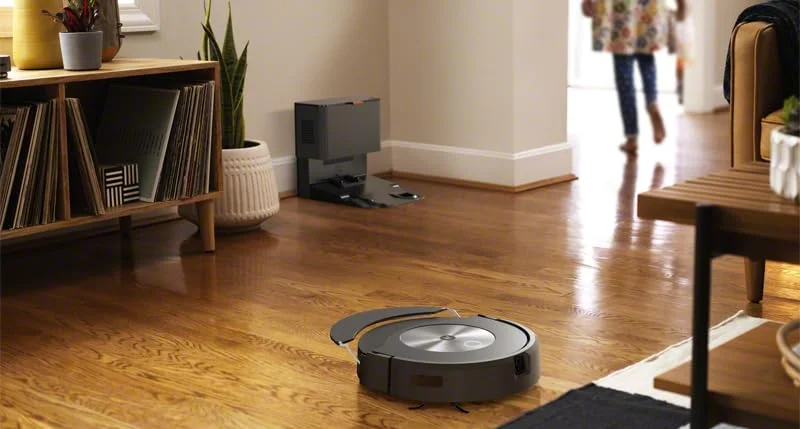
Roomba
What can Roomba do?
- Automatically clean your floors: Roomba vacuums dirt, dust, and debris from carpets, tiles, and hardwood floors without human effort.
- Navigate around obstacles: It uses sensors (and in newer models, cameras or LiDAR) to detect walls, furniture, pets, and other obstacles, avoiding collisions.
- Detect dirtier areas: Roomba’s Dirt Detect sensors make it focus more cleaning time on high-traffic or dirtier spots.
- Adjust to different surfaces: Automatically switches suction power or brush height when moving from carpet to hard floor for effective cleaning.
- Clean under and around furniture: Its low-profile design lets it reach under beds, sofas, and tables where traditional vacuums often can’t.
- Avoid stairs and drops: “Cliff sensors” prevent it from falling off steps or ledges.
- Return to the dock automatically: When the battery runs low, it finds its charging dock and recharges itself.
- Resume cleaning after charging: Higher-end models can continue cleaning right where they left off after recharging.
- Empty itself (in some models): Models with a Clean Base empty their dustbins into a larger bag automatically — you might not need to empty it for weeks.
- Map your home: Smart models (like the j7, s9, or Combo 10 Max) create detailed maps, letting you target specific rooms or set no-go zones.
- Clean on schedule: You can program Roomba to clean automatically at specific times or days.
- Controlled via app or voice: Use the iRobot HOME app or voice commands through Alexa, Google Assistant, or Siri to start, stop, or schedule cleanings.
- Spot clean specific areas: You can direct it to clean a small dirty area (like around a pet bowl or kitchen floor).
- Vacuum and mop (Combo models): Some Roombas combine vacuuming and mopping functions for deeper cleaning.
- Learn and adapt to your home: Advanced Roombas use AI to remember room layouts, cleaning habits, and preferred routines over time.
Roomba features
- 3-Stage Cleaning System: Roomba uses multiple tools (brushes, rollers, and suction) to loosen, lift, and pull in dirt from carpets, hard floors, etc.
- Dual Multi-Surface Brushes: Two brushes that rotate in opposite directions, often rubber, which adapt to different floor types and handle debris and pet hair.
- Edge Sweeping Brush: Smaller side brushes specifically designed to sweep dirt from edges and corners into the path of the main brushes or suction.
- Dirt Detect Sensors: Sensors that detect particularly dirty/high-traffic zones and trigger extra cleaning in those areas.
- Self-Adjusting or Adaptive Cleaning Head: The cleaning heads can adjust height to stay close to the floor, so they work better on carpets vs hard floors without manual adjustment.
- Full Suite of Sensors: Including cliff sensors (to avoid stairs/drop-offs), bumper sensors, IR sensors, etc., so the robot can navigate around furniture, avoid falling, etc.
- Smart Navigation & Mapping: Some models build maps of your home so they can clean more efficiently (in rows rather than randomly), remember rooms, allow you to target specific rooms, etc.
- Obstacle Recognition / Avoidance: Advanced models can recognize smaller obstacles (e.g. cords, pet waste, small items) and avoid them. Over time, navigation tends to get smarter via updates.
- Automatic Dirt Disposal / Clean Base: Some Roombas come with a docking base that automatically empties the robot’s bin into a larger bag (often lasting several weeks without needing manual emptying).
- Recharge & Resume: When the battery runs low, the robot returns to the dock, recharges, and then resumes cleaning where it left off.
- Smart App & Voice Control: Through the iRobot HOME app, you can schedule cleanings, start/stop/locate the robot, set preferences (like cleaning power), map-based room control, etc. Many models support Alexa, Google Assistant, and Siri shortcuts in some regions.
- Room & Cleaning Preferences Customization: You can oftentimes specify how each room is cleaned (e.g. more thorough in high-traffic rooms), set “no-go zones” or skip certain rooms, select cleaning modes like spot-cleaning, vacuum-only, mop (if combo), etc.
- Mopping Functionality (in Combo models): Some Roombas aren’t just vacuums—they’re combo vacuum + mop. They may have retractable mop pads, water tanks, mop cleaning, or dock features in advanced versions.
- Self-Wash / AutoWash Dock (for mop pads etc.): In newer models (like the “10 Max” etc.), the docking station can wash & dry mop pads, refill the water tank, and otherwise automate maintenance.
- Good Suction & Power (especially in newer series): Newer Roomba models have significantly increased suction power, often better motors, improved airflow, etc.
- Antibacterial / Hygiene Features: Newer docks use antimicrobial plastics to reduce odors/bacteria.
Advantages of Roomba
- Automatic Cleaning: Roomba cleans floors on its own—just set a schedule and it works without supervision.
- Time-Saving: Roomba frees up time since it vacuums automatically, even when you’re not home.
- Smart Navigation: Many models use sensors, cameras, or LiDAR to map your home and avoid obstacles.
- Compact Design: Roomba fits under furniture and into tight spaces that traditional vacuums can’t reach.
- Self-Charging: Roomba automatically returns to its dock to recharge when the battery is low.
- App & Voice Control: Roomba can be controlled via smartphone apps or voice assistants like Alexa and Google Assistant.
- Scheduled Cleaning: You can set daily or weekly cleaning schedules for convenience.
- HEPA Filters (in advanced models): Roomba helps trap dust, allergens, and pet hair, improving air quality.
Disadvantages of Roomba
- High Cost: Premium models can be quite expensive compared to traditional vacuums.
- Maintenance Required: Brushes, bins, and sensors need regular cleaning and replacement.
- Battery Life Limits: May need to recharge before completing large areas, especially in older models.
- May Miss Corners or Edges: Circular design sometimes struggles to clean corners or along walls thoroughly.
- Navigation Errors: Roomba can occasionally get stuck under furniture, on rugs, or tangled in cords.
- Small Dust Bin: Roomba needs to be emptied frequently, especially if you have pets or large homes.
- Noise: Some models can be noisy during operation, though quieter than most traditional vacuums.
- Internet Dependency (for smart features): Some features require Wi-Fi and an internet connection to work properly.
You can follow science online on YouTube from this link: Science online
Dyson 360 robot vacuum features, review, advantages and disadvantages
Whiz Robot features, advantages, disadvantages, Are vacuum robots worth it?
Roxxter robotic vacuum review, advantages, disadvantages and Is the robot vacuum worth it?
Wybot robotic pool cleaner with Solar Power, How does a Wybot work?
Robotic Pool Cleaners (RPC) review, uses, advantages and disadvantages