Miko Mini: The Smart Little Robot That Makes Learning Fun for Kids, Miko Mini vs. Miko 3
Miko Mini is a small AI-powered educational robot built specifically for children. It can talk, answer questions, recognize faces, and interact with kids in a natural, engaging way. The robot acts as both a learning tool and a playful companion, blending education with entertainment to make daily learning enjoyable.
Miko Mini: The Smart Little Robot
Technology is rapidly transforming the world of education, and one of the most exciting innovations for young learners is Miko Mini. Designed as an interactive companion, Miko Mini uses artificial intelligence to inspire curiosity, creativity, and learning. With its friendly personality and rich educational content, Miko Mini has become a popular choice for parents looking to introduce their children to safe, smart technology.
What is Miko Mini?
Miko Mini is a small, AI-powered educational robot designed for young children. It uses interactive voice technology, facial expressions, and age-appropriate content to help kids learn through stories, games, and simple conversations. Compact and easy to use, Miko Mini acts as a friendly companion that supports early learning, creativity, and communication in a fun and safe way.
Miko Mini is more than a toy—it’s a smart educational companion that brings learning to life. With its charming personality, strong educational value, and child-safe design, it offers a fun and effective way for kids to explore new ideas every day. Whether answering curious questions or engaging in playful storytelling, Miko Mini helps build a meaningful bridge between technology and early learning.
Features of Miko Mini
- Intelligent Voice Interaction: Miko Mini understands children’s questions and responds with clear, friendly answers. It uses advanced natural language processing to hold simple, meaningful conversations.
- Expressive Digital Emotions: Miko Mini displays emotions such as happiness, surprise, and curiosity using its animated facial expressions. This emotional connection makes the robot feel like a real little friend.
- Rich Educational Content: The robot includes a large library of stories, fun facts, quizzes, and STEM-based activities. Miko Mini helps Kids learn science, language, math basics, and general knowledge through playful interactions.
- Safe and Child-Friendly: Miko Mini is designed with child safety in mind. It includes strong privacy protections, secure data handling, and age-appropriate content.
- Compact and Durable Design: With its lightweight and robust structure, Miko Mini is suitable for everyday play and safe for young hands.
- App Connectivity: Parents can connect Miko Mini to the Miko app to unlock more features, manage settings, and monitor usage.
What Can Miko Mini Do?
Miko Mini comes with a variety of functions that support learning and fun:
- Miko Mini can answer kids’ questions in simple language. It can tell stories and jokes. It can play educational games and memory challenges. It can introduce basic concepts in science, math, and language. It can encourage creativity and critical thinking.
- Miko Mini can recognize children’s faces and respond with personalized greetings. It can play music and dance. It can provide emotional engagement through expressive reactions. This combination of learning and entertainment makes Miko Mini an ideal companion for children aged 5 to 10.
Advantages of Miko Mini
- Easy for young children to use.
- Encourages active learning through play.
- Portable and lightweight.
- Offers a wide range of educational content.
- Affordable compared to larger robots.
- Builds communication and social skills.
Disadvantages of Miko Mini
- Many features require an internet connection.
- Limited movement compared to advanced robots like Miko 3.
- Some premium educational content requires a subscription.
- The robot’s AI is simpler than that of full-size educational robots.
Who is Miko Mini Best For?
Miko Mini is ideal for:
- Parents who want a safe, interactive learning tool.
- Children who enjoy technology, stories, and games.
- Homes where a small, friendly robot can support daily learning.
- Schools and early education centers need simple AI companions.
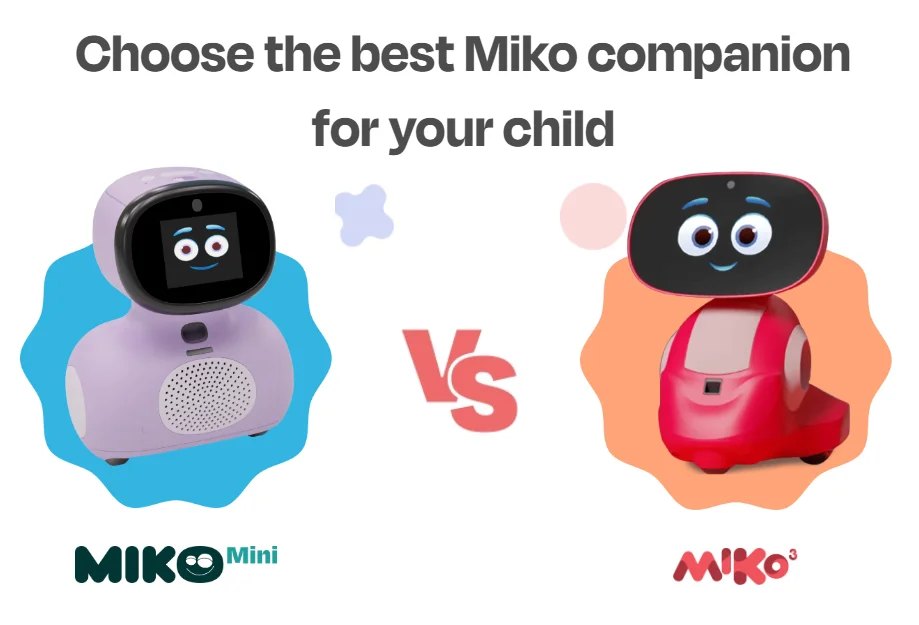
Miko 3 vs. Miko Mini
Miko Mini vs. Miko 3
Miko Mini and Miko 3 are both educational robots designed to support children’s learning through artificial intelligence, but they differ significantly in capability, size, and interaction style. Miko Mini is the smaller and more affordable option, built with a compact design that makes it easy for young children to handle. It focuses on simple voice interactions, expressive facial animations, and basic educational content.
Miko Mini offers stories, fun facts, and beginner games that help introduce kids to early learning concepts. Because of its lightweight design and simpler hardware, it is ideal for younger children or families seeking a gentle, budget-friendly entry into AI-powered learning.
On the other hand, Miko 3 is a much more advanced and feature-rich robot. It includes a large HD touchscreen, stronger processors, and multiple sensors that allow it to navigate more intelligently and deliver deeper interaction. Miko 3 not only talks and expresses emotions, but also supports apps, coding activities, videos, and a much larger library of educational content. It can handle more complex conversations and even support two-way video calls. Additionally, Miko 3 works in multiple languages, making it a flexible choice for multilingual families or educational settings.
Miko Mini is simpler, lighter, and better suited for quick interactions and basic learning, while Miko 3 is designed to grow with the child—offering richer learning experiences and more immersive interactivity. Miko Mini requires less supervision and has fewer controls, whereas Miko 3 provides a full interactive ecosystem that resembles a smart tablet inside a robot. Both models include privacy and safety features, but Miko 3 offers more advanced parental controls and learning management options.
Miko Mini is perfect for parents who want a small, safe, friendly robot that introduces their child to educational AI without complexity. Miko 3, however, is the better choice for families looking for a long-term educational companion with advanced features, broader content, and deeper engagement. Choosing between them depends on the child’s age, learning needs, and the level of interactivity you prefer.
Choose Miko Mini if:
- You want an affordable, entry-level companion for a younger child.
- You prefer a simpler, more compact device — easy to move around or carry.
- The child’s needs are basic: simple conversations, stories, early learning, and entertainment.
- You don’t mind using a companion app (on a tablet/phone) for richer content.
Choose Miko 3 if:
- You want a “next-level” educational companion with touchscreen interactivity.
- You value richer content: apps, videos, coding, multi-language support, and two-way video calls.
- The child is a bit older or likely to grow, so you want a robot that evolves with them.
- You want a more immersive, engaging, and self-contained experience without relying as much on external devices.
Which is Better?
If you are just starting — maybe for a younger child or as a first robot — Miko Mini is a smart, gentle, budget-friendly option that covers basics quite well. If you’re looking for a more complete, “grown-up” AI-powered learning companion that can offer richer interaction, educational depth, and better longevity, Miko 3 becomes worth the extra cost.
You can follow Science online on YouTube from this link: Science online
Miko Robot Features, importance, and drawbacks, Miko 2 vs Miko 3
Miko review, types, features advantages and disadvantages
Miko 2 vs Miko 3, Difference between Miko 2 and Miko 3
Loona robot review, advantages, disadvantages and what can Loona do?
Sophia robot review, features, use, advantages and disadvantages
Educational robotics, Robot teachers, Social robots review, features advantages & drawbacks
Humanoid robots use, risks, advantages and disadvantages