Romo – The Smartphone Robot, What Can Romo Robot Do?
Romo is one of the earliest consumer-friendly educational robots designed to make robotics engaging, accessible, and playful. Created by Romotive, Romo transforms a user’s smartphone into an intelligent robotic interface — allowing it to move, interact, and respond in real time. Combining mobile processing power with robotics hardware, Romo demonstrates how personal devices can be repurposed to power robotics without requiring complex hardware.
What is Romo?
Romo is a small, tank-like educational robot that uses a smartphone as its “brain” and face. Once the phone is mounted on Romo’s base, the robot gains motion, personality, and sensory capabilities through apps and software. Romo introduces robotics concepts to users — especially children and beginners — through interactive missions, telepresence, and programmable behaviors.
Romo Design & Components
Romo is made up of two primary components:
- The Robotic Base: It is equipped with: Tread wheels for omnidirectional movement, Motors for locomotion, Connectors for smartphone docking, Power supply & charging ports.
- The Smartphone (User Supplied): It acts as: CPU (processing unit), Display interface (shows Romo’s animated face), Control center for apps and scripts, Camera for telepresence and recognition, and Audio/speaker interaction.
This design enables Romo to run powerful robotics logic while keeping the cost lower than standalone robots.
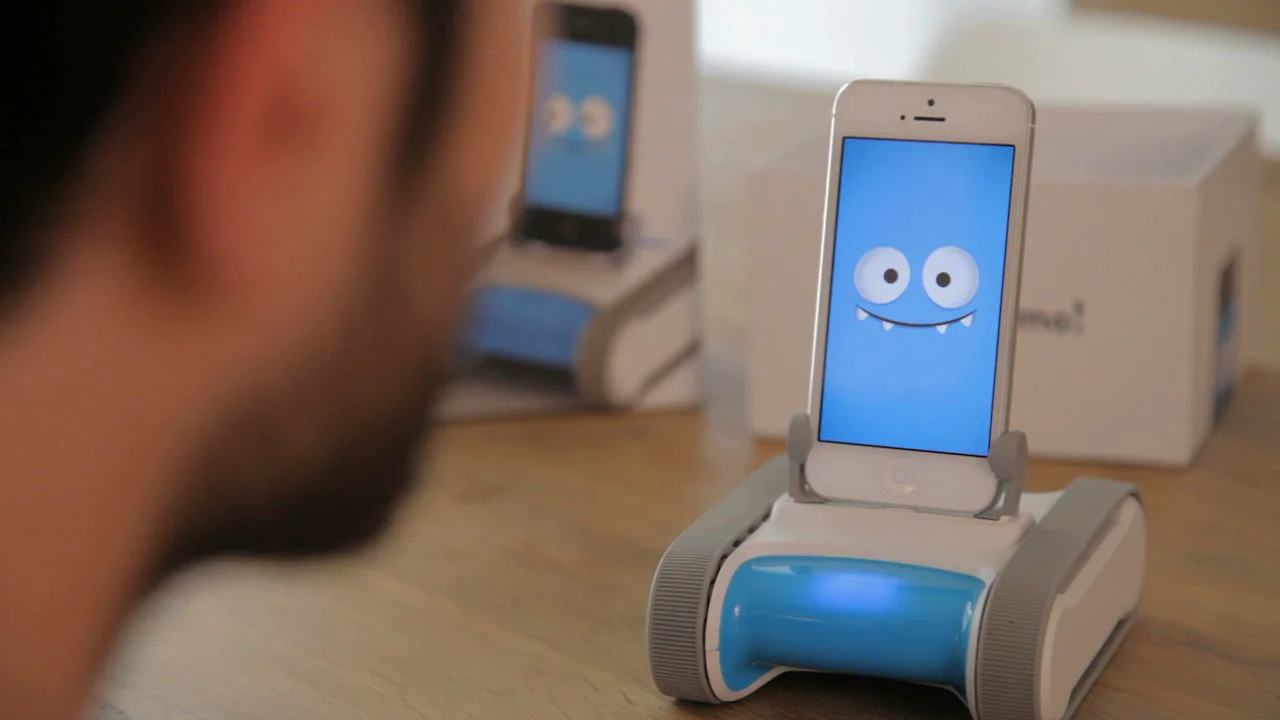
Romo: the smartphone robot
Features of Romo Robot
Romo offers a wide range of robotics and educational features:
- Mobile locomotion: Romo moves forward, backward, rotates, and navigates spaces via tracked wheels.
- Computer vision (via smartphone camera) is used for: Face tracking, object recognition, and telepresence streaming.
- Interactive personality: Romo shows emotions on the smartphone screen, making it feel alive and approachable.
- Programmability: Users can program Romo using Visual blocks, Missions, Commands, and Third-party apps (in some versions).
- Telepresence capability: Remote users can drive Romo and view surroundings through the phone’s camera.
- Gamified learning: Includes missions that teach basic robotics concepts, such as sequencing, Conditionals, and Logic.
- Compatibility: Romo is originally compatible with iOS devices like the iPhone and iPod Touch.
What Can Romo Robot Do?
Romo can demonstrate a variety of tasks and behaviors, especially for learning:
- Drive Around & Navigate: Romo moves around rooms, avoids obstacles, and responds to commands.
- Track Faces: Romo detects and follows human faces using smartphone vision.
- Remote Telepresence: Romo allows someone from another location to control Romo while streaming the camera feed.
- Teach Coding Concepts: Romo includes missions where users write sequences, set triggers, and build simple programs.
- Simulate Emotional Interaction: Romo displays expressions such as happiness, Sadness, Excitement, and curiosity.
- Perform Pre-programmed Routines: Romo includes dance movements, gestures, or reactions designed by developers.
Use of Romo
Romo fits several practical and educational applications:
- Education & STEM Learning: Romo is ideal for students learning Robotics, Logic programming, Sensors and motion control.
- Consumer Entertainment: Romo acts as a fun, interactive toy for kids and families.
- Telepresence Demonstrations: Romo is useful for remote control robotics experiments.
- Research & Maker Experiments: Hackable platform for DIY robotics developers.
Advantages of Romo
Romo brought several innovations to the consumer robotics space:
- Low Cost Robotics: Romo uses smartphone power instead of expensive custom processing boards.
- Accessible for Beginners: No prior coding or technical background required.
- Engaging & Friendly Design: Cartoon-like personality increases emotional engagement.
- Modular Tech Approach: Smartphones can be swapped or upgraded over time.
- Portable & Lightweight: Easy for classrooms and home usage.
- Encourages STEM Skills: Promotes curiosity in Robotics, AI, Teleoperation, and Machine vision.
Disadvantages of Romo
Despite its strengths, Romo has limitations:
- Limited Hardware Expansion: Romo is not as extensible as Arduino or Raspberry Pi robotics kits.
- Dependent on Supported Smartphone Models: As smartphone generations changed, compatibility became an issue.
- Not Industrial or High-Performance: Romo is designed purely for education and entertainment, not commercial robotics.
- Limited Sensor Suite: Romo uses mainly the phone camera and lacks advanced sensors like Lidar, Depth mapping, and IMUs (beyond phone sensors).
Why Romo Was Influential
Romo demonstrated a pioneering concept in robotics: using smartphones as robotics brains. This concept influenced later robots and educational tools by showing how consumer electronics can reduce robotics costs dramatically.
Romo – the Smartphone Robot — remains a notable example of creative, accessible robotics design that merges mobility, vision, and personality through a device people already own. Though not meant for industrial use, its educational and entertainment value made robotics fun, affordable, and emotionally engaging for a new generation of users.
You can follow Science online on YouTube from this link: Science online
Miko Robot Features, importance, and drawbacks, Miko 2 vs Miko 3
Miko review, types, features advantages and disadvantages
Miko 2 vs Miko 3, Difference between Miko 2 and Miko 3
Loona robot review, advantages, disadvantages and what can Loona do?
Sophia robot review, features, use, advantages and disadvantages
Educational robotics, Robot teachers, Social robots review, features advantages & drawbacks
Humanoid robots use, risks, advantages and disadvantages