Google Nest Mini Review | Features, Pros, Cons and What It Can Do
The Google Nest Mini is one of the most popular smart speakers in the world, designed to bring the power of Google Assistant into any room of your home. Despite its small size, it delivers impressive sound quality, smart home control, and hands-free assistance, making it an affordable and practical choice for everyday use.
What Is Google Nest Mini?
Google Nest Mini is a compact smart speaker developed by Google that uses voice commands through Google Assistant to help users control smart devices, play music, manage daily tasks, and get real-time information such as weather, news, and reminders. It is the successor to Google Home Mini and offers improved sound quality, better microphones, and enhanced AI performance.
Google Nest Mini Review
The Google Nest Mini stands out for its simplicity, affordability, and ecosystem integration. It is ideal for bedrooms, kitchens, offices, and small living spaces. It has a fabric-covered design and wall-mount option, and it blends easily into modern home décor.
- Sound Quality: For its size, the Nest Mini delivers clear vocals and stronger bass than its predecessor, making it suitable for podcasts, audiobooks, and casual music listening.
- Voice Recognition: Thanks to improved far-field microphones, it can hear commands clearly even in noisy environments.
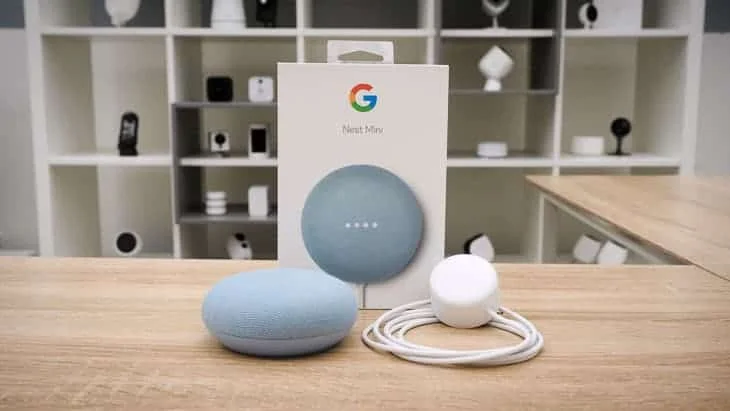
Google Nest Mini – Smart Speaker for Any Room
What Can Google Nest Mini Do?
The Google Nest Mini can perform a wide range of smart tasks, including:
- Play music and podcasts from Spotify, YouTube Music, and other services.
- Answer questions using Google Search.
- Set alarms, timers, and reminders.
- Control smart home devices (lights, thermostats, plugs, TVs).
- Manage your schedule and sync with Google Calendar.
- Provide real-time updates (weather, traffic, news).
- Make hands-free calls using voice commands.
- Create multi-room audio systems with other Google speakers.
Advantages of Google Nest Mini
- Affordable price.
- Compact and stylish design.
- Improved bass and sound quality.
- Excellent Google Assistant integration.
- Works with a wide range of smart home devices.
- Eco-friendly design using recycled materials.
- Wall-mountable.
Disadvantages of Google Nest Mini
- No built-in battery (must stay plugged in).
- Not suitable for large rooms or high-volume audio.
- Limited privacy controls compared to premium models.
- No Bluetooth speakerphone for mobile calls.
Google Nest Mini features
- Built-In Google Assistant Voice Control: Hands-free voice assistant powered by Google Assistant — just say “Hey Google…” to ask questions, play music, set timers and reminders, check the weather, news, traffic, and more.
- Improved Sound Quality: Delivers 360-degree audio with a 40 mm driver for richer sound and up to 2× stronger bass compared with the older Home Mini.
- Enhanced Voice Recognition: Three far-field microphones with advanced recognition let it hear and respond from across the room — even in noisy environments. Supports Voice Match: recognizes different voices in your household and gives personalized responses.
- Smart Home Control: Google Nest Mini works with thousands of compatible smart devices — lights, thermostats, plugs, cameras, and more — so you can control them with voice commands.
- Connectivity: Wi-Fi (dual band) and Bluetooth 5.0 built in for streaming and networking. Chromecast built-in lets you cast music or video from apps straight to your TV or other devices.
- Music & Entertainment: Play music, podcasts, radio, and more from services like Spotify, YouTube Music, Pandora, and others. Google Nest Mini can be grouped with other Nest speakers for multi-room audio.
- Communication: Use as an intercom — broadcast voice messages to other Nest devices around the home. Make hands-free calls or send messages via voice.
- Physical & Design Features: Compact, wall-mountable design — fits in any room or on a wall without taking up space. Capacitive touch controls for play/pause and volume adjustments. Mic-off switch for privacy.
- Eco-Friendly Build: Fabric cover made from recycled plastic bottles and partially recycled enclosure materials.
- Personalized Assistance: Google Nest Mini learns your habits and preferences over time — tailors answers like music suggestions and calendar reminders based on who’s speaking.
Who Should Buy the Google Nest Mini?
The Google Nest Mini is perfect for:
- Beginners in smart home technology.
- Users are deeply invested in Google services.
- Small apartments and bedrooms.
- Anyone looking for a budget-friendly smart speaker.
The Google Nest Mini is an excellent entry-level smart speaker that offers reliable performance, smart home control, and Google Assistant intelligence at an affordable price. While it won’t replace high-end speakers, it excels at everyday tasks and voice assistance.
FAQ – Google Nest Mini (Common Questions & Answers)
What is the Google Nest Mini used for?
The Google Nest Mini is a compact smart speaker that uses Google Assistant to answer questions, play music, set reminders and alarms, control smart home devices, and give information like weather and news — all by simple voice commands.
How does Google Nest Mini differ from other smart speakers?
Nest Mini offers clear, improved sound quality with stronger bass compared to older Mini models, supports Voice Match for personalized responses for multiple users, and integrates tightly with smart home devices and services like Chromecast.
Can Google Nest Mini control smart home devices?
Yes. You can use Google Nest Mini to control lights, plugs, thermostats, locks, cameras, and other compatible smart home devices using simple voice commands like “Hey Google, turn off the lights.”
Does Nest Mini support multiple user voices?
Yes — with Voice Match technology, the Nest Mini can recognize up to six different voices and provide personalized responses (such as calendars, playlists, and reminders).
What music services can I use with Google Nest Mini?
Google Nest Mini works with major streaming platforms such as Spotify, YouTube Music, and other supported services. You can ask the device to play songs, playlists, or radio stations by voice.
Does Google Nest Mini act as a Bluetooth speaker?
Yes, you can stream audio via Bluetooth from your phone or tablet to the Nest Mini if preferred; however, its primary mode is Wi-Fi streaming with voice assistant control.
Can Nest Mini provide answers like the weather and news?
Yes — Google Assistant on Nest Mini can answer questions like weather forecasts, daily news, general knowledge, calculations, language translations, and much more using the built-in Assistant intelligence.
Is the Google Nest Mini worth buying?
For users who want an affordable smart speaker with good sound, easy voice control, and seamless smart home integration, the Nest Mini offers excellent value, especially for bedrooms, kitchens, and casual listening.
Does Nest Mini listen all the time? Are there privacy issues?
Like most smart speakers, the Nest Mini actively listens for its wake phrase (“Hey Google”), but it doesn’t record or send audio until the wake word is detected. If privacy is a priority, you can review settings and delete voice history in the Google Home app.
How many people can Google Nest Mini recognize?
Google Nest Mini supports up to six different voice profiles using Voice Match, so it can distinguish between users and tailor responses like calendars and preferences per person.
You can follow Science Online on YouTube from this link: Science online
iPods features, use, advantages, disadvantages, Why Are People Buying iPods Again?
Mobile dongle review, advantages, disadvantages and How does a dongle work?
What is a MiFi?, Portable Wi-Fi hotspot, Mi-Fi devices advantages & disadvantages
MiFi Devices or Mi-Fi hotspots importance, Difference between Mi-Fi & Wi-Fi
Network Routers importance, types & uses