20 Powerful Uses of Graphic Packages Every Student & Designer Must Know
Graphic packages play a vital role in modern digital life, allowing users to create eye-catching designs, edit images, and produce professional visuals using powerful tools like Adobe Photoshop, Adobe Illustrator, and CorelDRAW, making them essential for students, designers, and businesses looking to communicate ideas creatively and effectively.
Graphic packages
A graphic package is a computer software tool like Adobe Photoshop or CorelDRAW that allows users to create, edit, and enhance images, designs, and visual content, making it essential for students, designers, and businesses in today’s digital world.
What is a Graphic Package?
A graphic package is software used to create, edit, and manipulate images, drawings, and visual designs on a computer. It helps users produce everything from simple drawings to complex professional designs.
Graphic packages are widely used in:
- Education.
- Advertising.
- Media.
- Web design.
- Printing.
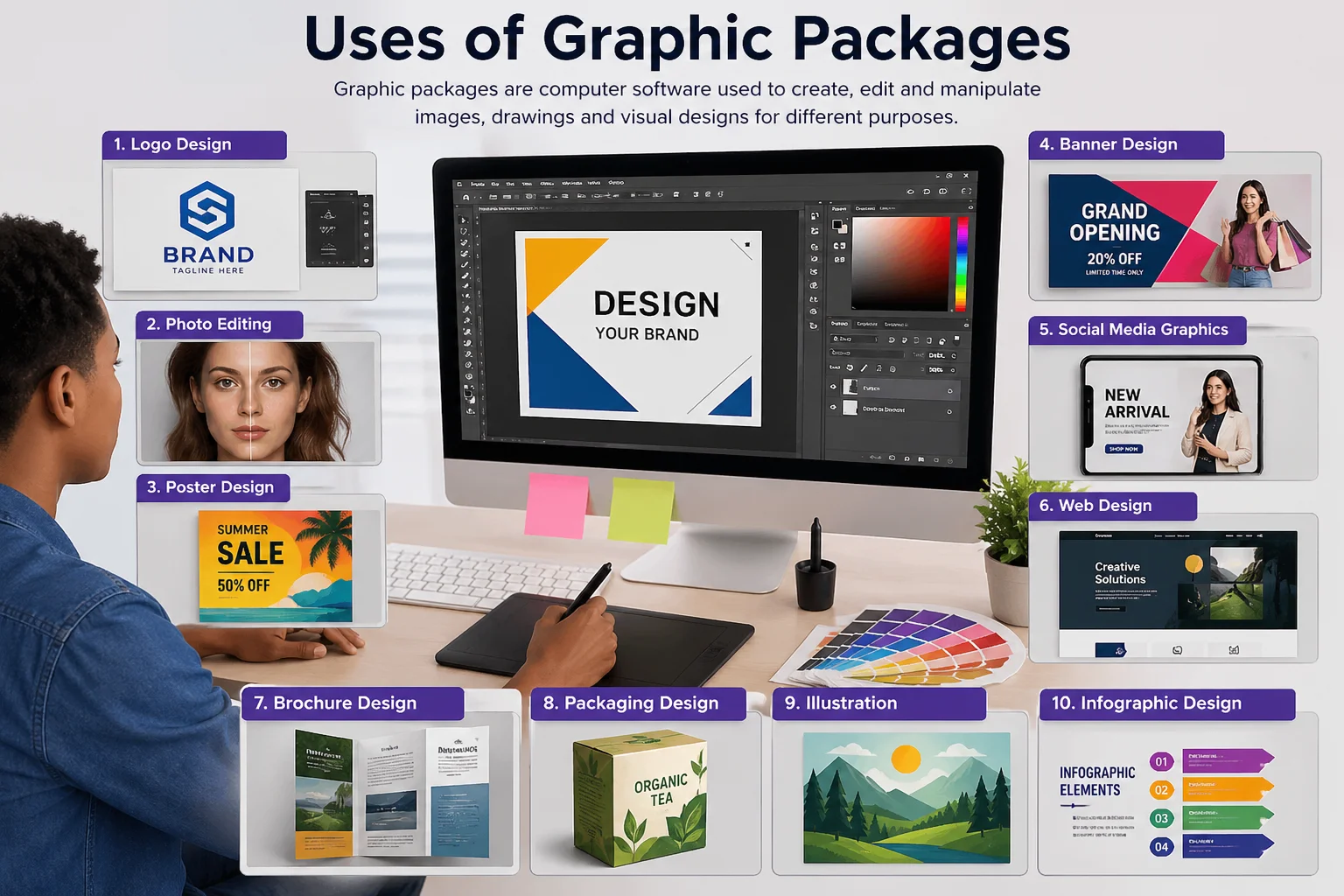
Uses of Graphic Packages
What is Graphic Design?
Graphic design is the art of combining text, images, and colors to communicate ideas visually. It uses graphic packages to create logos, posters, websites, and more.
Features of Graphic Packages
Graphic packages come with powerful tools that make design easy and professional:
- Drawing and painting tools.
- Color selection and editing.
- Layers for organizing designs.
- Zoom and resize options.
- Cut, copy, and paste functions.
- Text and font tools.
- Image editing and filters.
- Save and export in different formats.
Uses of Graphic Packages in Computer
Graphic packages are used on computers to:
- Create digital artwork.
- Edit images and photos.
- Design user interfaces.
- Produce visual content for websites and apps.
They are essential tools in both education and professional environments.
Five Uses of Graphic Packages
Creating logos and branding materials.
- Editing and enhancing photos.
- Designing posters and flyers.
- Creating illustrations and drawings.
- Designing web and app layouts.
List 10 Uses of Graphic Packages
- Logo design.
- Photo editing.
- Poster creation.
- Banner design.
- Social media graphics.
- Website design.
- Animation creation.
- Infographics design.
- Book and magazine layout.
- Advertisement design.
20 Uses of Graphic Packages
- Designing logos.
- Editing photos.
- Creating posters.
- Making flyers.
- Designing banners.
- Social media content creation.
- Website UI design.
- Mobile app design.
- Creating animations.
- Producing videos and multimedia.
- Designing business cards.
- Creating infographics.
- Game graphics design.
- Packaging design.
- Architectural visualization.
- Educational illustrations.
- Digital painting.
- Branding and identity design.
- Magazine and book layout.
- Advertising campaigns.
Uses of Graphic Packages (JSS2 Level)
For JSS2 students, graphic packages are used to:
- Draw simple pictures.
- Color designs.
- Create school projects.
- Design charts and diagrams.
- Learn basic computer creativity.
FAQ about Uses of Graphic Packages
1. What is the use of a graphics package?
It is used to create, edit, and design images and visual content on a computer.
2. What are the uses of graphics?
Graphics are used for communication, education, advertising, entertainment, and digital media.
3. What are the uses of graphic packages SS2?
In SS2, students use graphic packages for advanced design tasks like creating presentations, editing images, and designing projects.
4. Why are graphic packages important?
They help in creating professional visuals that improve communication and creativity.
5. Which software is commonly used?
Popular examples include Adobe Photoshop, Adobe Illustrator, and CorelDRAW.
Final Conclusion
Graphic packages are powerful tools that turn ideas into visual reality. Whether you are a student, designer, or business owner, learning how to use them opens the door to creativity, communication, and digital success. Graphic packages are essential tools for modern creativity and digital design.
Graphics tablet features, advantages, and disadvantages
Visual Communication features, advantages, and disadvantages