Unitree G1 humanoid robot advantages and disadvantages, What does Unitree G1 do?
The Unitree G1 is a bipedal robot designed for agility, research, and AI development. While compact and affordable compared to larger humanoids, it still performs a wide range of dynamic physical actions and perception-based tasks.
Unitree G1 humanoid robot
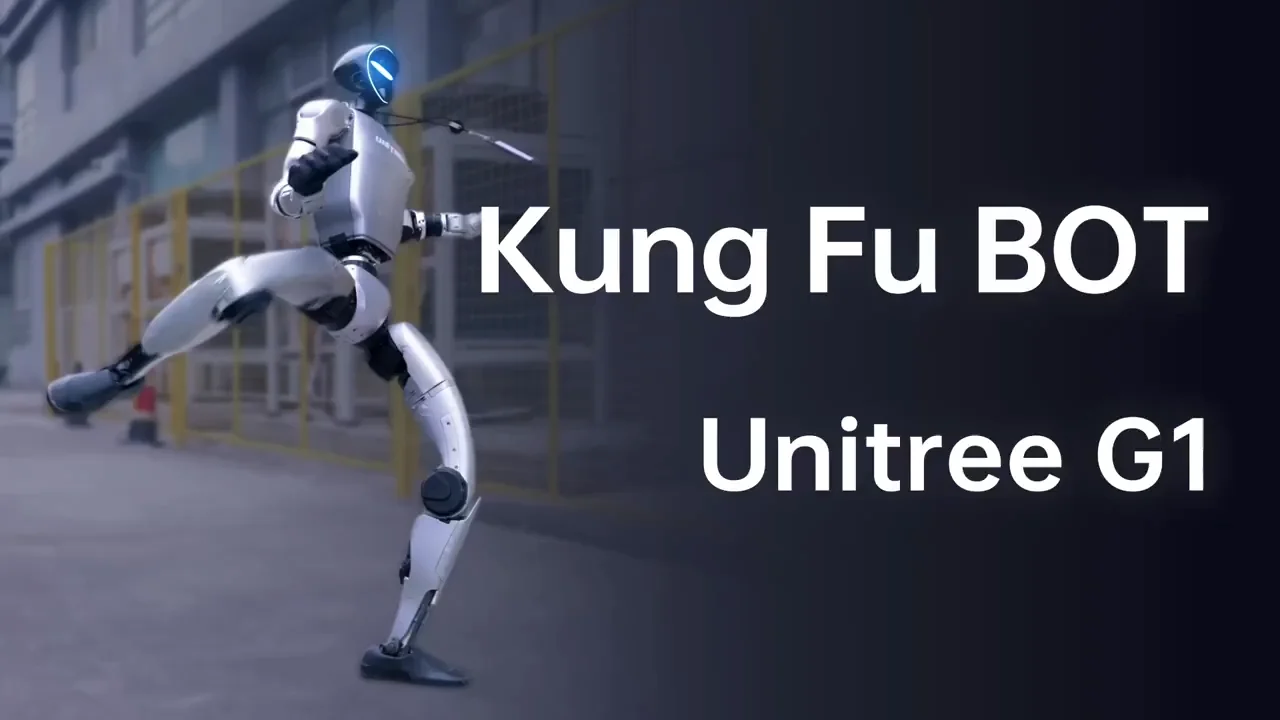
The Unitree G1 is a compact humanoid robot developed by Unitree Robotics, a Chinese robotics company known for affordable and agile robots like the Unitree Go1 and H1. The G1 is designed primarily for research and development, education, and light AI tasks, focusing on agility, mobility, and programmability. It has a humanoid shape with a slim torso, jointed arms and legs, and a small head unit. It has no face or screen; the head is usually a sensor module.
Unitree G1
Unitree G1 Humanoid Robot features
- Height ~127 cm (4.2 feet)
- Weight ~35 kg
- Degrees of Freedom (DOF) 23 (Head: 2, Arms: 6×2, Legs: 5×2)
- Top Speed: ~2 m/s (walking/running)
- Actuators: Custom high-torque motors (up to 360 N·m).
- Sensors: IMU, depth cameras, 3D LiDAR, joint encoders.
- Control System: Linux + ROS (Robot Operating System).
- Battery Rechargeable, swappable battery (~2–4 hours depending on load).
- Connectivity Wi-Fi, USB, CAN, Ethernet.
- Agile Bipedal Motion: Unitree G1 can walk, run, squat, jump, and balance dynamically. Demonstrated backflips and yoga-like poses in promotional demos.
- Affordable for a Humanoid: Unitree G1 is significantly less expensive than most humanoid robots (~$16,000 base), lowering the entry barrier for labs and startups.
- Modular Head Unit: Optional AI vision head includes RGBD camera and perception sensors for SLAM, facial tracking, and obstacle avoidance.
- ROS Support: Unitree G1 is compatible with ROS 2, making it ideal for academic and AI research environments.
Use of Unitree G1
- Robotics education and training.
- AI vision and navigation research.
- Locomotion and control algorithm development.
- Human-robot interaction (limited to non-verbal cues).
- Robotics competitions and demos.
What Can the Unitree G1 Do?
- Dynamic Movement & Mobility: Unitree G1 can walk forward, backward, and sideways. It can run at speeds up to ~2 meters/second. It can squat, kneel, and sit. It can perform yoga poses and stretching. It can jump and perform backflips. It can maintain dynamic balance on uneven terrain.
- AI and Vision Tasks (with optional sensor head): Unitree G1 can perform object recognition (via camera and AI vision), Human detection, and face tracking, Depth sensing, and 3D perception. SLAM (Simultaneous Localization and Mapping) for basic navigation, Obstacle detection, and avoidance.
- Robot Development Platform: Unitree G1 supports custom motion planning. It is compatible with ROS / ROS2 (Robot Operating System). It enables the development of gait optimization, AI-based decision-making, perception, and localization algorithms.
- Modularity & Expansion: Unitree G1 can add or swap modules like: AI camera head, more powerful batteries, external sensors or communication tools, USB, CAN, and Ethernet ports for hardware integration.
- Battery-Powered Autonomy: Unitree G1 operates wirelessly with 2–4 hours of battery life (varies by activity), hot-swappable battery design for uninterrupted use.
What It Can’t Do (Yet)
- Manipulate objects (no hands or grippers).
- Talk or interact verbally (no microphone/speaker or NLP support).
- Express emotions (no face or screen).
- Lift or carry heavy items (limited payload).
Unitree G1 advantages
- Affordable Price (for research): Priced between $16,000 and $90,000, depending on configuration, the G1 is more cost-effective than most humanoid robots, making it accessible to developers, researchers, and startups.
- High Agility and Balance: Unitree G1 features advanced motion control, dynamic balance, and high-speed walking, capable of activities like running, jumping, and backflips, rare at this price point.
- Lightweight and Compact: Unitree G1 weighs around 35 kg, which is lighter than many humanoid robots, making it easier to transport, deploy, and test.
- Strong Actuators: Unitree G1 is equipped with custom 360N.m joint motors that allow for high torque and joint flexibility, enabling natural human-like movement.
- Rich Sensor Suite: Unitree G1 includes 3D LiDAR, depth cameras, IMU, joint sensors, and optional AI camera modules, supporting real-time environmental awareness and navigation.
- Open Platform for Development: Unitree G1 comes with ROS (Robot Operating System) support, SDKs, and APIs, making it suitable for AI, vision, and robotics research.
- Battery-Powered Autonomy: Unitree G1 runs on a rechargeable battery that supports several hours of operation, depending on activity level.
- Modular Design: Parts and accessories (like head-mounted AI cameras) are modular, allowing for customization and easy upgrades.
Disadvantages of Unitree G1
- Limited Real-World Applications (currently): Unitree G1 is primarily built for R&D and experimental use, not yet fully ready for industrial or commercial deployments.
- No Hands or Fine Manipulation: Unlike some humanoids, the G1 lacks dexterous hands or fingers, so it cannot perform complex object manipulation.
- Battery Limitations: While portable, the battery life is limited, and heavy tasks drain it faster, requiring frequent recharging or battery swaps.
- Lacks Advanced AI Integration (by default): While capable, AI functions like NLP or autonomous decision-making must be programmed separately and are not as sophisticated out-of-the-box compared to robots like Ameca or Figure 01.
- No Voice or Face Interaction: Unitree G1 does not support voice communication or facial expressions, making it unsuitable for human-robot interaction (HRI) in social contexts.
- Requires Technical Expertise: Operating and programming the G1 requires robotics and coding knowledge, making it less ideal for general users.
- Limited Payload Capacity: Unitree G1 cannot carry or lift heavy objects, unlike some industrial humanoids focused on logistics or manufacturing.
- Unitree G1 is not equipped with grippers or articulated hands. It has no voice interaction or facial expression support. It is intended for indoor or flat-ground environments. It requires technical knowledge to program and operate.
You can follow Science Online on YouTube from this link: Science online
Sophia robot review, features, use, advantages and disadvantages
Robot teachers use, types, advantages and disadvantages
Advantages and disadvantages of using robots in our life
Automation in manufacturing uses, advantages and disadvantages
Humanoid robots use, types, risks, advantages and disadvantages
Pepper robot review, features and What can Pepper do for your business?
Boston Dynamics Atlas review, advantages and features, How does Atlas robot work?