Unitree Go2 Robot Dog Quadruped Robotics for Adults, What does the Unitree robot dog do?
The Unitree Go2 stands out as a highly interactive, agile robot dog suitable for personal, educational, or light commercial applications. It is a running companion, a programmable robot for research, and a mobile platform to experiment with AI and control systems.
Unitree Go2
The Unitree Go2 is among the most accessible and advanced quadruped robots available for enthusiasts, educators, and researchers. It packs powerful perception, agile movement, and AI‑assisted interaction into a compact package. It’s one of the most realistic ways to explore quadruped robotics without institutional budgets.
What can Unitree Go2 do?
The Unitree Go2 is a highly agile and intelligent robotic quadruped (robot dog) designed for mobility, sensing, and interaction. It’s built for personal use, education, research, and light commercial applications.
Unitree Go2
Mobility & Agility
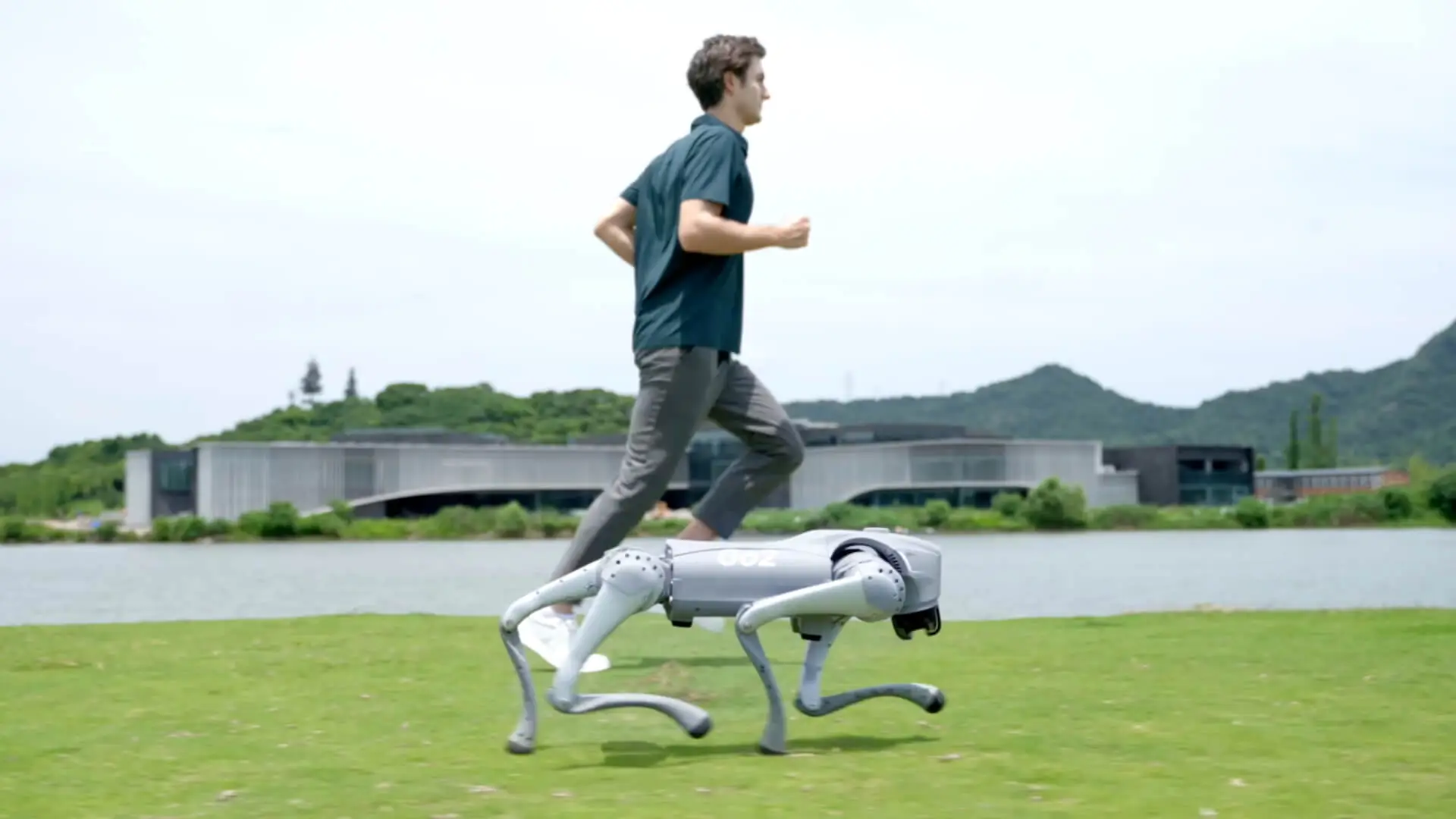
Unitree Go2 can walk, trot, run, and crawl on flat and uneven terrain. It can climb stairs, ramps, and slopes up to 35°. It can jump, roll, stretch, crouch, and perform expressive poses (like waving or bowing). It can maintain balance when pushed or navigating obstacles. It can reach speeds up to 3.7 m/s (≈13 km/h).
Perception & Sensing
- 4D LiDAR scanning: Maps 360° environments in 3D with obstacle detection down to 5 cm.
- Real-time SLAM (Simultaneous Localization and Mapping).
- Unitree Go2 avoids obstacles while walking or following you.
- Unitree Go2 builds 3D maps of rooms or environments for autonomous path planning.
AI & Interaction
- Voice command support (Pro/EDU versions): Unitree Go2 responds to spoken commands.
- Unitree Go2 can integrate with ChatGPT or other large language models to converse or process voice input.
- Unitree Go2 can recognize gestures and can be programmed to perform custom routines.
- Unitree Go2 automatically follows a person via the ISS 2.0 side-follow system with up to 30 m range.
App & Remote Control
- Unitree Go2 is controlled via a mobile app (iOS/Android): joystick mode, route planning, voice input.
- Unitree Go2 provides a live video feed and a programming interface.
- Unitree Go2 supports OTA (over-the-air) updates for continuous software and AI upgrades.
Programmability & Expansion
- Developers can program it using C++, Python, ROS, or visual coding.
- Go2 EDU version supports NVIDIA Jetson Orin for advanced AI development.
- Unitree Go2 can carry payloads (~7–10 kg) and connect to accessories (like robotic arms or sensors).
Performance Demos & Tricks
- Perform tricks like: sitting, handshaking, bowing, standing on hind legs (briefly), rolling over.
- Unitree Go2 is used in: School/university robotics labs, Tech demos and public performances, Surveillance or inspection (with camera and 4G options), Personal entertainment or exercise companion.
Unitree Go2 features
Features & Design
- 4D Ultra‑wide LiDAR L1: Unitree Go2 offers 360°×90° hemispherical scanning with detection range down to 0.05 m—improving recognition accuracy by up to 200% and minimizing blind spots.
- Advanced AI Mode: Trained with large-scale AI simulations to perform agile gaits like upside-down walking, rolling over, stair climbing, and obstacle traversal.
- Expressive Actions: Unitree Go2 greets commands and performs poses such as jumping, stretching, bowing, shaking hands, cheering, pouncing, and sitting down.
Intelligent Capabilities
- ISS 2.0 Side-Follow System: Unitree Go2 follows the wearer via a remote beacon with positioning 50% more accurate, up to 30 m range, and optimized obstacle avoidance.
- 3D LiDAR Mapping & Autonomous Routing: Unitree Go2 builds point-cloud maps and enables path-following via the companion App.
- OTA Software Updates: Cloud-based firmware and AI improvements to keep the device evolving.
- Mobile App Controls: Unitree Go2 provides live HD video feed, programming interface, voice commands (Pro/EDU), and graphical visual coding.
Available Editions
- Go2 Air: Entry-level version (~US $1,600) for home use, entertainment, light security, and following.
- Go2 Pro: Enhanced compute, voice commands, 4G connectivity, extended battery life—ideal for interactive and outdoor use (~US $2,800).
- Go2 EDU: Focused on educational and research applications, offers SDK, secondary development tools, and extended compute modules (Orin).
Use of Unitree Go2
- Exceptional mobility and terrain agility (stairs, slopes, rolling).
- Programmable motions and interactions for education or entertainment.
- Strong connectivity and follow-me modes for strolling or filming.
- OTA & app-based updates keep features fresh.
Advantages of Unitree Go2
Advanced Mobility & Navigation: Unitree Go2 performs dynamic gaits—trot, gallop, sidestep, even acrobatic moves like spins, handstands, and stair climbing with slope adaptation up to ~35°. It is equipped with a 4D ultra-wide LiDAR (360° horizontal × 90° vertical range, detection down to ~0.05 m) for precise obstacle avoidance and 3D mapping. Auto-adjusts gait, stride, and leg stiffness in real-time to handle diverse terrains—from pavement and curbs to grass and slopes.
Sensor & Connectivity: Pro and EDU models include Wi‑Fi 6, Bluetooth, and optional 4G/5G for remote operation, live video feeds, and app control. Embedded front camera and LiDAR support object detection, waypoint navigation, follow modes, and patrol routines via the mobile app.
Programmability & AI Modes: EDU version offers developer tools and SDK access. Some users have jailbroken the Pro version to unlock similar API control via community tools like go2_ros2_sdk. Fun built-in tricks and voice interaction (Pro/EDU) powered by large-model GPT-based interfaces support natural-language commands and expressive actions, such as dancing, greeting, or posing. OTA firmware and AI updates through the cloud allow future expansion of features.
Cost & Repairability: Much more affordable than industrial robots like Boston Dynamics Spot (~$75,000), with base pricing around US $1,600 for Air, $2,800–3,000 for Pro, and higher for EDU.
Modular build: removable feet and battery, straightforward access via screws; legs and motors seem replaceable, though spares are only available via contact form.
Disadvantages of Unitree Go2
- Battery & Runtime: Standard ~8,000 mAh battery offers just 1–2 hours of operation (up to ~3 h if idle). Optional 15,000 mAh battery (EDU) extends runtime to 2–4 h. Limited runtime necessitates frequent recharges or battery swaps.
- Initial setup can be finicky: improper starting posture often causes failures during boot—you must calibrate carefully; occasional unexpected shutdowns are reported with no warning or logs.
- Obstacle avoidance may sometimes misinterpret situations—for instance, some users report inability to walk forward via app controls unless obstacle avoidance is disabled or the system is recalibrated.
- Durability & Support Constraints: Neck joints and external shell parts may be prone to cracking under stress; knees can show wear from kneeling or rough surfaces.
- No official support ecosystems in many regions: parts and repairs rely on contacting support—no regional centers or ready-order spare parts.
- Demo clips sometimes appear over‑polished or simulated; real‑world performance is less smooth and more limited in agility and trick complexity. Many users note it is essentially a tool/platform—not a pet substitute: no autonomous roaming, no human-like awareness, no patrol scheduling without manual wakeup and operation.
- Full programming capability is reserved for the EDU version; Air and Pro lack an official SDK. Hobbyists rely on community jailbreaking (which involves risks) to access lower-level controls. Unitree Go2 requires technical skill and tinkering to use advanced features effectively; less plug-and-play than advertised.
You can follow Science Online on YouTube from this link: Science online
Aibo robotic dog review, features, advantages and disadvantages
Go2 robot dog review, types, advantages, disadvantages and features
Python Programming Language features, advantages and disadvantages
Importance and uses of Educational robotics for students
Educational robotics, Robot teachers, Social robots review, features advantages & drawbacks
Pros and cons of technology in education & Can technology replace teachers?
Artificial intelligence in education, AI tutors features, advantages & disadvantages