MiPosaur Robotic Dinosaur advantages and disadvantages, How to use MiPosaur?
The MiPosaur Robotic Dinosaur is an interactive robotic toy. It is created by WowWee. It combines gesture recognition, app control, and a smart trackball accessory to provide multi-mode play. It is designed to look and behave like a dinosaur with a built-in “personality” system that reacts differently depending on its mood (curious, excited, or annoyed).
MiPosaur Robotic Dinosaur
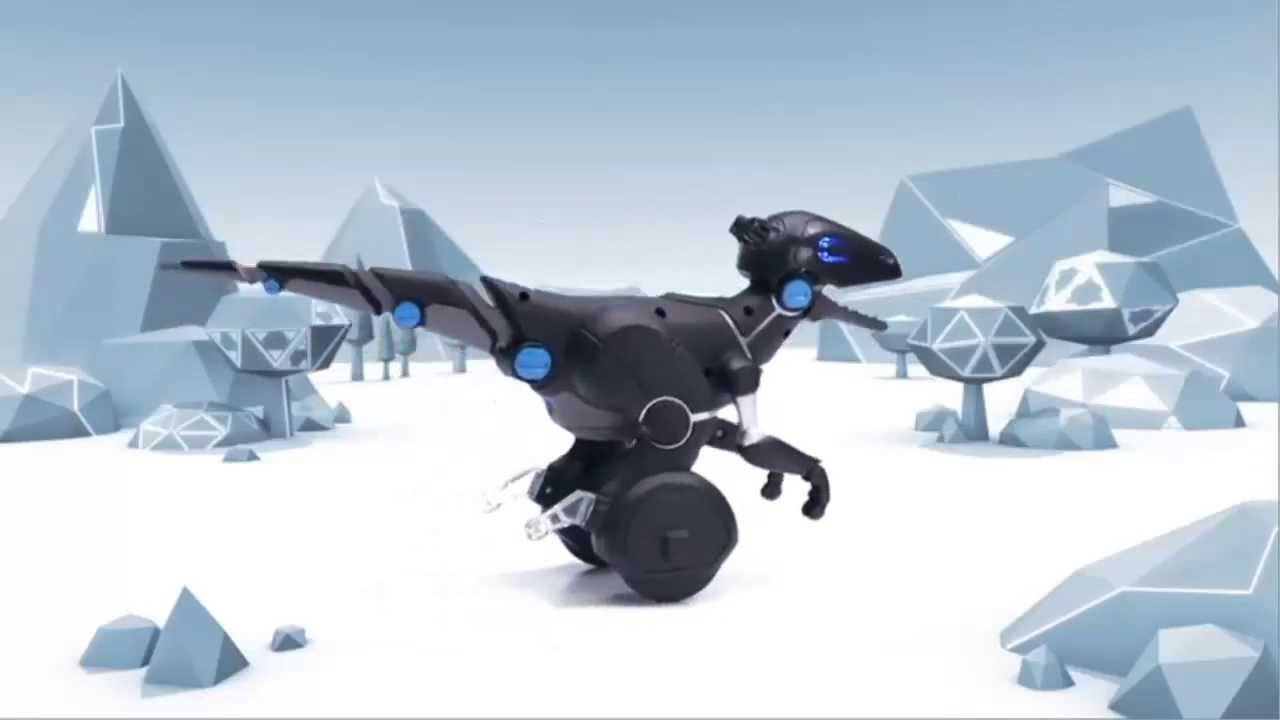
MiPosaur is a robotic dinosaur pet toy that blends robotics, sensors, and playful AI to entertain users by responding to gestures, toys, and smartphone commands. It is powered by a self-balancing two-wheel system; It can move dynamically, chase objects, dance, follow paths, and interact both autonomously and through user input. It responds to hand gestures, the included TrackBall, and a mobile app (iOS/Android), offering a mix of physical and digital play.
What can MiPosaur Robotic Dinosaur do?
The MiPosaur Robotic Dinosaur is designed as an interactive toy with personality, mobility, and multiple play modes. MiPosaur is an interactive robotic pet dinosaur that can follow commands, play games, dance, battle, and show personality through moods and reactions.
1. Respond to Gestures: MiPosaur uses GestureSense™ technology to recognize up to 10 different hand gestures. It reacts when you swipe, clap, or cover its eyes—sometimes becoming curious, playful, or annoyed depending on its mood.
MiPosaur Robot Dinosaur
2. Play with the TrackBall: MiPosaur Robotic Dinosaur comes with a BeaconSense TrackBall that unlocks six different play modes:
- Ball mode → chases the ball like a pet.
- Food mode → pretends to eat when near the ball.
- BeatBox mode → makes rhythm and sound effects.
- Leash mode → follows the ball as if being walked.
- Dance mode → performs fun dances.
- Teddy Bear mode → reacts as if cuddling.
3. Connect to a Mobile App: MiPosaur Robotic Dinosaur is connected via Bluetooth. The MiPosaur app lets you: drive the dinosaur around like a remote-control toy, draw paths for it to follow, play music, and make it dance, and feed it virtual food. Battle against another MiPosaur, and update its firmware to get new features.
4. Show Moods & Personality: MiPosaur has three moods shown by LED colors: Blue → Curious. Orange → Excited. Red → Angry/Annoyed. Its reactions (friendly, playful, stubborn) depend on its mood, making it feel more like a “pet” than a simple robot.
5. Move with Self-Balancing Agility: MiPosaur Robotic Dinosaur rolls on two Segway-style wheels with built-in gyroscopic balance. It can spin, chase, follow, and even do tricks while keeping its balance. It uses small heel supports to rest when it stops.
6. Play & Interact Autonomously: MiPosaur can wander around on its own when idle. It reacts to touch, claps, and interaction without needing the app. It is capable of playful “battling” or tug-of-war behavior when interacting with others.
MiPosaur Robotic Dinosaur features
1. Three Ways to Play
Gesture Control: Using GestureSense™ technology, MiPosaur responds to up to 10 hand gestures—like swiping, clapping, or covering its eyes—to trigger actions such as becoming your “friend,” feeding, or reacting playfully.
TrackBall Interaction: The included Beacon-Sense TrackBall offers 6 unique game modes. You can rotate the ball’s knob to switch between activities like playing fetch, feeding, beatboxing, leash-walking, dancing, and engaging with a “teddy bear” mode.
Mobile App Control: Via Bluetooth Low Energy (BLE), the MiPosaur app allows you to drive the dinosaur, feed it, draw movement paths, play music that it dances to, or initiate battles with another MiPosaur.
2. Dynamic Mood System: MiPosaur exhibits three distinct moods—Curious (blue LED), Excited (yellow), and Annoyed/Angry (red)—each influencing how it responds to play or commands.
3. Balancing & Mobility: MiPosaur moves on two wheels using a self-balancing, Segway-style mechanism with a pendulum design. When stationary, it can lean back onto small heel supports for stability. Its reactions and movement remain responsive to the TrackBall thanks to embedded indoor GPS-like sensor tech, though aggressive collision behavior is part of its playful character.
4. App Functionality & Firmware Updates: The app supports firmware updates, allowing WowWee to improve MiPosaur’s capabilities over time. MiPosaur provides detailed feedback on mood, control over volume, and connectivity to multiple devices (including previous MiP models).
5. Specs & Compatibility:
- Gestures ~10 hand gestures (sound sensors + front/back sensors).
- TrackBall Modes: 6 modes: Dance, Food, Teddy Bear, Ball, Leash, Beat Box.
- App Controls: Drive, Feed, Draw Path, Battle, Dance, Battle Mode.
- Moods: Curious, Excited, Angry.
- Power MiPosaur: 4 × AA batteries; TrackBall: 4 × AAA batteries.
- Size & Weight Approx. 15″ L × 7″ W × 9″ H; ~2.75 lb.
- Compatibility iOS 7+ on iPhones/iPads and Android 4.3+ (BLE).
Advantages of MiPosaur
- Highly Interactive & Multi-Modal Control: MiPosaur uses GestureSense™ technology to respond to up to 10 hand gestures, such as swipes, claps, or covering its eyes, making interactions feel dynamic. The included Beacon-Sense TrackBall features six engaging modes—Dance, Food, BeatBox, Leash, Ball, and Teddy Bear—that deliver a variety of play experiences. MiPosaur is controlled via Bluetooth Low Energy. The free app allows direct driving, feeding, drawing movement paths, battling, dancing to your own music, and even firmware updates.
- Personality & Mood-Based Behavior: Visual mood indicators (LED colors) reflect three moods: Blue (Curious), Orange (Excited), and Red (Annoyed). These moods influence how MiPosaur responds—adding depth and character to the play experience.
- Self-Balancing Mobility: MiPosaur moves on two wheels with gyroscopic (Segway-like) balancing, enabling fluid and agile movement. When not in motion, it rests on heel supports. It demonstrates simple obstacle avoidance and autonomous wandering behavior when idle.
- Fun, Engaging Experience: Reviewers and parents report that kids love playing with it, making it popular across age groups. One GeekDad reviewer said they couldn’t even test it because “my children would not stop playing with them.”
- Vintage Robotic Charm and Value: Viewed as a cooler version of the MiP robot, especially appealing to dinosaur-loving kids and tech enthusiasts. TrustedReviews admired its array of functions and character, calling it “a truly fun toy”.
Disadvantages of MiPosaur
- Gesture Control Is Flaky: Hand gesture responsiveness can be inconsistent, requiring repeated attempts to get it to work.
- Requires Ample Play Space: Many modes, especially those involving chasing or ball play, work best in open areas; they can be limited in smaller rooms or spaces with lots of furniture.
- Loud Audio & Lack of Volume Control: Some users found it louder than expected. GeekDad’s reviewer noted a lack of volume control as a drawback. Additional reports mention it can get “a little too loud,” which might be bothersome in quiet environments.
- Battery Life & Power Issues: MiPosaur requires 4 AA batteries for the MiPosaur and 4 AAA (or sometimes AA) batteries for the TrackBall. Battery life can be short—Best Buy reviews frequently mention battery life and difficulty changing batteries as pain points. Sluggish movement and balancing problems can occur with weak batteries.
- Durability & Quality Concerns: Some buyers reported issues like water damage or sticky battery compartments upon arrival, raising concerns about quality control. There are also occasional complaints of decreased interest over time—lasting novelty might wear off for some users. A few users note minor balance or movement irregularities.
- Not Educational or Developmental: GeekDad emphasized that MiPosaur is purely entertainment-focused and not an educational robotics kit—those seeking coding or learning experiences should consider more specialized products. Little Robot Shop suggested it’s more suited to older kids (around 10+) and may be underwhelming for younger children, who may find its complexity less engaging.
You can follow Science Online on YouTube from this link: Science online
Minions Fart Gun Battle Bot features, How to get the minion fart gun to work?
Sophia robot review, features, use, advantages and disadvantages
Robot teachers use, types, advantages and disadvantages
Advantages and disadvantages of using robots in our life
Automation in manufacturing use, advantages and disadvantages
Humanoid robots use, types, risks, advantages and disadvantages
Pepper robot review, features, and What can Pepper do for your business?
Boston Dynamics Atlas review, advantages and features, How does Atlas robot work?