Dash robot features, Meet Dash and Dot Robots for kids ages 6+ | Wonder Workshop
Dash is an interactive, programmable educational robot created by Wonder Workshop to teach children the basics of coding, robotics, and problem-solving through play. It can move, light up, make sounds, detect obstacles, and respond to voice or sound. Dash is controlled through kid-friendly coding apps such as Blockly and Wonder, making it ideal for teaching sequencing, loops, events, and other early programming concepts.
Dash Robot
Dash is a small, programmable educational robot designed by Wonder Workshop to teach children the basics of coding, robotics, and problem-solving through play. It responds to voice commands, moves in all directions, lights up, plays sounds, and interacts with its environment using built-in sensors. Dash is commonly used in schools and homes as a hands-on tool to learn coding concepts such as loops, events, sequences, and conditional logic.
What Makes Dash Special
- Dash is fully assembled and ready to use out of the box.
- It responds to the environment using interactive sensors (IR, sound, motion, distance, gyroscope).
- It teaches coding through fun challenges and puzzles.
- It is safe and engaging for children. Kid-friendly design for ages 6+
- It is used widely in homes and schools for STEM learning.
- Programmable using apps like Blockly, Wonder, and Go.
- It moves and navigates with precise motors.
- It has lights and sounds for expressive responses.
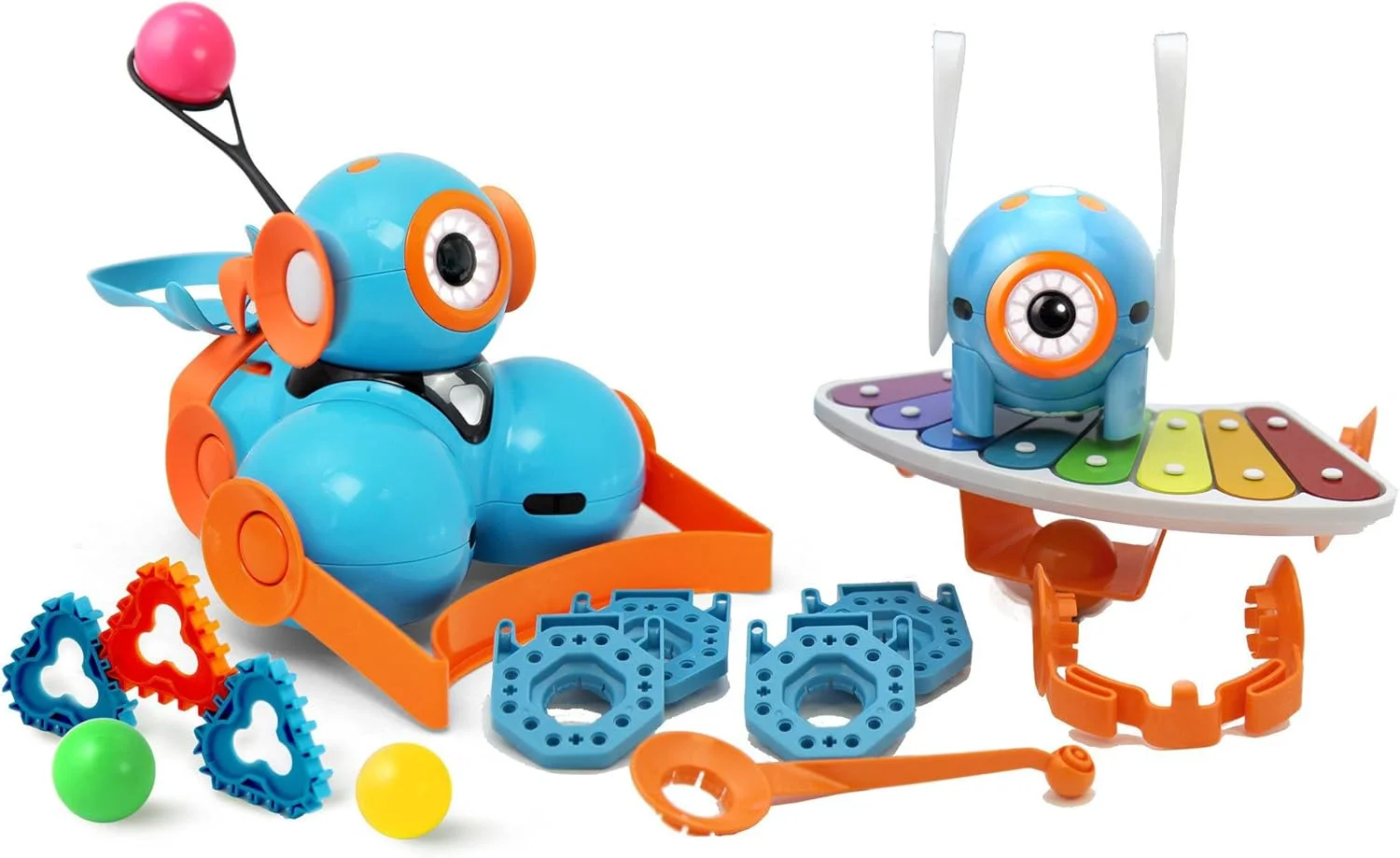
- It is expandable with accessories (launcher, bulldozer, xylophone, building brick connectors).
Dash robot
Dash Robot features
- Programmable & educational: Dash robot is designed to teach coding and computational thinking using block-based programming (via Blockly, Wonder (app), and other supported apps). Kids can create sequences, loops, conditionals, and more.
- Movement & mobility: Dash robot drives on two wheels (plus a balance caster), allowing it to move forward, backward, spin, and navigate with freedom.
- Sensors for environment awareness: Dash is equipped with sensors such as proximity/IR sensors, a gyroscope, and an accelerometer, enabling it to detect obstacles and help it balance or orient itself.
- Interactive lights and sounds — It has programmable LEDs (for example, in its “eyes”), which can light up in different colors or patterns, and it can make sounds — including preset tones, noises (animals, effects), even recorded voice/sounds.
- Voice & sound response: Dash can respond to sounds or voice commands, and can “listen” via built-in microphones (e.g. responding to claps or noises) for interactive play.
- Expandable / accessory support: Dash supports add-ons/accessories (via building brick connectors) such as attachable arms, xylophones, and more, letting kids expand Dash’s functionality (music, movement, creative builds) beyond what’s built-in.
What Kids & Learners Can Do With Dash
- Kids can program Dash to move along paths, react to obstacles, or navigate mazes.
- Kids can make Dash light up, flash patterns, change colors, or animate LED “eyes.”
- Kids can make Dash produce sounds, speak, play recorded audio, or even “perform” — sing, bark, make noises, based on programming.
- Kids can use Dash to learn fundamental programming concepts — sequencing, loops, events, conditions, algorithms, and more — through playful, visual coding.
- Combine creativity + engineering: by attaching accessories (e.g. arms, bricks), kids can build custom add-ons — blending robotics, building toys (like bricks), and coding.
Use of Dash
- Children roughly aged 6+: Dash is designed with kids in mind (easy to use, no assembly required) — great for introducing them to robotics and coding early.
- Home or school learning: Many educators and parents use Dash to teach STEM/robotics concepts in a fun, interactive way.
- Creative learners: Because of its mix of coding + lights + sounds + movement + attachments — Dash appeals to kids who like building, music, exploration, or imaginative play.
Dash Robot advantages
- Dash is great for learning coding and computational thinking. Dash supports block-based programming via companion apps, making it easy for kids (age ~6+) to learn sequencing, loops, conditionals, events, and more — all in a playful, intuitive way.
- Interactive & fun: mobility, lights, sounds, sensors. Dash moves around on wheels, can navigate spaces, avoid obstacles, respond to voice or sound (e.g. claps), light up, make sounds, or even “speak” (pre-programmed or voice-recorded), which makes programming feel alive and engaging.
- Good build quality and durability. Many users mention that Dash has strong motors, smooth movement, and a robust shell — able to withstand rough play and everyday use.
- Expandable and versatile. You can add accessories (sold separately): building brick connectors, musical attachments (like xylophones), grippers/arms — letting kids expand Dash’s functions and creativity.
- Kid-friendly and engaging for STEM learning at home/school. Many educators and parents find Dash ideal for introducing STEM, robotics, programming, and problem-solving in a fun, accessible format.
Disadvantages of Dash
- Limited to advanced programming / “black-box” design. Dash is largely a closed system: you don’t build it yourself (so no hands-on assembly), and you may not move beyond block-based coding. For kids wanting to learn “real” programming (Python, C++ etc.) it may feel limiting.
- Potential connectivity, device compatibility, or setup issues. Some users report problems connecting via Bluetooth or difficulties pairing with certain tablets/devices, which can be frustrating.
- Battery & power constraints. While Dash runs on a rechargeable battery, some users say it doesn’t hold a charge well or drains quickly. Also, the battery is not user-replaceable (the robot is sealed), which may shorten the useful lifespan if battery performance degrades.
- Cost and extra expenses. Compared to simpler or DIY robots, Dash can be relatively expensive. Also, many useful add-ons (accessories, extras) are sold separately, which can add up if you want to expand functionality.
- Not always ideal for very young children. While marketed for ~6+ years, younger kids (5–6) might need significant adult help to understand the apps/logic, and may not fully grasp the programming lessons. For toddlers (2–4 years) it’s mostly just a fun toy, not educational.
What it’s best for — and when to consider alternatives
Dash is best suited for:
- Kids ~6 years old and up who are just starting to learn coding and robotics.
- Parents or teachers wanting a ready-to-use robotics toy — no building required.
- Use in the home or classroom for playful STEM learning, creativity, and introductory programming.
- Kids who will enjoy lights, sound, movement, and use accessories to expand creativity (music, drawing, building).
You might want to consider other options (DIY robots, more advanced kits) if:
- You want deeper programming exposure (text-based, “real” coding).
- You wish to learn robotics building + coding — not just coding.
- You need a robot with a replaceable battery or modular hardware for long-term use.
You can follow Science online on YouTube from this link: Science online
Miko Robot Features, importance, and drawbacks, Miko 2 vs Miko 3
Miko review, types, features advantages and disadvantages
Miko 2 vs Miko 3, Difference between Miko 2 and Miko 3
Loona robot review, advantages, disadvantages and what can Loona do?
Sophia robot review, features, use, advantages and disadvantages
Educational robotics, Robot teachers, Social robots review, features advantages & drawbacks
Humanoid robots use, risks, advantages and disadvantages