Wonder Workshop Cue Robot: Coding in Blockly and JavaScript
CUE Robot is an interactive educational robot developed by Wonder Workshop, designed to help students learn coding, computer science, and problem-solving skills in a fun and hands-on way. It is primarily used by middle school and high school students and supports both block-based coding and text-based programming.
CUE Robot
CUE stands for “Coding Utility Engine, and the robot features modular hardware with interchangeable parts, allowing learners to experiment with sensors, actuators, and real-world robotics concepts while writing code through a companion app.
What are Cue robots?
CUE robots are educational programmable robots created by Wonder Workshop that help learners—especially children and students—explore coding, robotics, and computational thinking in a hands-on, interactive way.
Unlike simple remote-controlled toys, CUE robots are designed to be programmed. Users can write code that tells the robot how to move, respond to its environment, play sounds, use lights, and interact with sensors. This bridges the gap between play and real coding skills, making them excellent tools for STEM education in classrooms, clubs, or at home.
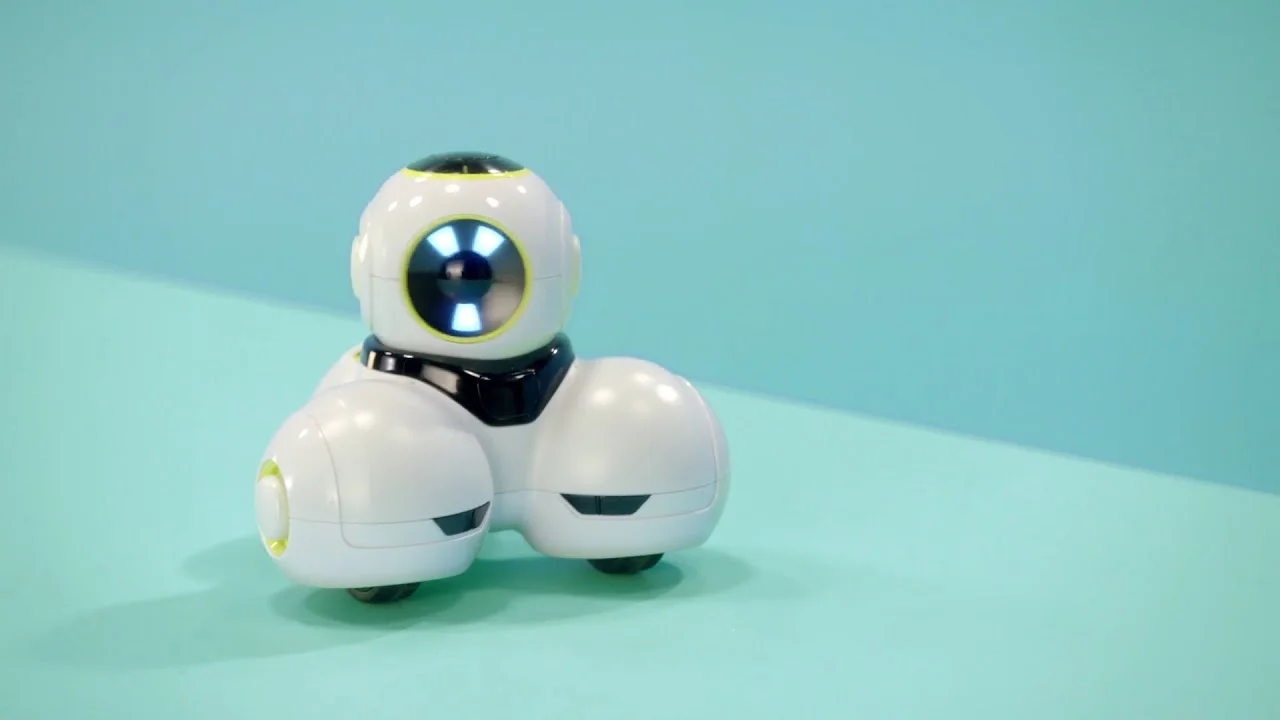
Cue Robot
CUE Robot is an interactive learning tool. It can encourage logic, creativity, and problem-solving. It works with both block-based coding (beginner-friendly) and text-based coding (like JavaScript for more advanced learners). It can detect light, obstacles, touches, and more.
CUE Robot connects via Bluetooth to tablets or phones. It comes with guided activities and challenges to build coding confidence. CUE robots turn abstract coding concepts into fun, physical, engaging experiences, making coding accessible and exciting for learners of many ages.
CUE Robot supports block coding (Blockly) and JavaScript. It includes motors, lights, sounds, sensors, and Bluetooth connectivity. It is designed for classroom learning and STEM education. It encourages creativity, logic, and computational thinking.
CUE Robot bridges the gap between beginner and advanced coding by combining physical robotics with progressive programming challenges, making it a powerful tool for modern STEM education.
CUE Robot features
Hardware & Sensors
- Programmable motors for movement and robotics tasks.
- LED lights for visual feedback and signaling.
- Sound effects and speakers for audio responses.
- Touch sensors to detect interaction.
- Light sensors for environmental feedback.
- Extendable modular parts to customize physical builds.
Programming & Software
- Block-based coding (Blockly-style) — great for beginners.
- Text-based coding (JavaScript) — for advanced learners.
- Bluetooth connectivity to control the robot wirelessly.
- Companion CUE app (iOS/Android) for code creation and tutorials.
- Pre-built challenges and lessons to guide students through projects.
Educational Design
- CUE Robot is designed for classroom use and STEM labs.
- CUE Robot supports individual and group activities.
- CUE Robot includes progressive challenges from simple to complex.
Advantages of CUE Robot
CUE Robot is great for Learning & Engagement:
- Hands-on experience makes coding tangible.
- CUE Robot encourages creative problem-solving.
- CUE Robot builds computational thinking step by step.
- CUE Robot works for beginners and intermediate coders.
Flexible Programming Options:
- Block coding introduces foundational logic.
- JavaScript support allows transition to real-world coding.
Interactive & Fun:
- Visual and audio feedback keep students engaged.
- Physical movement and customization make learning interactive.
Classroom-Friendly:
- CUE Robot supports collaborative projects.
- Lesson plans and structured challenges aid instruction.
- CUE Robot works well in formal and informal learning environments.
Disadvantages of the CUE Robot
- Cost: CUE Robot can be expensive for individual students or schools with limited budgets. Additional accessories can increase the total cost
- Limited Advanced Robotics: CUE Robot is not as capable as high-end robotics kits used in competitive robotics. Hardware modules are somewhat fixed, with fewer expansion options than open-ended robotics platforms.
- Software Limitations: The companion app may require frequent updates. Some advanced JavaScript features may be limited compared to full programming environments.
- Learning Curve: Beginners may still need teacher guidance initially. Transitioning to text-based coding fully may require external resources.
You can follow Science online on YouTube from this link: Science online
Miko Robot Features, importance, and drawbacks, Miko 2 vs Miko 3
Miko review, types, features advantages and disadvantages
Miko 2 vs Miko 3, Difference between Miko 2 and Miko 3
Loona robot review, advantages, disadvantages and what can Loona do?
Sophia robot review, features, use, advantages and disadvantages
Educational robotics, Robot teachers, Social robots review, features advantages & drawbacks
Humanoid robots use, risks, advantages and disadvantages