KIBO Robot Review — Features, Pros & Cons, What It Can Do
The Kibo Robot (often referred to as Kibo-RPC) is a free-flying cube-shaped robot used on the International Space Station (ISS). It was developed by JAXA (Japan Aerospace Exploration Agency) as part of the Kibo module. It’s used in classrooms, after-school programs, and homes to introduce STEAM concepts in a developmentally appropriate way.
What is the KIBO Robot?
KIBO isn’t a traditional autonomous robot like a social assistant or home helper — it’s an educational robot kit designed to teach young children basic programming and computational thinking through hands-on play. Kids build and decorate the robot, then program motions and behaviors using physical coding blocks — all without screens or tablets.
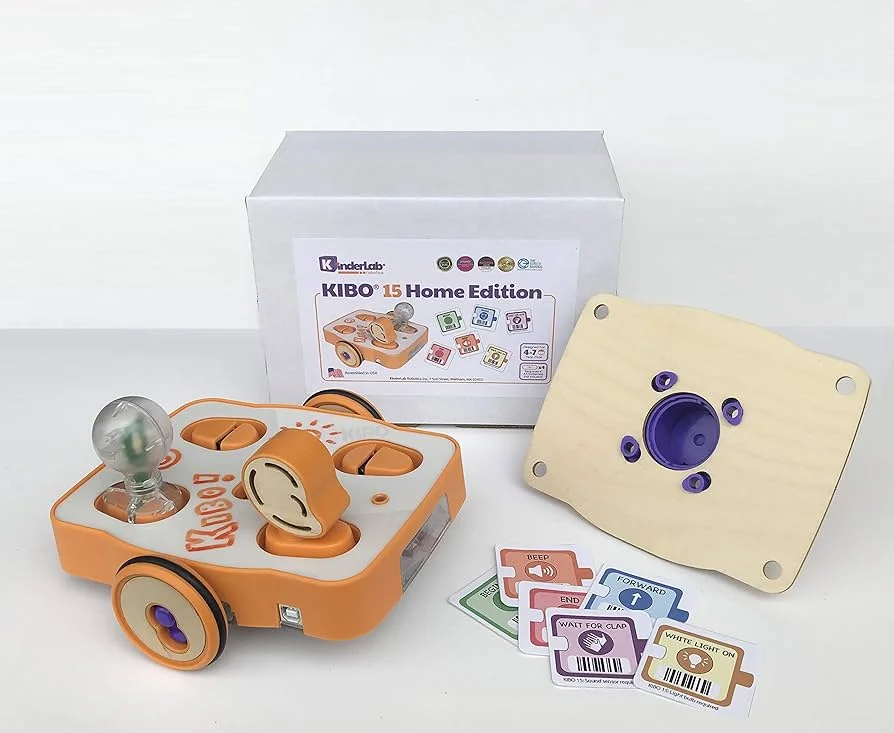
kibo robot
Kibo Robot use
Kibo Robot is used for:
- Space robotics research.
- Remote-controlled experiments.
- Autonomous navigation in microgravity.
- Education and international robotics competitions.
Unlike Kilobots, Kibo Robot is not a swarm robot and operates as a single intelligent system in space.
- Product: KIBO
- Type: Educational STEAM coding robot kit for kids
- Target Ages: ~4–7 years (PreK–2nd grade).
- Purpose: Screen-free robotics & coding learning tool.
- Category: STEM/STEAM Robotics Education Tool.
KIBO robot features
- Hands-On Construction: Children assemble KIBO using wooden and plastic parts, creating a tactile understanding of robotics basics. Kits usually include wheels, motors, sensors (light, sound, distance), and coding blocks for commands.
- Screen-Free Block Programming: Kids program the robot using physical blocks that represent actions (forward, turn, repeat, sensor triggers). KIBO scans these blocks and executes the sequence without the need for a computer or tablet.
- Customization & Creativity: Children decorate KIBO with art materials, making the robot a creative project as much as a coding one. LEGO-compatible connectors expand play and design possibilities.
- Curriculum & Educator Support: Extensive STEAM and computational-thinking lesson plans are available, aligned with early education standards. Teachers can integrate KIBO across subjects: literacy, science, math, and more.
- Development Focused: Based on over 20 years of research in early childhood learning and coding education.
KIBO Advantages
- Screen-free & developmentally appropriate: KIBO avoids tablets and phones while introducing computational logic in a concrete, tactile way that suits young learners.
- Encourages problem-solving & creativity: Children sequence commands, test actions, fix errors, and decorate robots — blending logic with artistic expression.
- Helps build fundamental STEAM skills: Engages kids with early principles of engineering, coding, sequencing, cause/effect reasoning, and critical thinking.
- Flexible classroom tool: Multiple kit versions (10, 15, 18, 21 blocks) allow gradual learning and more complex behaviors.
- Durable and safe: KIBO is designed for small hands, robust play, and early learners’ natural curiosity.
KIBO Disadvantages
- Not an autonomous smart robot: Unlike advanced home robots, KIBO isn’t AI-driven; it doesn’t respond to voice, navigate on its own, or sense environment dynamically beyond basic sensor signals.
- Requires guidance for setup: Young kids may need adult or teacher help to assemble, scan blocks properly, and run sequences at first.
- Battery dependency: Some kits run on replaceable batteries, so spare batteries and occasional adult help are needed.
- Can be costly for families: Higher-level kits add up in price (typically starting around mid-hundreds USD for complete classroom sets), though many schools buy them as shared resources.
What Can KIBO Do?
KIBO brings robotics to life for young learners by allowing kids to:
- Build a real robot: KIBO can assemble physical parts and design a decorated robot body.
- Program behavior: KIBO can line up coding blocks — each representing a command — and have KIBO move, turn, pause, or react accordingly.
- Use basic sensors: KIBO can integrate simple sensors such as light, sound, and distance to enable interactive behaviors.
- Explore STEAM concepts: Learn sequencing, loops, cause/effect, and more through repeated playful experimentation.
- Create cross-disciplinary projects: Use KIBO in narratives, art themes, storytelling, and thematic units in class.
- Educational Impact: Studies and educators report that KIBO boosts computational thinking and sequencing skills more effectively than some screen-based tools — with kids scoring higher on early coding tasks when using tangible tools versus apps alone.
KIBO isn’t a smart AI assistant — it’s a powerful educational tool that teaches young kids the building blocks of programming and thinking skills without screens. For parents, teachers, and early learners, it’s one of the most effective tactile ways to introduce robotics and coding fundamentals.
FAQ – KIBO Robot
What is the KIBO Robot?
The KIBO Robot is an educational robotics kit designed to help young children learn coding, engineering, and problem-solving through hands-on play without screens.
Who is KIBO Robot for?
KIBO is mainly designed for preschool and early elementary students (ages 4–7) as an introduction to computational thinking and programming concepts.
How does the KIBO Robot work?
Children build the robot and program it using wooden coding blocks that represent actions like move, turn, or sound — no screens or typing required.
Is the KIBO Robot suitable for classrooms?
Yes, KIBO is widely used in schools and early education programs as a STEM learning tool to support curriculum and collaborative projects.
Do you need a computer or tablet to use KIBO?
No — KIBO uses tangible coding blocks and doesn’t require a computer, making it accessible for young learners.
What skills do children learn with the KIBO Robot?
Students learn sequencing, logic, design, creativity, critical thinking, and basic programming concepts.
Can KIBO play music or sounds?
Yes, KIBO can be programmed to play sounds and music as part of its behavior sequences.
Is KIBO safe for young children?
Yes — the components are designed to be child-safe, durable, and suitable for ages 4 and up.
How long does a typical KIBO activity take?
Activities can range from 10 to 30 minutes, depending on the lesson or challenge.
Does KIBO require batteries?
Yes, KIBO robots typically require rechargeable batteries to power movement and sound modules.
You can follow Science Online on YouTube from this link: Science online
Swarm robotics features, advantages, disadvantages, and what is swarm robotics used for?
Emo robot review, advantages, disadvantages, features and What can Emo do?
Top trending topics on Emo robots and What can Emo do?
Ameca robot review, features, advantages, disadvantages and What can Ameca Do?
Eilik Desktop Companion Robot structure, features, use, advantages and disadvantages
Humanoid robots use, types, risks, advantages and disadvantages
Sophia robot review, features, use, advantages and disadvantages
Robot teachers use, types, advantages, and disadvantages
Tesla robots (Optimus) review, use, advantages and disadvantages