PAL Robotics’ ARI features, advantages, disadvantages and What can ARI do?
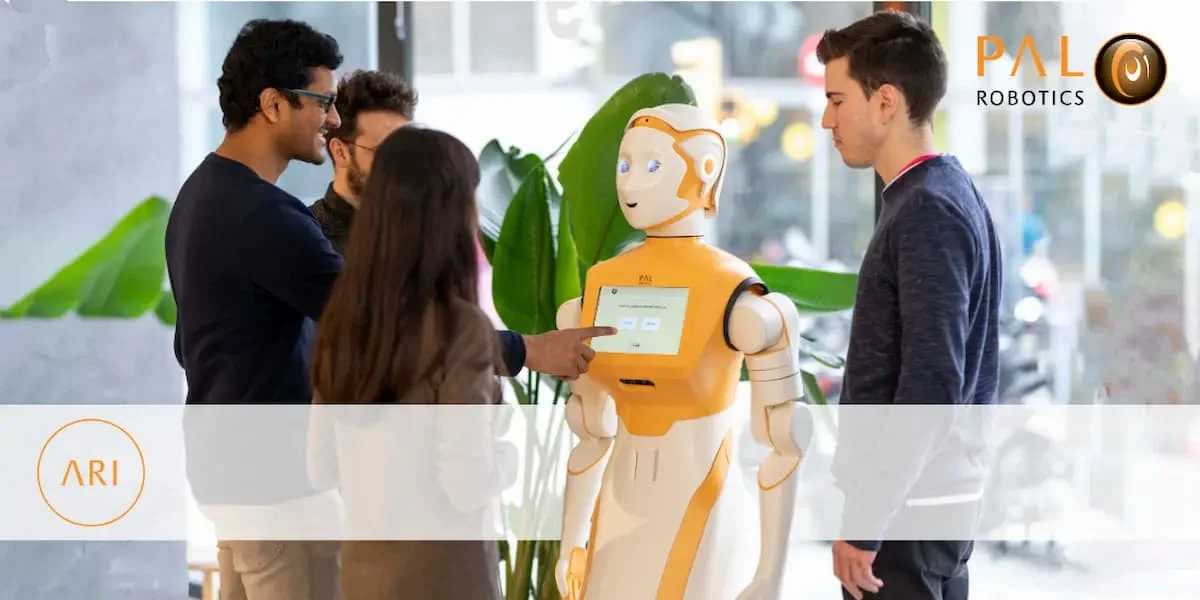
PAL Robotics’ ARI is a sleek, expressive social humanoid robot that features a tablet-like touchscreen on its chest, animated eyes, and fluid gestures that bring it to life. It can act as a receptionist or guide—welcoming visitors and providing dynamic information.
PAL Robotics’ ARI
PAL Robotics’ ARI is a social humanoid robot combining expressive design, natural interaction, autonomous mobility, and strong research/development tools—ideal for labs, healthcare, and public service environments.
What can PAL Robotics’ ARI do?
- Expressive Social Interaction: ARI uses animated LCD eyes, LED lighting, head and arm gestures, and gaze behavior to engage users with lifelike, intuitive social cues.
- Interactive Touchscreen: A 10.1″ touch display lets ARI present multimedia content, surveys, games, or informational menus. You can design and modify interactions via its web-based interface.
- Multimodal Social Perception: ARI is equipped with face recognition, speech recognition & synthesis (in over 30 languages), and intent understanding. ARI provides advanced human-robot interaction.
- Autonomous Navigation & Safety: ARI navigates autonomously using Visual SLAM, lidar (optional), and obstacle avoidance—without the need for physical environment modifications like tracks or guide wires.
- High-Performance On-Board Computing: ARI comes configurable with robust hardware: Intel i5/i7/i9 CPUs, up to 32 GB RAM, 1 TB SSD, and optionally GPUs like NVIDIA Xavier or Orin.
- Easy Customization & Deployment: ARI offers a user-friendly web UI for building gestures, touchscreen content, dialogues, and motion sequences. REST APIs and ROS SDKs allow integration with external systems.
- Flexible Integration & Connectivity: ARI supports Wi-Fi (dual-band), Ethernet, cloud services, and is GDPR-compliant—making it adaptable to diverse settings like healthcare, retail, education, and research.
- ROS-Based & Simulation Support: ARI is fully compatible with ROS (Robot Operating System). A simulation model is available through ROS Wiki, supporting easier development and testing via Gazebo or Docker.
PAL Robotics’ ARI
What ARI Can Do “Out of the Box”
ARI can act as a receptionist or guide—welcoming visitors and providing dynamic information. It can conduct surveys or promotional campaigns via its touchscreen and expressive movements. It can engage in basic dialogue through speech recognition and synthesis across multiple languages. It can function as a research tool for HRI, AI behavior studies, or ROS-based prototyping. It can be deployed as an educational assistant, museum guide, or event entertainer.
ARI features
Expressiveness & Human Interaction: ARI has animated LCD eyes, expressive gestures, and LED lighting that help ARI convey emotion and engage attention naturally. Its gaze, head movements, and upper-body gestures foster an intuitive human-robot connection. The robot’s mobility, lightweight design, safety-first engineering, and friendly, modern aesthetic are all designed to enhance user acceptance and comfort.
Perception & Social Capabilities: ARI features face and object recognition, speech recognition and synthesis, intent understanding, and skeleton tracking—enabling nuanced multi-modal human-robot interaction. It is built with ROS4HRI standards for social perception, ARI tracks single individuals (2D/3D), recognizes gaze, and detects engagement levels. Known limitations include detection accuracy under 2 meters, no voice separation or group recognition, and reliance on external vision tools like MediaPipe or dlib.
Hardware, Mobility & Power: ARI stands about 165 cm tall, with a 10.1″ touchscreen (1200×800) and a battery life of 8–12 hours. It includes upgrades such as 4-DoF arms with movable wrists, LIDAR for navigation, and ergonomic redesigns for better touchscreen placement.
Compute & Connectivity: ARI can be configured with powerful hardware: Intel i9 CPU, up to 32 GB RAM, 1 TB SSD, and GPUs like NVIDIA Xavier or Orin. It runs on ROS (Robot Operating System) within Ubuntu LTS, with developer tools, a web interface, REST APIs, and ROS SDKs for ease of use.
Programming & Customization: ARI offers a user-friendly web GUI for designing touchscreen content, gestures, motion sequences, dialogues, and LED patterns—no advanced programming needed. Developers can leverage ROS tools like behavior trees, semantic reasoning, MoveIt!, and even simulate virtual versions in Gazebo, with tutorials available.
Real-World Applications & Pilots: Educational pilots in the PRO-CARED project show ARI serving as a proactive tutor with personalized interaction capabilities. In healthcare contexts (e.g., the SHAPES project), ARI has aided elderly users with temperature checks, reminders, video calls, games, fall detection, and more. User feedback highlighted a need for adjustable fonts, volumes, screen angles, and improved fall detection accuracy for wheelchair users. Hospital uses include teleoperation for caregiver support, welcoming visitors, and interacting with e-health systems—ideal during times demanding remote engagement.
Advantages of ARI
- Highly expressive: ARI is equipped with lifelike gestures, LEDs, a touchscreen, gaze behavior, and vocal interaction for intuitive engagement.
- Robust perception & interaction: ARI includes speech recognition, intent detection, facial/object recognition, and handles multiple languages.
- Customizable & flexible: ARI is built on ROS with REST APIs, gesture editors, and an SDK for tailored deployments.
- Strong processing capability: ARI is available with Intel i7 / NVIDIA Jetson modules.
- No major environmental modifications needed: ARI navigates existing spaces without guided tracks or complex setup.
- Privacy-conscious: ARI is designed with GDPR compliance in mind.
Disadvantages of ARI
ARI is likely high cost, though exact pricing isn’t disclosed (requires inquiry). It may require technical expertise for effective customization and deployment. It is not designed for rugged physical tasks; primarily social or research-focused.
PAL Robotics’ ARI review
PAL Robotics’ ARI is a social humanoid robot designed for research, healthcare, and service environments:
Physical & Design Features
- Height: ~1.65 m (5’5’’), human-like presence.
- Weight: ~40 kg.
- Head: Expressive design with gaze behaviors, LED animations, and RGB cameras.
- Arms & Gestures: Upper-body mobility for expressive gestures and interaction.
- Touchscreen: Built-in chest display for visual communication and apps.
- LED Indicators: Multi-color lights for expressive feedback.
- Base Mobility: Wheeled base for autonomous navigation.
Perception & Interaction
- Speech Recognition & Synthesis: Multi-language natural conversations.
- Face & Object Recognition: ARI detects, tracks, and interacts with people.
- Gesture & Gaze Behaviors: ARI enhances social interaction.
- Intent Detection: ARI understands user needs for more natural communication.
- Microphone Array: ARI captures sound direction and enables noise filtering.
Navigation & Autonomy
- Autonomous Mapping & Navigation: ARI moves around buildings without tracks or major modifications.
- Obstacle Detection & Avoidance: Real-time environmental awareness.
- Multi-Room Coverage: ARI can patrol, guide, or deliver information across large spaces.
Hardware & Computing
- Processing Units: Configurable with Intel i7 or NVIDIA Jetson Xavier modules.
- Sensors: RGB-D cameras, LIDAR (Laser scanners), Depth sensors, IMU (Inertial Measurement Unit)
- Battery: Rechargeable; designed for hours of operation before docking.
Software & Integration
- Operating System: ROS (Robot Operating System) for flexibility in research and integration.
- APIs & SDKs: REST APIs, ROS packages, gesture editors for developers.
- AI & Cloud Services: Compatible with cloud-based processing for advanced applications.
- Data Privacy: GDPR-compliant design.
Applications
- Healthcare & Assistance: Guiding patients, social engagement, and reminding schedules.
- Research & Education: Platform for AI, HRI (Human-Robot Interaction), and robotics studies.
- Hospitality & Retail: Welcoming guests, providing information, guiding through spaces.
- Events & Exhibitions: Interaction, demonstrations, surveys, and presentations.
You can follow Science Online on YouTube from this link: Science online
Sophia robot review, features, use, advantages and disadvantages
Robot teachers use, types, advantages and disadvantages
Advantages and disadvantages of using robots in our life
Automation in manufacturing use, advantages and disadvantages
Humanoid robots use, types, risks, advantages and disadvantages
Pepper robot review, features, and What can Pepper do for your business?
Boston Dynamics Atlas review, advantages and features, How does Atlas robot work?