Amazon Echo Dot Review 2026: Features, Pros, Cons, What Alexa Can Do, Echo Dot vs Google Nest Mini
Amazon Echo Dot Alexa is a compact smart speaker powered by Alexa, Amazon’s voice assistant. It lets you control smart home devices, play music and podcasts, get weather and news updates, set alarms and reminders, and perform many voice commands hands-free.
What is Amazon Echo Dot?
Amazon Echo Dot Alexa is a compact smart speaker powered by Alexa, Amazon’s voice assistant. It connects to your Wi-Fi network, listens for the wake word (“Alexa”), and responds to spoken commands to answer questions, play audio, control smart home devices, set reminders, and more. It’s one of the most affordable ways to bring Alexa into your home and acts as an entry point to smart speaker technology.
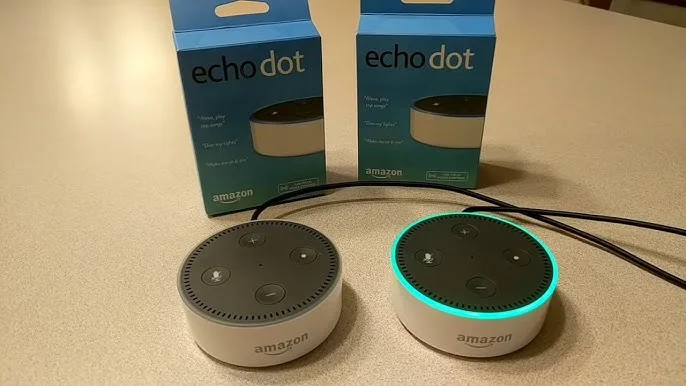
Amazon Echo Dot Alexa
Key Highlights
- Voice control with Alexa.
- Smart home hub.
- Music & podcasts (Spotify, Amazon Music, and more)
- Alarms, reminders, routines.
- Wi-Fi + Bluetooth.
- Echo Dot with Clock.
Features of Amazon Echo Dot
- Voice Assistant (Alexa): When you say “Alexa…”, the Echo Dot can: answer questions (weather, news, trivia), set timers, alarms, reminders, and calendar events. create shopping or to-do lists. Handle basic math and conversions.
- Audio Playback: Amazon Echo Dot streams music from services like Amazon Music, Spotify, and Apple Music. It can play podcasts, audiobooks, and radio stations. Sound quality is surprisingly good for its size, though not as rich as larger speakers.
- Smart Home Integration: Echo Dot can control smart devices — lights, plugs, thermostats, cameras, fans, blinds, and more — simply by voice or routines through the Alexa app.
- Routine and Automation: You can set routines like: turn on lights when you say “Alexa, good morning,” and shut off devices at a specific time. Trigger scenes based on motion or temperature (in newer models).
- Bluetooth Connectivity: You can pair your phone or tablet via Bluetooth to play music through the Echo Dot or even use it to control playback.
- Sensors (in Newer Generations): Some of the latest Echo Dot models include temperature sensors and motion detection for automatic routines.
- Privacy Controls: You can mute the microphone physically, view and delete voice recordings, and manage privacy settings in the Alexa app.
Advantages of Amazon Echo Dot
- Affordable and Compact: Small footprint fits easily on desks, nightstands, or counters. One of the most budget-friendly smart speakers available.
- Strong Alexa Integration: Hands-free voice control for everyday tasks and information. Access to thousands of Alexa “skills” that add features like games, news briefings, quizzes, and more
- Smart Home Hub Functionality: Controls compatible lights, plugs, thermostats, and more with voice or routines.
- Decent Sound for Its Size: Audio is clear and well-balanced for casual listening (music, podcasts, news).
- Useful Everyday Assistant: Great for timers, reminders, alarms, weather, shopping lists — especially when your hands are busy.
Disadvantages of Amazon Echo Dot
No device is perfect. Here are common drawbacks reported by reviewers:
- Depends on the Internet: A stable Wi-Fi connection is required for most features; offline functionality is limited.
- Privacy Concerns: Always-listening microphones raise concerns about unintended recordings and data being sent to the cloud.
- Sound Limitations: Not as powerful as larger smart speakers or dedicated audio systems. Bass is limited, and audio may lack depth in big spaces.
- Voice Recognition Isn’t Perfect: Occasionally, Alexa mishears commands or fails to recognize accents or speech in noisy environments.
- No Battery Option: Must remain plugged into power — no portable use.
- 3.5mm Audio Jack Removed: Latest models no longer have a wired audio port, so external speakers must connect via Bluetooth only.
What Can the Echo Dot Actually Do?
- Voice Interaction: “Alexa, what’s the weather like today?”, “Alexa, set a timer for 15 minutes.”, “Alexa, remind me to take my medicine at 7pm”.
- Entertainment: “Alexa, play jazz music”, “Alexa, skip this track”, and “Alexa, volume 5”.
- Smart Home Control: “Alexa, turn off the lights”, “Alexa, set thermostat to 22 °C”, and “Alexa, lock the front door” (if compatible devices connected).
- Information & Updates: “Alexa, give me the news”, “Alexa, how tall is Mount Everest?”, and “Alexa, define ‘intelligence’”.
- Automation: Motion triggers (turn lights on when entering a room), Temperature triggers (adjust A/C automatically at certain temperatures).
- Setup & Ease of Use: Setting up the Echo Dot is straightforward: Plug in the device, download the Alexa app, and connect to Wi-Fi. Register the device with your Amazon account.
Most users can complete this in a few minutes, even without technical skills.
The Amazon Echo Dot is a versatile entry-level smart speaker that brings Alexa’s voice assistant into your home affordably and usefully. It’s especially strong for smart home control, reminders, simple queries, and casual audio playback. It is best for:
- Smart home beginners.
- Busy households.
- Anyone looking for hands-free voice interaction.
It is less ideal if you want:
- High-fidelity audio.
- Offline voice assistant use.
- Portable speaker functionality.
FAQ – about Amazon Echo Dot
What is Amazon Echo Dot used for?
The Amazon Echo Dot is a smart speaker with the Alexa voice assistant. It helps users play music, control smart home devices, set alarms and reminders, check the weather, ask questions, and manage daily tasks hands-free.
What can Amazon Echo Dot do?
Amazon Echo Dot can play music and podcasts, answer questions, control smart lights and plugs, set timers and reminders, create routines, provide news and weather updates, make announcements, and control compatible smart home devices using voice commands.
Does Amazon Echo Dot need Wi-Fi to work?
Yes, Amazon Echo Dot needs a Wi-Fi connection to work properly. Most features, including Alexa voice commands, music streaming, smart home control, and updates, require an active internet connection.
Can Amazon Echo Dot work without Alexa?
No, Amazon Echo Dot is designed to work with Alexa. Without Alexa and an internet connection, its features are very limited, and it cannot perform smart assistant functions.
Is Amazon Echo Dot worth buying in 2026?
Yes, the Amazon Echo Dot is still worth buying in 2026 for users who want an affordable smart speaker for daily tasks, smart home control, music streaming, and voice assistance. It offers great value for its price, especially for beginners.
Can Amazon Echo Dot control smart home devices?
Yes, the Amazon Echo Dot can control compatible smart home devices, such as smart lights, plugs, TVs, thermostats, cameras, and locks, using voice commands or routines through the Alexa app.
Does Amazon Echo Dot listen to you all the time?
Amazon Echo Dot listens only for the wake word (like “Alexa”). It starts recording after hearing the wake word. Users can mute the microphone and manage or delete voice recordings in the Alexa app for privacy control.
Can Amazon Echo Dot play music from Spotify and Apple Music?
Yes, Amazon Echo Dot supports music streaming from Spotify, Apple Music, Amazon Music, and other supported services. You can link your accounts in the Alexa app.
Is Amazon Echo Dot good for kids or elderly people?
Yes, Amazon Echo Dot is suitable for kids and elderly users. It can set reminders, answer simple questions, play music, control lights, and help with daily routines using simple voice commands. Parental controls are also available.
What is the difference between Echo Dot and Echo?
The Echo Dot is smaller and cheaper with basic sound quality, while the regular Amazon Echo is larger, louder, and offers better audio performance. Both use Alexa and have similar smart features.
Does Amazon Echo Dot have a battery?
No, Amazon Echo Dot does not have a built-in battery. It must be plugged into a power outlet to work.
Can Amazon Echo Dot be used as a Bluetooth speaker?
Yes, Amazon Echo Dot can be used as a Bluetooth speaker. You can connect your phone or laptop to play audio wirelessly through it.
Echo Dot vs Google Nest Mini
The Amazon Echo Dot is a compact smart speaker powered by Alexa. It’s great for voice commands, reminders, alarms, and smart home control. Echo Dot integrates deeply with Amazon services and Alexa Skills, making it ideal for users who rely on Amazon Music, Audible, and smart plugs or lights that support Alexa.
Pros: Strong Alexa ecosystem, good smart-home routines, wide device compatibility.
Cons: Sound is okay but not premium; features depend heavily on Wi-Fi and Alexa skills.
Google Nest Mini is a small smart speaker powered by Google Assistant. It shines in answering questions, web searches, and controlling Google-compatible smart devices. It works seamlessly with YouTube Music, Google Calendar, and Chromecast, which is perfect for users in the Google ecosystem.
Pros: Smarter web answers, strong Google services integration, and clear voice recognition.
Cons: Fewer third-party skills than Alexa; limited hardware features.
Echo Dot vs Google Nest Mini – Which is Better?
Both speakers offer similar core features like music playback, smart home control, and voice assistance. Echo Dot is better if you’re invested in Amazon services and Alexa routines, while Google Nest Mini is better for search accuracy and Google apps. Sound quality is similar for casual listening, so your ecosystem preference is the real decider.
- Choose the Echo Dot if you want powerful smart-home routines and Alexa Skills.
- Choose Google Nest Mini if you want smarter answers, better Google integration, and Chromecast support.
You can follow Science Online on YouTube from this link: Science online
Google Nest Mini Review | Features, Pros, Cons and What It Can Do
iPods features, use, advantages, disadvantages, Why Are People Buying iPods Again?
Mobile dongle review, advantages, disadvantages and How does a dongle work?
What is a MiFi?, Portable Wi-Fi hotspot, Mi-Fi devices advantages & disadvantages
MiFi Devices or Mi-Fi hotspots importance, Difference between Mi-Fi & Wi-Fi
Network Routers importance, types & uses