Android Go Review (2026): Powerful Performance, Features, Limitations, Android Go vs Android One
Android Go is Google’s lightweight version of Android, designed specifically for budget smartphones with limited RAM and storage. It delivers smooth everyday performance, improved battery life, and optimized Google apps while using fewer system resources. With features like faster app launching, reduced data consumption, and efficient memory management, Android Go provides a reliable and user-friendly experience for browsing, messaging, streaming, and other daily tasks on affordable devices.
Android Go vs Android One
Android Go
Android Go is Google’s optimized version of Android, designed specifically for entry-level smartphones with limited RAM and storage. It delivers a smoother experience by using lightweight apps, faster boot times, and reduced background resource consumption.
Android Go includes optimized versions of popular Google apps such as Gmail Go, Maps Go, and Gallery Go, allowing users to enjoy essential smartphone features without sacrificing performance. For users looking for an affordable device with reliable everyday functionality, Android Go remains an excellent choice in 2026.
Android Go plays a vital role in making smartphones more accessible and affordable for millions of users around the world. Designed for entry-level devices with limited RAM and storage, it delivers a smooth and reliable Android experience through optimized performance, lightweight Google apps, and efficient storage management.
Android Go also receives essential security updates and supports modern Android features, allowing users to stay connected, learn online, use social media, navigate with maps, and access digital services without needing expensive hardware. By extending the usability of budget smartphones, Android Go helps bridge the digital divide and provides an efficient mobile experience for students, first-time smartphone users, and anyone seeking a dependable low-cost device.
Android Go review
Android Go is Google’s lightweight version of Android, specifically designed for entry-level smartphones with limited RAM and storage. It provides a smooth user experience on affordable devices by optimizing system resources, reducing app sizes, and improving battery efficiency. If you’re looking for a budget-friendly smartphone, Android Go Edition can deliver reliable everyday performance for calling, messaging, browsing, and social media without requiring expensive hardware.
Unlike the standard Android operating system, Android Go includes optimized Google apps such as Gmail Go, Maps Go, Gallery Go, and Files by Google, making it ideal for users who need essential smartphone features while consuming less storage and mobile data.
What is Android Go?
Android Go (also called Android Go Edition) is a lightweight operating system developed by Google for smartphones with:
- 2 GB RAM or less (older versions).
- Up to 4 GB RAM for recent Go editions.
- Limited internal storage.
- Budget processors.
It was introduced to help manufacturers build affordable smartphones that remain fast and responsive.
The operating system includes:
- Smaller system size.
- Faster app launching.
- Better RAM management.
- Lower data usage.
- Longer battery life.
Android Go Features
- Lightweight Operating System: Android Go occupies significantly less storage than the standard Android version, leaving more space for apps, photos, and videos.
- Optimized Memory Management: The system automatically limits background processes to reduce lag on low-end hardware.
- Faster App Performance: Go Edition apps are optimized to launch faster while using less RAM.
- Better Battery Efficiency: Since fewer background services run continuously, Android Go devices generally offer longer battery life.
- Built-in Data Saver: Android Go helps reduce mobile data consumption through Google’s Data Saver feature.
- Security Updates: Recent Android Go versions receive many of the same security protections found in standard Android.
Android Go Performance Review
Performance is where Android Go truly shines for budget smartphones.
Everyday Usage
For common tasks such as:
- WhatsApp.
- Facebook Lite.
- YouTube Go alternatives.
- Web browsing.
- Email.
- Google Maps Go.
Android Go performs surprisingly well.
Apps open quickly, and basic multitasking feels smooth when compared to older entry-level Android devices.
Gaming Performance
Android Go is not designed for heavy gaming. Simple games perform well, including:
- Subway Surfers.
- Candy Crush.
- Chess.
- Puzzle games.
However, demanding games like:
- PUBG Mobile.
- Call of Duty Mobile.
- Genshin Impact.
May experience reduced graphics, lower frame rates, or may not run well at all.
Multitasking
Multitasking is limited because of smaller RAM capacity. Opening too many applications simultaneously may cause apps to reload. For light users, this usually isn’t a major issue.
Camera Performance
Camera quality depends on the phone manufacturer rather than Android Go itself. However, image processing tends to be simpler than flagship Android phones due to less powerful processors.
Android Go Apps
Google offers lightweight versions of many applications.
Popular Android Go apps include:
- Gmail Go.
- Maps Go.
- Gallery Go.
- Assistant Go (older devices).
- Files by Google.
- Google Go.
- Camera Go.
Many Lite applications from third-party developers also work exceptionally well.
Android Go Limitations
- Although Android Go is excellent for budget phones, it does have some limitations.
- Limited Multitasking: Running many apps simultaneously may reduce performance.
- Reduced Gaming Capability: Heavy games often struggle due to limited hardware.
- Fewer Premium Features: Some advanced Android features found on flagship devices may be unavailable.
- Limited Storage: Many Android Go phones include only 32 GB or 64 GB of storage.
- Camera Processing: Advanced computational photography features are often missing.
Android Go Edition 16
Android Go Edition 16 is expected to continue Google’s focus on:
- Better AI optimization.
- Improved battery management.
- Enhanced privacy controls.
- Faster app launching.
- Improved security.
- Better support for budget hardware.
Manufacturers continue adopting newer Go versions for affordable smartphones worldwide.
Android Go 15
Android Go 15 introduces further optimizations that improve responsiveness while supporting modern Android security standards.
Notable improvements include:
- Better memory handling.
- Faster startup times.
- Improved accessibility.
- Enhanced privacy settings.
- More efficient background processing.
Android Go Phones
Popular Android Go smartphones include devices from brands such as:
- Nokia.
- Motorola.
- Xiaomi.
- Samsung.
- Tecno.
- Infinix.
- Lava.
- itel.
These devices mainly target first-time smartphone users and budget-conscious buyers.
Android Go Download
Android Go cannot simply be downloaded like a normal application. It is a customized operating system installed by smartphone manufacturers. Installing Android Go on unsupported devices usually requires custom ROMs, unlocked bootloaders, and technical knowledge.
Android Go APK
There is no official “Android Go APK.”
Instead, users can install many Go Edition apps individually from the Google Play Store, including:
- Gallery Go.
- Camera Go (supported devices).
- Google Go.
- Maps Go.
Android Go App Ecosystem
Android Go supports most Android applications available on Google Play.
However, lightweight apps generally perform much better, including:
Facebook Lite
Messenger Lite
Google Go
Gmail Go
TikTok Lite
Spotify Lite
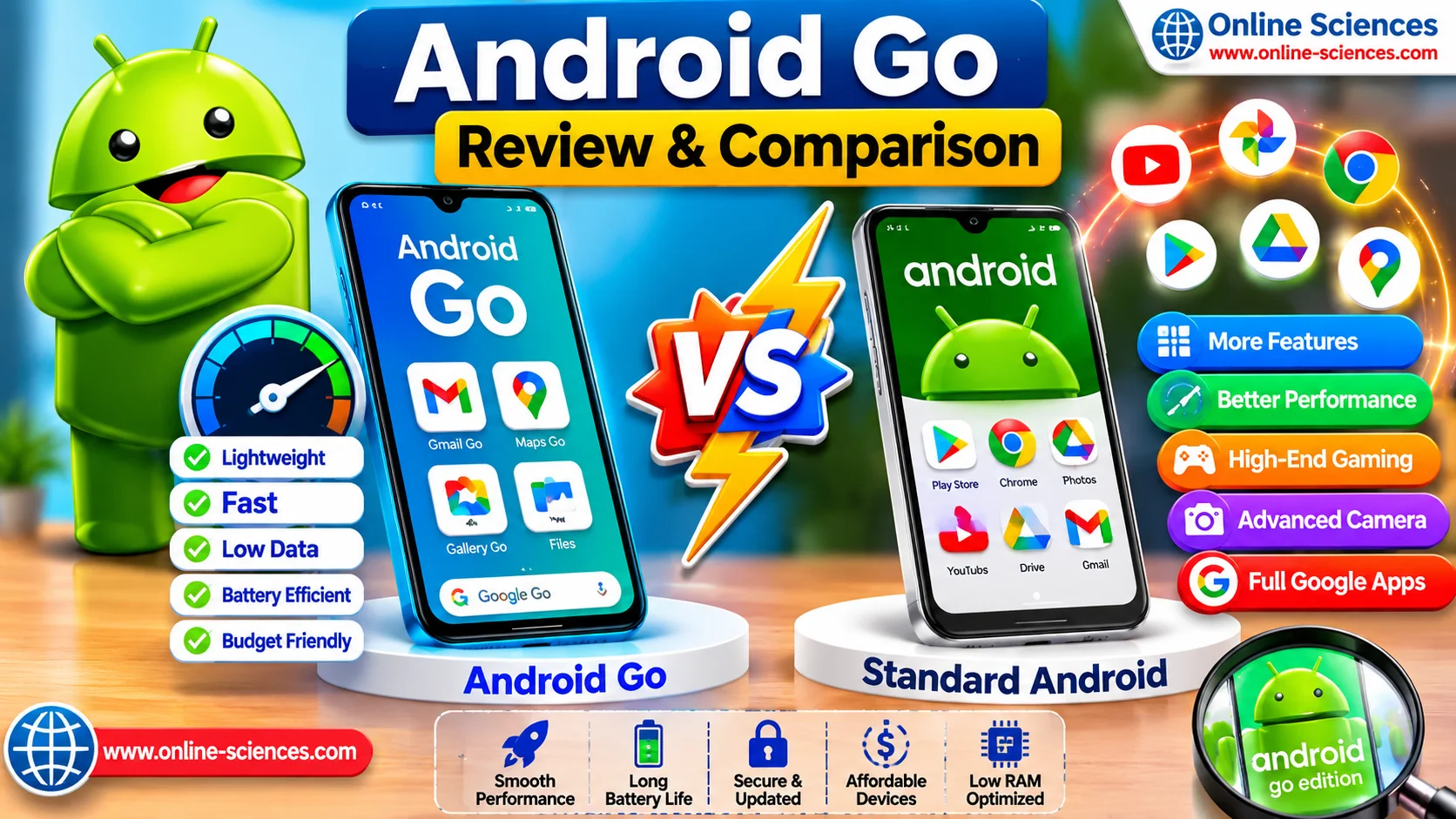
Android Go vs Android One
Android Go and Android One were both introduced by Google to improve the Android experience, but they target different types of smartphones and users. Android Go is a lightweight operating system designed for entry-level devices with limited RAM and storage. It includes optimized Go Edition apps that consume less memory, storage space, and mobile data, making it ideal for affordable smartphones and first-time Android users.
Android One, on the other hand, was created for mid-range smartphones that offer better hardware and a near-stock Android experience. It provided full-featured Android with guaranteed software updates and security patches directly from Google. While Android One delivered smoother multitasking, better performance, and access to all standard Google apps, the program has largely been phased out, with most manufacturers now focusing on standard Android or Android Go. If your priority is affordability and efficiency, Android Go is the better choice, whereas users seeking a richer Android experience on more capable hardware benefit from standard Android rather than Android One.
Android Go vs Standard Android
The biggest difference between Android Go and Standard Android lies in performance optimization and hardware requirements. Android Go is specifically built for budget smartphones with lower-end processors, limited RAM, and smaller storage capacities. It uses lightweight system components and optimized Google applications to deliver smooth everyday performance while minimizing battery and data usage.
Standard Android is designed for mid-range and flagship smartphones with more powerful processors, larger amounts of RAM, and greater storage capacity. It supports advanced multitasking, high-end gaming, AI-powered features, superior camera processing, and a full range of Android functionalities. While Android Go excels in speed and efficiency on entry-level devices, Standard Android offers a more feature-rich experience with better overall performance, making it the preferred choice for users who frequently multitask, play graphics-intensive games, or use demanding productivity and creative applications.
Is Android Go Edition Better Than Android?
It depends on your needs.
Android Go is better if you:
- Want a very affordable smartphone.
- Mainly use messaging and social media.
- Need long battery life.
- Have limited storage.
Standard Android is better if you:
- Play demanding games.
- Edit videos.
- Use professional apps.
- Need extensive multitasking.
- Want premium features.
What Devices Use Android Go?
Android Go is commonly found on:
- Entry-level Android smartphones.
- Budget phones under $150.
- Educational devices.
- First-time smartphones.
- Emerging market devices.
Brands including Samsung, Nokia, Motorola, Tecno, Infinix, Xiaomi, and itel have released Android Go models.
What is the Android Go Version?
Android Go Edition is Google’s optimized operating system for low-end smartphones. Each Go release corresponds to a standard Android version, including:
- Android 10 Go.
- Android 11 Go.
- Android 12 Go.
- Android 13 Go.
- Android 14 Go.
- Android 15 Go.
- Android Go Edition 16.
Each version introduces improved speed, security, and battery optimization while remaining lightweight.
Is Android Go OK?
Yes. Android Go is an excellent option for users who:
- Make calls.
- Browse the internet.
- Use WhatsApp.
- Watch YouTube.
- Check email.
- Use social media.
- Need reliable battery life.
However, power users may prefer a standard Android device with stronger hardware.
Advantages of Android Go
- Fast, on-budget hardware.
- Excellent battery life.
- Lower storage usage.
- Reduced mobile data consumption.
- Optimized Google apps.
- Affordable smartphones.
- Improved security.
- Easy to use.
Disadvantages of Android Go
- Limited multitasking.
- Not suitable for heavy gaming.
- Fewer premium features.
- Lower camera processing capabilities.
- Limited hardware compatibility.
Frequently Asked Questions (FAQ) about Android Go
1. Is Android Go Edition better than Android?
Android Go is better for low-cost smartphones with limited hardware, while standard Android provides a richer experience on more powerful devices.
2. What devices use Android Go?
Many affordable smartphones from Nokia, Samsung, Motorola, Tecno, Infinix, Xiaomi, Lava, and itel use Android Go Edition.
3. What is the Android Go version?
Android Go is Google’s lightweight Android operating system designed for entry-level devices, with versions aligned to major Android releases such as Android 15 Go and Android Go Edition 16.
4. Is Android Go OK?
Yes. It delivers reliable performance for everyday tasks like messaging, web browsing, email, navigation, and streaming on budget smartphones.
5. Can Android Go run normal Android apps?
Yes. Most Android apps work on Android Go, although lightweight versions generally provide better performance.
6. Can I install Android Go on my phone?
Not officially. Android Go is pre-installed by manufacturers, and installing it on unsupported devices usually requires custom ROMs and advanced technical steps.
7. Is Android Go good for gaming?
It is suitable for casual games but not for graphics-intensive titles that require powerful hardware.
You can subscribe to Science Online on YouTube from this link: Science Online
Android 16 features, advantages and disadvantages, Why Android 16 Matters
The advantages and disadvantages of Android mobile phones
Android Oreo (Go Edition) review, features, advantages & disadvantages
Android 15 advantages, disadvantages, Will Android 15 have AI? and Which phone has Android 15?
Android 14 review, features, advantages and disadvantages
Android 13 features, advantages, privacy, and Android 13 vs Android 12
Android 12 review, features, advantages and disadvantages
Google Android 8 Oreo review, features, advantages and disadvantages
Android 9 Pie review, features, advantages, and disadvantages