MobBob Review 2026: 10 Amazing Features, Specs, Performance & DIY Guide
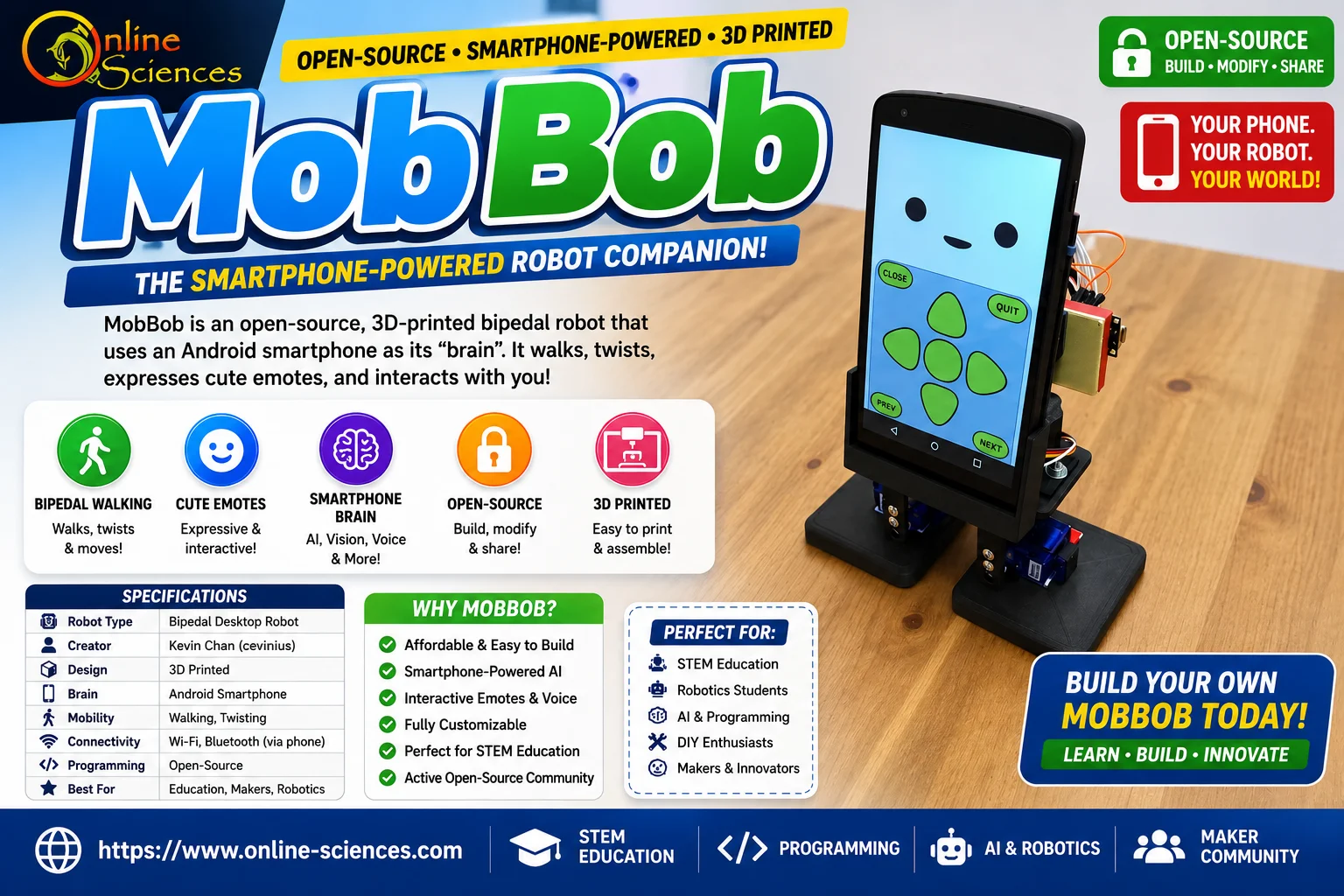
MobBob is an innovative open-source desktop robot that combines affordable hardware, 3D printing, and smartphone computing into a fun and customizable companion. Unlike expensive humanoid robots, MobBob uses an Android smartphone as its processing unit, making it capable of walking, expressing emotions, recognizing users, and interacting with the environment while remaining budget-friendly for makers, students, and robotics enthusiasts.
MobBob
What is MobBob?
MobBob is a compact 3D-printed bipedal robot developed by Kevin Chan (cevinius). Rather than including an expensive onboard computer, the robot mounts a smartphone that handles:
- Artificial intelligence.
- Computer vision.
- Speech recognition.
- Motion planning.
- User interaction.
This clever design dramatically lowers the cost while allowing users to upgrade the robot simply by replacing the smartphone. As an open-source project, users can freely download its design files, modify the hardware, improve the software, and contribute to future development.
MobBob Specifications
- Robot Type: Open-source desktop humanoid robot.
- Creator: Kevin Chan (cevinius).
- Design: Fully 3D Printed.
- Mobility: Bipedal walking.
- Processing: Android Smartphone.
- AI Features: Computer vision, speech recognition.
- Connectivity: Wi-Fi, Bluetooth (through smartphone).
- Programming: Open-source.
- Expansion: Highly customizable.
- Primary Purpose: Education, research, and desktop companion.
MobBob Design
One of MobBob’s strongest features is its adorable appearance. The robot is intentionally designed to look friendly rather than industrial.
Highlights include:
- Rounded body.
- Compact desktop size.
- Animated smartphone face.
- Smooth walking motion.
- Cute body gestures.
- Lightweight construction.
Since nearly every structural component is 3D printed, users can personalize:
- Colors.
- Body shell.
- Accessories.
- Height.
- Decorative parts.
This makes every MobBob unique.
Smartphone-Powered Intelligence
Instead of relying on expensive processors like the Raspberry Pi or NVIDIA Jetson, MobBob simply uses an Android smartphone.
The smartphone provides:
- Powerful CPU.
- GPU acceleration.
- Camera.
- Microphone.
- Speakers.
- Touchscreen.
- Wireless networking.
This significantly reduces both cost and development complexity. As smartphone hardware improves each year, MobBob naturally becomes more capable without requiring redesigns.
Walking Performance
MobBob features true bipedal locomotion, allowing it to:
- Walk forward.
- Walk backward.
- Turn left.
- Turn right.
- Twist its body.
- Perform simple dance moves.
- Balance during movement.
Although it isn’t designed for rough terrain, it performs well on smooth indoor surfaces such as desks and wooden floors.
AI Features
Using the attached smartphone, MobBob can perform several intelligent tasks.
- Face Detection: The robot can identify human faces using the smartphone camera.
- Voice Interaction: Users can issue voice commands.
- Speech Output: MobBob responds using natural speech.
- Computer Vision: The robot can detect objects using AI models.
- Interactive Emotions: MobBob displays animated eyes and expressions on the smartphone screen.
- Motion Control: The robot synchronizes body movement with emotional expressions.
Open-Source Advantages
One of MobBob’s biggest strengths is its open-source philosophy.
Developers can:
- Modify CAD files.
- Improve firmware.
- Build custom accessories.
- Create new animations.
- Add AI features.
- Share upgrades with the community.
This makes MobBob an excellent robotics learning platform.
Educational Benefits
MobBob is ideal for:
- STEM education.
- Robotics classes.
- AI programming.
- Computer vision projects.
- University research.
- DIY robotics clubs.
Students gain hands-on experience in:
- Electronics.
- Servo control.
- Mechanical design.
- Artificial intelligence.
- Mobile programming.
- Robotics engineering.
- Customization Options.
Since almost every part is customizable, builders can upgrade MobBob in many ways.
Examples include:
- Better servos.
- Larger battery.
- Improved feet.
- LED lighting.
- Extra sensors.
- Custom body shells.
- Personalized animations.
- New AI models.
Battery Life
Battery life depends on:
- Smartphone model.
- Servo activity.
- Screen brightness.
- AI workload.
Typical usage provides several hours of interactive operation before recharging.
Ease of Assembly
MobBob is designed for hobbyists with access to a 3D printer.
Assembly generally involves:
- Printing all components.
- Installing servos.
- Connecting electronics.
- Mounting the smartphone.
- Uploading software.
- Calibrating walking.
The open-source documentation helps simplify the building process.
Performance Review
MobBob delivers impressive performance considering its low cost.
Strengths
- Affordable design.
- Smartphone-powered AI.
- Open-source.
- Easy to customize.
- Lightweight.
- Cute personality.
- Educational value.
- Active maker community.
Weaknesses
- Requires 3D printing.
- Limited payload capacity.
- Indoor use only.
- Walking speed is modest.
- Battery life varies by smartphone.
Overall Rating: ★★★★☆ (4.7/5).
MobBob vs Competitors
MobBob vs Unitree G1
- MobBob: Low-cost DIY robot powered by an Android smartphone, ideal for education and makers.
- Unitree G1: Commercial humanoid with advanced mobility, sensors, and industrial-grade performance, but significantly more expensive.
MobBob vs Tesla Optimus
- MobBob: Open-source, desktop-sized, highly customizable, and designed for learning robotics.
- Tesla Optimus: Full-size humanoid aimed at factories and household automation with advanced AI and manipulation capabilities.
MobBob vs Boston Dynamics Atlas
- MobBob: Lightweight, affordable, and built for hobbyists and students.
- Atlas: Enterprise-grade humanoid with exceptional agility, balance, and industrial applications, but far beyond the budget of most enthusiasts.
MobBob vs Agility Robotics Digit
- MobBob: Best for STEM education, programming practice, and desktop interaction.
- Digit: Designed for warehouse logistics, package handling, and commercial automation.
MobBob vs UBTECH Walker
- MobBob: Fully open-source with downloadable designs and extensive hardware customization.
- UBTECH Walker: Proprietary humanoid robot intended for research, education, and commercial demonstrations.
MobBob vs Typical DIY Robots
- MobBob features true bipedal walking instead of wheels or tracks.
- Uses a smartphone as the AI brain, eliminating the need for an expensive onboard computer.
- Offers expressive animations, voice interaction, and computer vision.
- Easier to upgrade by simply replacing the smartphone.
- Strong community support thanks to its open-source design.
Why MobBob Stands Out
- Open-source hardware and software.
- Affordable 3D-printed construction.
- Smartphone-powered AI and computer vision.
- Cute desktop companion with expressive emotes.
- Excellent platform for STEM education and robotics learning.
- Highly customizable for makers and developers.
- Lower cost than commercial humanoid robots while still offering interactive AI features.
Who Should Buy MobBob?
MobBob is perfect for:
- Robotics beginners.
- STEM educators.
- AI developers.
- Makers.
- Engineering students.
- DIY enthusiasts.
- Open-source contributors.
- Desktop robot collectors.
It may not be suitable for users seeking industrial-grade robotics or heavy-duty automation.
Why MobBob Stands Out
Unlike many DIY robots that require costly embedded computers, MobBob leverages the processing power already available in modern smartphones. This approach lowers costs, simplifies upgrades, and enables advanced AI features without specialized hardware. Combined with its expressive design and open-source ecosystem, MobBob offers a unique balance of affordability, creativity, and educational value.
Future of MobBob
As smartphone processors become faster and AI models more efficient, MobBob has the potential to support:
- More natural conversations.
- Better object recognition.
- Autonomous navigation.
- Gesture recognition.
- Smarter emotional interactions.
- Integration with smart home devices.
- Multi-robot collaboration.
Its open-source nature ensures the community can continue expanding its capabilities.
Frequently Asked Questions (FAQs) about MobBob
1. What is MobBob?
MobBob is an open-source, 3D-printed bipedal desktop robot that uses an Android smartphone as its main processor for AI, vision, and interaction.
2. Who created MobBob?
MobBob was created by Kevin Chan (cevinius) as an open-source robotics project.
3. Is MobBob open source?
Yes. The design files, software, and documentation are available for the community to build, modify, and improve.
4. Does MobBob require a smartphone?
Yes. An attached Android smartphone serves as the robot‘s primary computing platform.
5. Can beginners build MobBob?
Yes. Builders with basic 3D printing and electronics experience can assemble it by following the project documentation.
6. Can MobBob recognize faces?
Yes. Using the smartphone camera and AI software, MobBob can detect and recognize faces.
7. Is MobBob suitable for education?
Absolutely. It is widely suited for STEM learning, robotics education, AI experimentation, and engineering projects.
8. Can I customize MobBob?
Yes. Since it is open source and 3D printed, you can customize its appearance, hardware, and software extensively.
9. Does MobBob support voice interaction?
Yes. It can process voice commands and respond using speech generated through the smartphone.
10. Is MobBob worth building?
For robotics enthusiasts, students, and makers, MobBob offers an excellent combination of affordability, customization, and AI-powered interaction.
Conclusion
MobBob demonstrates how creative engineering can make robotics more accessible. By combining a fully 3D-printed body with the power of a modern smartphone, it delivers interactive AI features, expressive movements, and educational value at a fraction of the cost of traditional humanoid robots. Whether you’re a student, hobbyist, or developer, MobBob is an exciting platform for learning, experimentation, and building your own intelligent desktop companion.
You can follow Science online on YouTube from this link: Science online
Romo – The Smartphone Robot, What Can Romo Robot Do?
Miko Robot Features, importance, and drawbacks, Miko 2 vs Miko 3
Miko review, types, features advantages and disadvantages
Miko 2 vs Miko 3, Difference between Miko 2 and Miko 3
Loona robot review, advantages, disadvantages and what can Loona do?
Sophia robot review, features, use, advantages and disadvantages
Educational robotics, Robot teachers, Social robots review, features advantages & drawbacks
Humanoid robots use, risks, advantages and disadvantages