Mobile Wi-Fi Hotspot features, types, uses and advantages
A mobile hotspot is a portable device or smartphone feature that offers Internet access on many devices, such as a laptop, a smartphone, an MP3 player, a tablet, or a portable gaming device. It is also known as a Mobile Wi-Fi hotspot, a Wi-Fi hotspot, and portable hotspot.
Mobile Hotspot
Mobile hotspot function is the same as that of USB modems. It depends on the mobile broadband service from the cellular provider to provide 3G or 4G Internet access. They allow multiple devices to connect at the same time, and they connect any Wi-Fi-enabled device within about 30 feet.
Public Wi-Fi provides you with internet access seemingly anywhere. It is convenient, but many take for granted, Internet connections over a public network can cause many security leaks, from people obtaining sensitive information to others reading your Facebook conversations, while it may have some perks.
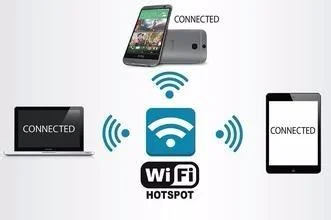
Wi-Fi-style hotspots or Mobile Wi-Fi hotspots enable users to connect multiple PCs, iPads, iPhones, and other mobile devices to the Internet. Mobile hotspots are easier to operate than USB sticks, and they do not require any special software.
The latest smartphones with mobile hotspot capabilities can connect without requiring a tether. Late model smartphones tether to laptops with Bluetooth or USB cables. Smartphones do not connect at speeds as fast as Wi-Fi hotspots. Mobile hotspots are best suited to a single laptop. You should load specific drivers & connection software onto your PC with the USB stick.
Wi-Fi Hotspot
Benefits of Mobile Hotspots
Mobile hotspots are present anywhere, providing Internet access. They are critical for anyone who travels or who needs to have constant access to the Internet with multiple devices. They allow web surfers to work at faster speeds than their home connections, thanks to nationwide LTE networks.
Mobile hotspots can connect more than laptops to the Internet. Tablets such as iPads and Google Nexus are compatible with mobile hotspots. The mobile hotspot gives you Wi-Fi on-the-go. As long as your smartphone has a cellular signal, you can offer Wi-Fi for the other devices.
Most users can use the mobile hotspot to have a dedicated connection for their devices. Mobile hotspots eliminate the worry of conducting business or personal work over an unsecured public Wi-Fi connection, and they have faster connection speeds than public Wi-Fi.
Mobile hotspots help you avoid using all of the phone’s data plan and spare your phone’s battery. Reliably tethering to multiple devices, working for longer periods of time without dropping a connection, you can use your phone while your Wi-Fi mobile hotspot keeps you online.
You can access the internet from a variety of different locations, so if you need to catch up with your emails, for example, you can. You do not need to buy secondary devices ( like an iPad with built-in 3G or 4G ) when you can get a Wi-Fi only version and connect it to your smartphone’s mobile hotspot.
The mobile hotspot refers to the ability of some smartphones to broadcast a Wi-Fi signal which the other devices can connect to, A lot of mobile hotspots allow for multiple connections, usually 5 or 10 of them, You can play anywhere your phone has good signal coverage, The quality of internet is as good as cabled internet and you no longer have to deal with dial up internet.
Wi-Fi hotspots types
Selling Wi-Fi
Selling a Wi-Fi business model is the oldest model. The user has to pay (credits or vouchers) to connect to the Wi-Fi hotspot; Wi-Fi brings revenue to the hotspot owner. It can be used in airports, business centers, conference venues & public venues.
But there is no easy access to the Wi-Fi for the users, and no data capture. This is likely the worst solution if your clients expect to have free and ubiquitous Wi-Fi connectivity because they could refuse to pay for the Wi-Fi.
Freemium Wi-Fi
Freemium Wi-Fi presents free internet in exchange for the user data, which is the most important asset for the provider & for the company that offers Wi-Fi. As soon as you register for the captive portal on its Wi-Fi-enabled device, you can use the Wi-Fi network for free for a limited time.
The company that presents free Wi-Fi can show its logo, product advertisements, and promotions on the splash page. It uses the collected information for marketing and sales campaigns. Freemium Wi-Fi is used in retail shops, shopping malls & public venues.
But some applications, such as Skype or Google Drive, eat up the bandwidth. We suggest setting up the general and individual bandwidth limit, and to black-list clients or banning devices if needed.
Advertisement-based Wi-Fi
In an ad-based Wi-Fi business model, the provider makes money thanks to advertising seen by the users. It is easy-to-access Wi-Fi, which the users like, Free service to the customers, and the revenues from advertising. Advertisement-based Wi-Fi is used in public venues, commercial venues, sports events, leisure venues, retail shops, and shopping malls.
But the splash page has to generate a high number of impressions and clicks in order to interest the advertisers and generate revenue for the provider. Selling ads and managing the advertisers is a time-consuming activity.
Social Wi-Fi
The social Wi-Fi business model is the most advanced business model. Almost everybody has a social media account, so the easiest access for users to Wi-Fi is the Facebook Login, or the Twitter Login, but other social login systems are available as well, such as Instagram, LinkedIn, Google+…
In Social Wi-Fi, Free Wi-Fi connectivity is given in exchange for a Facebook Like, a Facebook post, a Tweet, or a check-in. Whatever the goal is, the hotspot owner can set up the action that the user is asked to do before connecting.
Social Wi-Fi is a free service for the customers. It offers data capture, it is easy-to-access Wi-Fi, it can be used in every public or commercial venue, client monitoring and abuse control are available as well Advertisements on the splash page.
You can subscribe to Science Online on YouTube from this link: Science Online
What is a MiFi?, Portable Wi-Fi hotspot, Mi-Fi devices advantages & disadvantages
Wi-Fi health dangers and the radiation health effects of routers at home