1st Browser features, uses, advantages and disadvantages
Millions of people use the web browser for research, online shopping, communication and entertainment, It is the software used to access World Wide Web, However, many may not know about the options available for web browsers, They stick to Internet Explorer as it comes pre-installed with Windows, Up-to-date web browsers can fetch you with enhanced and simplified browsing experience.
1st Browser features
1st Browser is a free-to-use browser for Windows OS, It is a Potentially Unwanted Program, or PUP, which is custom built using the open source Google Chromium browser, It is designed to show ads and earn revenue by using Ask Search and it is bundled with the other free programs that you download from the Internet.
When it is installed, It will modify Windows so that it becomes the default program when opening up HTML files or web sites on your computer, 1st Browser bundles Search App by Ask extension so that your searches will go through Ask.com, It can keep track of your browsing habits and adapts with easy access to most visited websites, preferences etc, You can share the websites and the photos.
1st Browser is created to generate revenue for the developers by modifying the open-source Google Chromium. The program will look identical to Chrome, except for the name and icon. It offers safe surfing with antivirus and malware protection, but you should use Chrome so that you benefit from the latest security updates from Google.
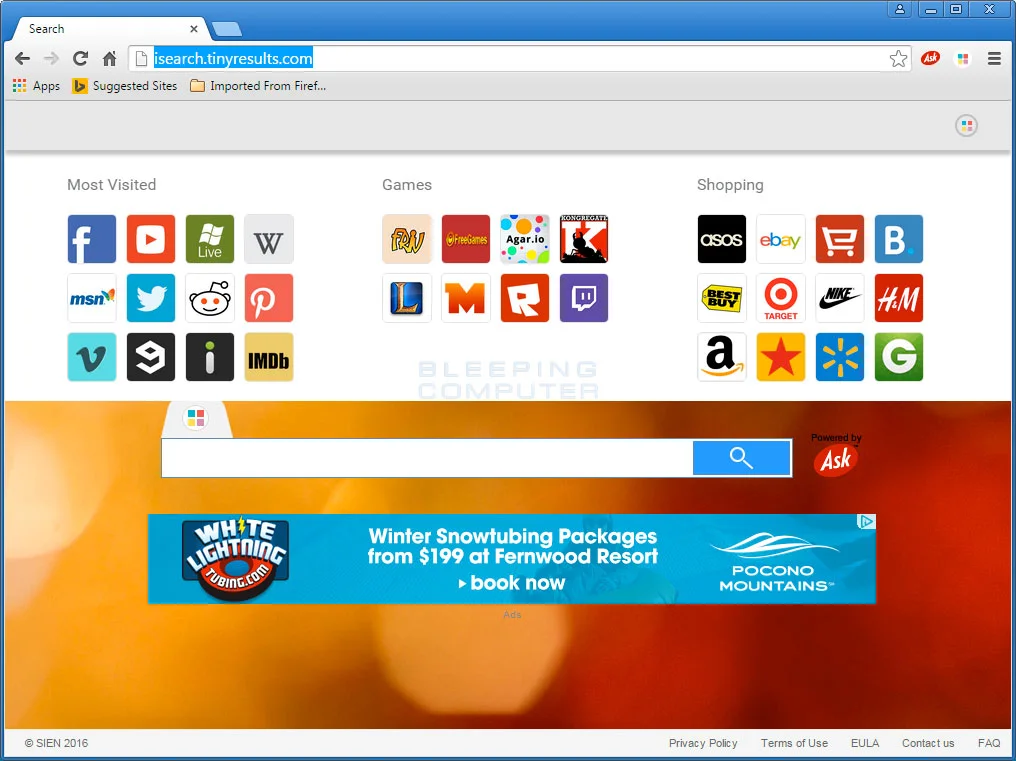
1st browser 1
1st Browser is an interactive browser, It boasts high features adapted for a modern browsing experience. It contains a special sidebar to access all your social network websites quickly to be up to date with notifications etc, You can enjoy many smileys, stickers, and emoticons when chatting with your friends online.
1st Browser has many icons and colorful designs for you to choose from, It is a fully customizable browser, You can surf the web safely without interruptions and risks, You can enjoy easy and quick access to your most visited websites, The program allows smart and modern online shopping tools that can be shared as well, It can receive notifications for price drops and special coupons.
1st Browser is not harmful or malicious to your computer, but you should pay close attention to license agreements and installation screens when installing anything from the Internet, 1st Browser is installed by free programs which you download from the Internet, which do not adequately disclose that the other software would be installed along with it.
When the installation screen gives you Custom or Advanced installation options, So, You have to select these as they will disclose what the other 3rd party software will be installed, If the license agreement or installation screens state that they are going to install the toolbar or the other unwanted adware, So, You should cancel the install and you should not use the free software.
System Requirements
1st Browser needs 2200 MHz central processing unit, It needs 512 Mb RAM or more, It needs 334 Mb free hard disk space, 32 Bit or 64 Bit hardware architecture (x86 or x64), The operating system is Windows XP, Windows Vista, Windows 7, Windows 8 and it needs Internet connection (online installation).
1st Browser disadvantages
1st Browser is the standard extension, although it differs from the other add-ons since it penetrates into the system. So, it is tricky to eliminate it. This type of adware is installed secretly; you will hardly find any signals that you may set up 3rd party apps and browser add-ons.
Most of these signals are barely readable on the set-up dialogues, So, The PC user sets up required computer software, but at the same time on the background, advertising-supported software or adware can be installed, When you open the web browser, you can see many advertisements and popups that you do not want to have.
1st Browser slows down the system, because adware has to connect with the server to obtain information on which classifieds and popups to show, and new registry keys appear, which may complicate the eradication process.
1st Browser can generate its registry keys, and it writes its code directly into registry entries. So, it is difficult to easily remove it. It is possible, but this process requires much time. But when the adware is removed from the browser, it resolves the problem immediately.
1st Browser has closed source code, it comes with no portable version. Some anti-viruses may report it as a malware file, It is unoriginal; this is a clone software. You will find many reasons why 1st Browser threatens your desktop and, thus, exactly why it must be removed.
1st Browser is a bad dream for newcomers. With this particular extension installed on your PC, you will have a completely different web browser homepage. So, when you fire up your web browser, you are rerouted to some weird web pages.
1st Browser can distort online search, which badly influences the user’s surfing experience. The system and web browser operation happen to be impacted; 1st Browser will worsen the performance of your system. All additional toolbars and processes eat additional resources, so you will notice that the PC is incredibly slow.
With this particular extension installed in your PC, you will have corrupt registry files, Many keys tend to be impacted, So, it is extremely hard to remove them, You will have risk of other malware installation, There are odds that various other malicious applications might be set up, when you will be unaware, So, 1stBrowser may access confidential information.
How to remove 1st Browser adware
1st Browser is one of the internet browser’s add-ons that you do not wish to install. Many users have faced difficulties with undesirable add-ons that demonstrate the programs, download computer files as well as malicious software.
1st Browser is a type of extension that is installed in all popular web browsers presently, such as Chrome, Firefox, and Internet Explorer, It can display ads in the boxes. It can’t be called a virus, although it is an undesirable browser extension that should be taken off the laptop.
Computer users don’t wish to watch all those ads, pop-ups as well as the other information, these pop-ups can be unsafe, When you want to get rid of 1stBrowser by hand, It takes much time, you can get rid of the extension from the web browser and delete registry keys, but you can damage registry entries and thus the operating system will not work.
There are no guarantees of finding all of the spots infected by the advertising-supported software. So, you’ll still have an issue, having adware on the laptop is a risk, because a lot of fraudsters as well as hackers, could take advantage of it.
To remove 1st Browser, use Rkill to terminate suspicious programs. Use Malwarebytes Anti-Malware to Scan for Malware and Unwanted Programs, You have to use AdwCleaner to remove adware from the computer. Use HitmanPro to scan your computer for malware and run Secunia PSI to find outdated and vulnerable programs.
Spyhunter successfully copes with the malware and advertising-supported software, It was produced by the people who have expertise with an advertising-supported a software removal, It ensures eradication of 1st Browser from internet browser or registry, So, you’ll remove it from all locations, This particular computer software is easy to use for folks with no superior IT knowledge.
You can find the best practices to shield your PC against downloading and installing 1st Browser, You should not download computer software coming from strange web-sites, while searching for software, many of us visit distrustful websites, You are not certain that you install the right software, you download and install a couple of applications, malicious programs and add-ons.
When you assume that a specific internet site could be risky, leave it. The anti-virus program may help. Don’t be in a hurry while installing computer software; just by clicking on it, you agree to download and install a lot of unwanted applications and extensions.
You can follow Science Online on YouTube from this link: Science online