MBot Robot Review: Definition, Features, Advantages, Disadvantages & What MBot Can Do
MBot is an educational programmable robot kit developed by Makeblock, designed to help beginners—especially students—learn coding, robotics, and basic electronics through hands-on activities using sensors, motors, and visual programming tools.
What is MBot?
MBot is an educational STEM robot kit developed by Makeblock, designed to help beginners—especially students and educators—learn programming, robotics, and electronics in a fun, hands-on way. It is widely used in schools, coding clubs, and robotics competitions because it is easy to assemble, affordable, and compatible with visual programming platforms.
MBot is a programmable educational robot kit that teaches coding, robotics, and problem-solving through hands-on learning using sensors, motors, and visual programming tools.
MBot is particularly suitable for:
- Beginners in robotics.
- Primary and middle school students.
- Introductory coding and STEM education.
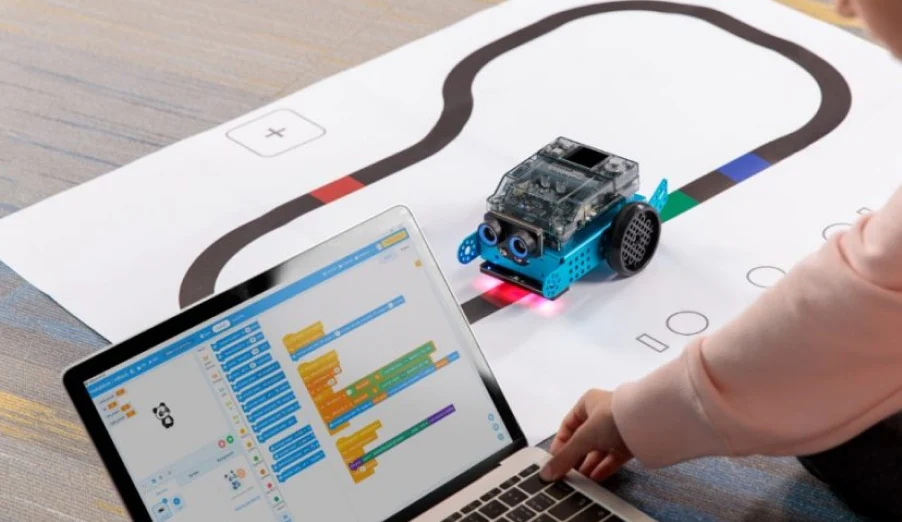
MBot Robot
Features of MBot
MBot combines simplicity with powerful learning features:
- Easy Assembly: MBot can be assembled in 10–15 minutes. No soldering required. Plug-and-play electronic components.
- Programmable: MBot supports Scratch-based programming (mBlock). It also supports Arduino C for advanced users. It works on Windows, macOS, and tablets.
- Multiple Sensors: Ultrasonic sensor (distance measurement), Line-following sensor, Light sensor, and an Infrared receiver.
- Wireless Control: MBot can be controlled via computer, tablet, or smartphone. via Bluetooth or 2.4G wireless modules.
- Modular Design: MBot can be expanded with additional Makeblock modules. It encourages creativity and experimentation.
What Can MBot Do?
MBot can perform a wide range of educational robotics tasks, including:
- Line Following: MBot follows black or colored lines on the ground. It teaches logic, conditionals, and sensor feedback.
- Obstacle Avoidance: MBot uses an ultrasonic sensor to detect objects. It automatically changes direction to avoid collisions.
- Remote Control: MBot is controlled via mobile apps or a computer. It helps students understand wireless communication.
- Interactive Light & Sound: MBot uses RGB LEDs and a buzzer. It creates visual and audio feedback for programs.
- Basic AI & Logic Learning: MBot introduces decision-making concepts. It uses “if/else” logic and loops.
- Robotics Competitions: MBot is commonly used in beginner robotics contests, and it is ideal for school STEM challenges.
Advantages of MBot
- MBot has many strengths that make it popular worldwide:
- Beginner-Friendly: MBot is an ideal first robot for kids and beginners. Visual programming makes learning easy.
- Strong Educational Value: MBot teaches coding, electronics, and problem-solving. It encourages logical thinking and creativity.
- Affordable: MBot offers a lower cost compared to advanced robots. It has great value for schools and institutions.
- Durable & Safe: MBot is made with child-safe materials and features a strong metal body design.
- Large Learning Community: Extensive tutorials and lesson plans, an active global user community.
Disadvantages of MBot
Despite its strengths, MBot has some limitations:
- Limited Advanced Capabilities: MBot is not suitable for complex AI or humanoid tasks, and it has limited processing power.
- Basic Design: MBot is not intended for social interaction, and it has a simple appearance compared to humanoid robots.
- Requires External Device: MBot needs a computer or tablet for programming, and it is not fully standalone.
- Limited for Older Students: Advanced learners may outgrow it quickly.
MBot vs Advanced Educational Robots
MBot focuses on foundational learning, unlike advanced robots that emphasize AI, vision, or social interaction. It is best viewed as a starting point, not a replacement for high-end research or humanoid robots.
Who Should Use MBot?
MBot is perfect for:
- Schools and STEM programs.
- Coding beginners.
- Children aged 8–14.
- Teachers introducing robotics concepts.
- Parents encouraging STEM learning at home.
Is MBot Worth It?
Yes—especially for beginners.
MBot is one of the best entry-level educational robots available today. It balances affordability, ease of use, and strong educational value. While it may not satisfy advanced robotics needs, it excels at what it was designed for: teaching the fundamentals of robotics and programming in an engaging way.
- Best for: Beginners and STEM education.
- Strengths: Easy, affordable, educational.
- Limitations: Not for advanced AI or research.
You can follow Science online on YouTube from this link: Science online
Miko Robot Features, importance, and drawbacks, Miko 2 vs Miko 3
Miko review, types, features advantages and disadvantages
Miko 2 vs Miko 3, Difference between Miko 2 and Miko 3
Loona robot review, advantages, disadvantages and what can Loona do?
Sophia robot review, features, use, advantages and disadvantages
Educational robotics, Robot teachers, Social robots review, features advantages & drawbacks
Humanoid robots use, risks, advantages and disadvantages