iPhone-compatible Robot review, features, advantages and disadvantages
An iPhone-compatible Robot is a robotic device that can connect to, be controlled by, or programmed through an iPhone using dedicated apps, Bluetooth, Wi-Fi, or Apple ecosystem integrations. iPhone-compatible robots are user-friendly, versatile, and educational, but they can be costly, battery-hungry, and limited by their dependency on the Apple ecosystem.
iPhone-Compatible Robots
iPhone-Compatible Robots are robots designed to work seamlessly with iOS devices, allowing users to control, customize, or program them through iPhone applications. They may serve various purposes, including education, entertainment, personal assistance, smart home management, or security.
iPhone-compatible robots can be remote-controlled, coded, customized, and integrated into daily life for education, entertainment, and smart home tasks.
Characteristics
iPhone-compatible Robots are controlled via iPhone apps instead of standalone controllers. They use Bluetooth, Wi-Fi, or cloud services for communication. They may integrate with Apple features (Siri Shortcuts, HomeKit, ARKit). They offer firmware updates and customizations through iPhone apps. They range from toys and educational bots (Sphero, Cozmo) to home robots (Roomba, Eufy) and AI companions (Vector, Emo).
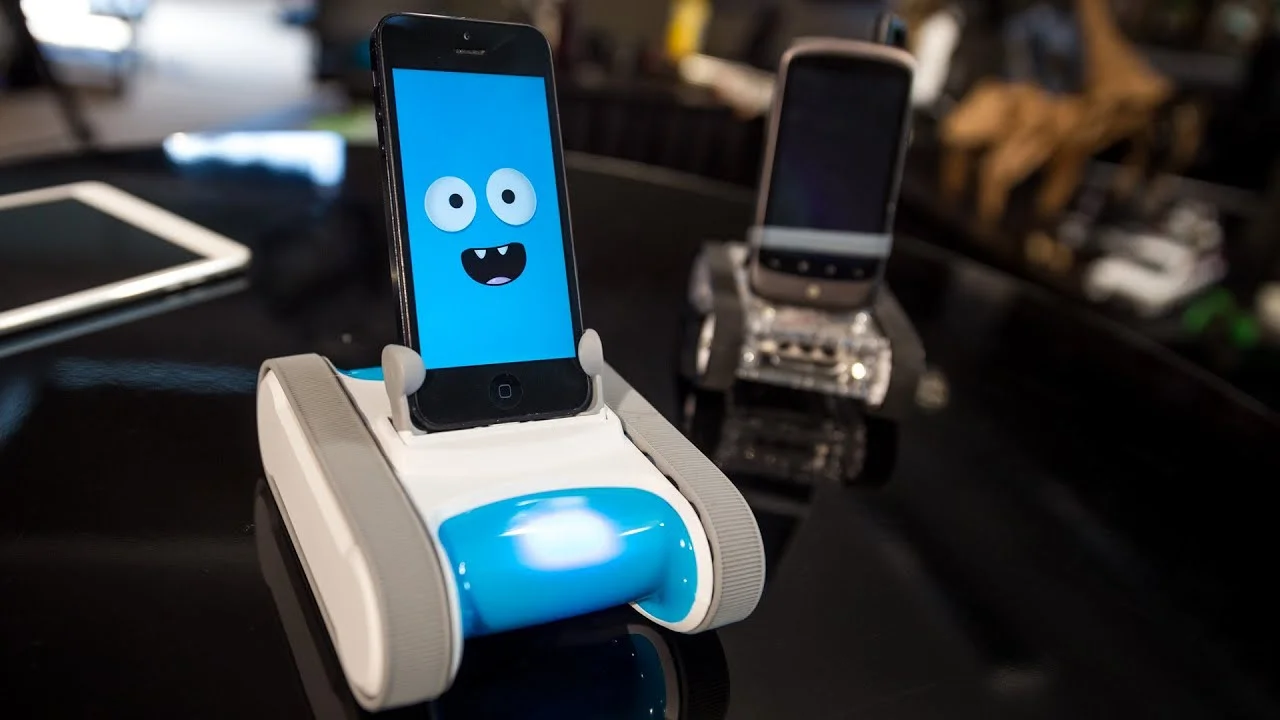
iPhone-compatible Robots
What can iPhone-Compatible Robots do?
- Remote Control: iPhone-compatible Robots use iPhone apps as a joystick, touchscreen, or motion controller. Some allow gesture control via the phone’s sensors (tilt, swipe).
- Voice Integration: iPhone-compatible Robots work with Siri Shortcuts for hands-free commands. Smart robots may connect with Apple HomeKit for automation.
- Live Camera Streaming: Security and exploration robots stream real-time video to iPhones. Some enable remote navigation and two-way communication.
- Learning & Coding: Educational robots (like Sphero, mBot, DJI RoboMaster) allow coding in Swift, Python, or block coding (Scratch-like) via iPhone apps. Gamified lessons make STEM learning interactive.
- Entertainment & Play: Companion robots (Cozmo, Vector, Emo) can play games, show emotions, and respond to iPhone app interactions. Some robots use iPhone ARKit to blend physical robots with virtual elements.
- Smart Home Assistance: Cleaning robots (Roomba, Eufy) can be controlled and scheduled from iPhone apps. Notifications and real-time alerts (including cleaning progress and security updates) are sent directly to your iPhone.
- Customization: iPhone-compatible Robots change robot behaviors, voices, movements, or LED displays through iPhone apps. Some allow advanced programming for unique personalities.
- Collaboration with iPhone Features: Robots can use location services for navigation tasks. Pair with iPhone’s AR, camera, and sensors for interactive experiences.
Examples of iPhone-Compatible Robot Actions
- Sphero BOLT & SPRK+ → Educational rolling robots controlled and coded via iPhone. They roll, race, and code custom paths.
- Anki Vector / Cozmo → Companion robots with AI and iPhone app control. They respond to commands, recognize people, and send app notifications.
- Robosen Transformers → Auto-transforming robot controlled via iPhone app.
- DJI RoboMaster S1 → Educational battle robot with camera streaming to iPhone. They drive, battle, and stream video to iPhones.
- Eufy / iRobot Roomba → Home robots that sync with iPhone apps for cleaning schedules and remote control. They can start cleaning, map floors, and schedule via the iPhone app.
Features of iPhone-Compatible Robots
- iPhone-compatible robots usually feature app control, coding education, entertainment, AR, and smart integration, making them versatile for learning, play, and daily tasks.
- App Control: Robots can be paired with an iPhone via Bluetooth or Wi-Fi. Dedicated apps allow control, customization, and updates. Some offer motion joysticks, gesture control, or AR interfaces.
- Voice Integration: iPhone-compatible robots support Siri Shortcuts for hands-free commands. Some also integrate with Apple HomeKit or Apple Music for smart home or entertainment tasks.
- Camera & Sensors: Robots often stream live video directly to an iPhone screen. iPhone apps provide remote navigation, obstacle detection, and sometimes AR overlays.
- Educational Features: Coding robots (like Sphero, Cozmo, or mBot) come with iPhone apps that teach block coding (Scratch-style) or real programming (Swift, Python, JavaScript). Many have gamified lessons accessible from the phone.
- Entertainment Features: Companion robots (e.g., Anki Vector, Emo, or AI pets) interact through iPhone apps for customization, updates, and play modes. Remote-control robots (like Robosen Transformers or drone-style robots) can be controlled directly from the iPhone’s touch screen.
- Smart Home & IoT Integration: Some robots sync with iPhone Home apps to act as mobile assistants (cleaning robots, security bots, robotic companions). Push notifications and live status reports are sent directly to iPhones.
- Augmented Reality (AR) Features: Certain robots combine with the iPhone’s ARKit, projecting games, path-planning, or interactive experiences.
- Updates & Cloud Features: Firmware and feature updates are delivered via iPhone apps. Cloud accounts enable data sync across multiple Apple devices.
iPhone-Compatible Robots Advantages
- Easy App Control: Seamless pairing with iPhone apps (Bluetooth/Wi-Fi). Intuitive touch, voice, or gesture-based control.
- Integration with Apple Ecosystem: Some support Siri, HomeKit, and iCloud, making them part of the Apple smart ecosystem. Notifications and real-time status updates appear directly on iPhones.
- Portability & Convenience: No need for extra controllers—your iPhone acts as the remote. You can control your robot from anywhere (if cloud features are enabled).
- Educational Value: Coding and STEM robots (like Sphero or mBot) work well with iPhone apps. Kids and beginners can learn block coding or Swift-based programming.
- Entertainment & Engagement: Robots can combine AR with iPhone features. Companion robots become more customizable via apps.
- Regular Updates: Firmware and software updates delivered through the iPhone app keep robots up to date.
Disadvantages of iPhone-compatible robots
- iOS Dependency: Features may only work fully with iPhones, limiting Android compatibility. Some robots are locked into Apple’s ecosystem.
- Battery Drain: Continuous Bluetooth/Wi-Fi use drains the iPhone battery. Some robots themselves have short operating times.
- Connectivity Issues: Bluetooth range is limited. Wi-Fi robots can lag or disconnect if the network is weak.
- Cost Factor: iPhone-compatible robots are often premium-priced. Accessories and replacement parts can also be expensive.
- Learning Curve for Beginners: Advanced robots may require time to understand coding or complex app interfaces.
- Privacy Concerns: Robots with cameras/microphones stream data to iPhone apps (sometimes via cloud). This raises potential security risks if not encrypted.
You can follow science online on YouTube from this link: Science online
Vector robot review, advantages, disadvantages and specifications
Emo robot review, advantages, disadvantages, features and What can Emo do?
Ameca robot review, features, advantages, disadvantages and What can Ameca Do?
Eilik Desktop Companion Robot structure, features, use, advantages and disadvantages
Humanoid robots use, types, risks, advantages and disadvantages
Sophia robot review, features, use, advantages and disadvantages
Tesla robots (Optimus) review, use, advantages and disadvantages