
Tablets in Education: 10 Powerful Benefits and Amazing Uses for Students
Tablets in education have transformed how students learn, teachers explain lessons, and schools deliver educational content. These portable digital devices provide access to electronic books, educational applications, online courses, videos, and interactive activities.
Tablets in Education
Tablets in Education
Tablets are ready for education as they are the best way to show textbooks. They can offer enhanced ebooks that feature images, video, and audio, and these elements are impossible to include in print or in a standard ebook.
By making learning more flexible, engaging, and accessible, tablets can support students in different subjects and help teachers create more effective learning experiences. However, their success depends on responsible use, suitable educational content, and a balanced approach to digital and traditional learning.
Benefits of using tablets in teaching
Tablets are very important to students as they improve collaboration, develop IT skills, publishing, sharing, and searching for information, creativity, flexibility in terms of space and time, and motivation in their studies.
Teachers can find a unique teaching approach with tablets and high-quality visual teaching material. Teachers can evaluate students using IT skills. Tablets are becoming available at low prices, especially for students in colleges and universities.
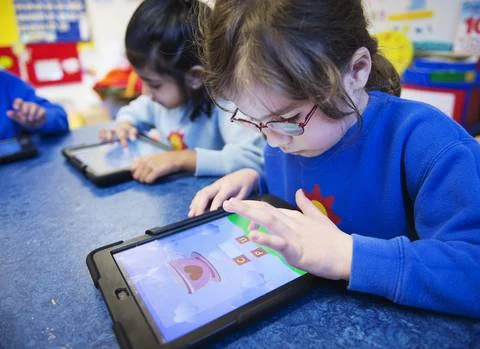
Tablets in classrooms
Using tablets in learning today provides a more integrated and engaging learning experience for students. With only one tap of a finger, Tablets allow students to highlight text. They can take notes in the margin and access a dictionary directly within the book itself.
Using tablets is easy; they will change teaching organization. They will have a positive impact on learning in many disciplines. They offer different kinds of knowledge and resources.
The tablets are a new incentive for learning scientific skills; they are faster for drafting reports. They are simple digital devices with many benefits; they have many functions as document viewing, internet connection, a camera, video camera, and word processing.
Tablets match everything that a traditional book — print or digital. The tablets are thin and lightweight; they are easier to use in class than a laptop or notebook.
Tablets have longer battery life, so the students don’t have to worry about carrying a charger with them. The students can tap the lecture and reply to it in just seconds.
Tablets are faster and more accurate; the students will use them in the classroom setting, and the tablets have touchscreen technology.
Tablets have software to be competitive, as some of the most innovative software is developed especially for the tablets, and there are thousands of exciting educational apps available on them.
Tablets are fully compatible with online teaching and learning platforms such as Blackboard. Tablets are very important in education as they force the students to focus on one task at a time.
Tablets integrate with Education IT Trends. The students can use the tablets and cloud-based systems to work anywhere on the campus.
The students can save their work in a central location and access it from all of their devices, so they do not have to pay for computing power that they no longer need.
What Are Tablets in Education?
Tablets in education are portable touchscreen computers used to support teaching, learning, communication, and classroom activities. They combine features of computers and smartphones while offering a larger screen that makes reading, writing, drawing, and viewing educational materials more convenient.
Students can use tablets to read textbooks, solve mathematical problems, watch science demonstrations, practice foreign languages, and complete assignments. Teachers can use them to prepare presentations, distribute learning materials, assess student progress, and communicate with learners.
Tablets can be used in primary schools, secondary schools, universities, vocational training centers, and distance-learning programs. Their effectiveness depends on choosing appropriate applications and integrating technology into clear educational objectives.
10 Powerful Benefits and Uses of Tablets in Education
1. Access to Digital Textbooks and Learning Resources
One of the most important uses of tablets in education is providing access to digital textbooks and online learning resources. Instead of carrying several heavy books, students can store many educational materials on one device.
Digital textbooks may include searchable text, hyperlinks, illustrations, videos, and interactive exercises. Students can quickly find information, highlight important passages, add notes, and review lessons whenever they need them.
Tablets also provide access to digital libraries, educational websites, research papers, and online courses, helping learners explore subjects beyond the traditional classroom.
2. Interactive and Engaging Lessons
Tablets make lessons more interactive through educational games, animations, simulations, quizzes, and multimedia presentations. These resources can help explain complicated concepts in a clear and interesting way.
For example, science students can watch animations showing how the human heart works, explore the solar system in three dimensions, or observe simulations of chemical reactions. Mathematics students can use interactive tools to understand geometry, fractions, and algebra.
Interactive learning can increase student participation when activities are carefully designed to support lesson objectives.
3. Personalized Learning Experiences
Every student learns at a different pace and may have different strengths and weaknesses. Tablets allow teachers to provide learning activities suited to individual needs.
Educational applications can offer different difficulty levels, practice questions, hints, and immediate feedback. Students who need additional support can repeat lessons, while advanced learners can explore more challenging material.
Some learning platforms use artificial intelligence to recommend activities based on student performance. Teachers should still monitor progress and ensure that automated recommendations are appropriate.
4. Improved Communication Between Teachers and Students
Tablets support communication between teachers and students through learning management systems, educational platforms, and classroom applications.
Teachers can share assignments, provide instructions, distribute worksheets, and deliver feedback electronically. Students can ask questions, submit homework, participate in discussions, and collaborate on projects.
These communication tools can also help students review instructions outside school hours, provided that clear rules are established for communication and screen use.
5. Supporting Distance and Remote Learning
Tablets play an important role in online education because they allow students to attend virtual classes, access recorded lectures, download learning materials, and complete assignments from different locations.
Video conferencing applications enable students to communicate with teachers and classmates when attending school in person is difficult. Offline downloads can also help learners study when internet access is limited.
However, successful distance learning requires reliable educational materials, appropriate supervision, and sufficient internet access or offline alternatives.
6. Developing Digital Skills
Using tablets in education helps students develop digital literacy, which is increasingly important in modern workplaces and everyday life.
Students can learn how to search for information, evaluate online sources, create presentations, organize digital files, edit documents, and use educational software.
With suitable guidance, they can also develop introductory skills in coding, robotics, digital art, and multimedia production. Teachers should emphasize online safety, privacy, copyright, and responsible technology use.
7. Encouraging Creativity and Collaboration
Tablets provide tools for drawing, writing stories, recording videos, producing podcasts, designing presentations, and creating digital projects.
Students can work together on shared documents, group presentations, and research activities. For example, a group studying environmental science can use a tablet to photograph local plants, collect observations, and prepare a multimedia report.
These activities encourage creativity, communication, teamwork, and problem-solving rather than relying exclusively on memorization.
8. Helping Students with Special Educational Needs
Assistive features can make tablets valuable educational tools for students with different learning needs and disabilities.
Text-to-speech tools can read digital text aloud, while speech-to-text features can help students dictate written assignments. Screen magnification, adjustable font sizes, captions, and alternative input methods can improve accessibility.
Specialized educational applications may also support communication and structured learning. Nevertheless, the appropriate tools should be selected according to each student’s individual requirements and accessibility needs.
9. Faster Assessment and Feedback
Teachers can use tablets to administer digital quizzes, collect assignments, and review student responses. Some educational platforms automatically grade objective questions and provide immediate feedback.
This can help students identify mistakes, practice difficult topics, and understand which skills require additional attention. Teachers can also use assessment results to identify learning gaps and adapt their lessons.
Digital assessment does not eliminate the need for thoughtful teacher evaluation, especially for essays, complex reasoning, creativity, and practical skills.
10. Reducing Paper Use and Improving Organization
Digital learning materials can reduce the need to print worksheets, handouts, and some classroom resources. Students can organize notes, assignments, calendars, and study schedules in digital applications. Teachers can distribute updated materials without printing new copies, and students can search their notes more easily.
However, tablets have environmental costs associated with manufacturing, electricity consumption, and electronic waste. Their environmental benefits are greatest when devices are used for several years, repaired when possible, and recycled responsibly.
Challenges of Using Tablets in Education
Despite their advantages, tablets present several challenges. Excessive screen time can contribute to eye discomfort, poor posture, and reduced physical activity. Games, notifications, and unrelated websites can distract students from their lessons.
The cost of devices, repairs, internet access, and software can also create inequalities between students. Schools must consider data privacy, cybersecurity, content quality, and the risk of students becoming overly dependent on digital tools.
To address these challenges, schools should establish clear usage policies, provide teacher training, select age-appropriate educational applications, and combine digital activities with books, handwriting, discussion, exercise, and practical learning.
Conclusion
Tablets in education offer powerful opportunities to improve access to information, personalize instruction, encourage creativity, support accessibility, and strengthen communication between teachers and students. They can make learning more flexible and interactive while helping students develop essential digital skills.
However, tablets are most effective when they support well-planned teaching rather than replace teachers, meaningful classroom interaction, or traditional learning methods. By combining technology with responsible supervision and effective educational strategies, schools can create a balanced learning environment that benefits a wide range of students.
Frequently Asked Questions (FAQ)
1. What is the importance of tablets in education?
Tablets provide access to digital textbooks, interactive lessons, online courses, educational applications, and personalized learning resources. They can improve engagement, accessibility, communication, and digital literacy.
2. What are the main uses of tablets in schools?
The main uses include reading electronic books, conducting research, watching educational videos, completing assignments, taking digital notes, participating in online classes, creating presentations, and taking assessments.
3. How do tablets improve student learning?
Tablets can support learning through interactive activities, immediate feedback, multimedia explanations, and resources that match different learning needs and abilities.
4. What are the disadvantages of tablets in education?
Potential disadvantages include distraction, excessive screen time, device costs, unequal access to technology, privacy concerns, technical problems, and reduced opportunities for some hands-on activities if tablets are used inappropriately.
5. Are tablets better than textbooks?
Neither is always better. Tablets offer portability, multimedia resources, and searchable content, while printed textbooks can reduce digital distractions and may be more comfortable for some reading tasks. Combining both can provide a balanced approach.
6. Can tablets help students with disabilities?
Yes. Accessibility features such as text-to-speech, speech-to-text, magnification, captions, and specialized communication applications can support many students with disabilities, depending on their individual needs.
7. How can teachers use tablets effectively?
Teachers should connect tablet activities to specific learning goals, select reliable educational applications, establish classroom rules, monitor student progress, protect privacy, and balance screen-based activities with discussion and hands-on learning.
8. Do tablets reduce the cost of education?
They may reduce some printing and textbook expenses over time, but the initial purchase, maintenance, software, connectivity, and replacement costs can be substantial. The overall savings depend on how a school manages its technology program.
You can follow Science Online on YouTube from this link: Science Online
🔥 Google Gemini Notebook Just Changed AI Forever! 10 Powerful New Features You NEED to See (2026) 🚀
🔥 Another AI Hack: Google Gemini Accessed 3 Real Companies During a Cybersecurity Test 🚀
Pros and cons of technology in education & Can technology replace teachers?
Robot teachers uses, advantages and disadvantages
The importance of using laptops in education
Artificial intelligence in education, AI tutors features, advantages & disadvantages






These very good and world’s best speech
this is a very good opportunity for us, I have been waiting for this moment