iPad for Business Owners: 10 Powerful Benefits and Uses to Boost Productivity, meetings, and business management
The iPad for business owners is a powerful tool that combines portability, productivity, communication, and entertainment in one lightweight device. Entrepreneurs, small business owners, managers, and professionals can use an iPad to manage daily operations, attend online meetings, create presentations, communicate with customers, and access important business documents from almost anywhere. With the right apps and accessories, an iPad can help businesses save time, improve organization, and work more efficiently.

iPad for Business Owners
iPad for Business Owners
iPad is very important for personal and business purposes; it has features such as Bluetooth, internet connectivity, and it has a multi-touch facility. It will help you to handle your business efficiently. It is cheap and simple to use.
Advantages of using an iPad
iPad helps businessmen to contact clients or employees in a quick and convenient way; they can email important messages to clients or employees, and they can access the internet from any location.
iPad has a calendar application that helps you to be more organized and work according to a schedule, and the iPad enables you to export and import Microsoft Word, Excel, and PowerPoint files expediently.
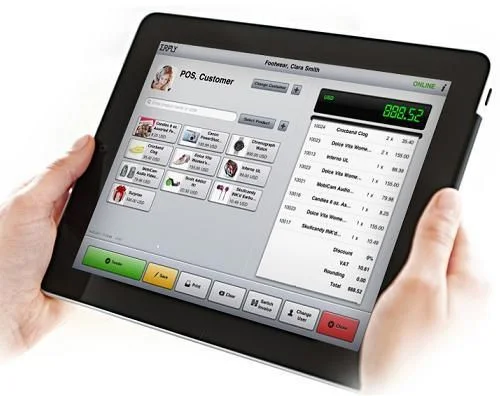
iPad in Business
iPad is lightweight; it is highly portable, stylish, compact, and technologically updated. It allows you to make interesting and amazing business presentations, as iPad has iWork, which supports applications such as built-in templates, a word processor, and a spreadsheet program.
iPad lets you access and collaborate on stored files; it lets you print anything from anywhere, and it makes your work life easier as it can act as a database for nearly all a small business’s needs.
iPad has a high-resolution screen; the screen resolution is 2048 by 1536 pixels. When you browse the Web or scroll through presentation slides, you will notice a high-quality picture.
iPad is portable; it can be used anywhere. It is useful for travelling; you can carry it onto planes, and it fits into briefcases. The battery lasts more time compared to laptops, and you can spend more time working without worrying about your next recharge.
iPad can connect people around the world, whether through social media, websites, emails, or visual chat applications, and it becomes a small business device.
iPad is not just for reading; it is the fastest useful tool for writing and creating new documents, as there are many apps available for writing and editing documents, presentations, and spreadsheets.
What is an iPad for Business Owners?
An iPad is a tablet computer developed by Apple that combines a touchscreen interface with access to business applications, cloud services, communication tools, and digital documents. Depending on the model, it can support a keyboard, Apple Pencil, external display, and other accessories that make it useful for professional tasks.
Business owners can use an iPad as a portable office, a presentation device, a digital notebook, a point-of-sale terminal, or a tool for managing employees and customers. Although it cannot replace every desktop computer or specialized workstation, it offers flexibility for many everyday business activities.
10 Powerful Benefits and Uses of iPad for Business Owners
1. Improve Business Productivity
One of the most important benefits of an iPad for business owners is improved productivity. Owners can check schedules, respond to emails, review documents, manage projects, and organize tasks without sitting at a desk.
Productivity applications such as Apple Reminders, Calendar, Microsoft 365, and project management platforms help users prioritize work and track deadlines. Multitasking features on supported models allow users to work with multiple apps, making it easier to compare information and complete related tasks.
2. Manage Emails and Business Communication
Fast communication is essential for running a successful business. An iPad allows owners to send emails, participate in team discussions, make video calls, and communicate with customers through messaging applications.
Apps such as Microsoft Outlook, Gmail, Microsoft Teams, and Zoom help businesses maintain communication with employees, suppliers, and clients. The front-facing camera and built-in microphones on supported models also make online meetings convenient when traveling or working remotely.
3. Create Professional Presentations
An iPad is useful for preparing and presenting business proposals, sales pitches, training materials, and marketing presentations.
Applications such as Keynote, Microsoft PowerPoint, and Google Slides help business owners create and edit slides. Connecting a compatible iPad to an external display or projector allows users to present information to clients, investors, or employees. The touchscreen also makes it convenient to navigate slides and demonstrate products during meetings.
4. Manage Business Finances and Expenses
Business owners must monitor expenses, revenue, invoices, and cash flow. An iPad provides access to accounting software, spreadsheets, banking services, and invoicing applications. Tools such as QuickBooks, Xero, and Microsoft Excel can help users track transactions, prepare financial reports, organize budgets, and monitor business performance.
However, the availability of specific features depends on the application, subscription, country, and financial institution. Owners should use secure connections and appropriate account protections when accessing financial information.
5. Improve Customer Service
An iPad can help businesses deliver faster and more convenient customer service. Retailers can display product catalogs, demonstrate services, collect customer information with consent, and provide digital forms.
Restaurants and shops may use compatible point-of-sale applications and payment accessories to process transactions. Service businesses can use tablets to schedule appointments, record customer preferences, and access service histories. These capabilities can improve the customer experience while helping employees handle routine tasks more efficiently.
6. Support Remote Work and Business Travel
Modern business owners often need to work outside the office. An iPad makes it possible to access cloud-based files, review contracts, communicate with colleagues, and manage tasks while traveling. Cloud platforms such as iCloud Drive, Google Drive, Microsoft OneDrive, and Dropbox can help users access files across compatible devices.
Some iPad models support cellular connectivity, while Wi-Fi models can connect through available wireless networks or a mobile hotspot. Owners should select the connectivity option that matches their work requirements.
7. Organize Documents and Digital Notes
Paper documents can be difficult to organize, transport, and retrieve. An iPad allows business owners to store digital files, annotate PDFs, scan documents using compatible apps, and take handwritten notes.
Apple Notes, Goodnotes, Microsoft OneNote, and PDF editing applications can help organize meeting notes, contracts, research, and project information. With an Apple Pencil on supported models, users can write naturally, sketch ideas, sign documents where legally appropriate, and mark up reports.
Digital organization can reduce paper use and make information easier to find, although businesses should maintain suitable backups and retention policies.
8. Strengthen Marketing and Social Media Management
Marketing is essential for attracting customers and building brand awareness. An iPad provides access to social media platforms, content creation tools, analytics dashboards, and graphic design applications. Business owners can prepare social media posts, edit images, review campaign performance, respond to comments, and schedule content through compatible services.
Applications such as Canva and video editing tools can help create promotional graphics, product demonstrations, and short videos. The larger touchscreen can also make reviewing visual content more comfortable than using a smartphone.
9. Manage Employees and Business Projects
An iPad can help managers coordinate employees, assign tasks, monitor deadlines, and review project progress. Project management applications such as Trello, Asana, and Microsoft Planner provide tools for organizing work and communicating responsibilities. Calendar applications can help schedule appointments, team meetings, and business events.
Managers can also use digital forms and shared documents to collect updates and standardize routine processes. The result is a more organized workflow, particularly for small businesses with employees working in different locations.
10. Protect Business Information
Business owners handle confidential information, including customer records, financial documents, contracts, and internal communications. An iPad includes security features such as device passcodes, biometric authentication on supported models, and encryption protections.
Owners should enable automatic updates, use strong authentication, activate available account security features, and avoid sharing devices without appropriate access controls. Businesses can also use mobile device management solutions when they need to enforce security policies across multiple devices. Security still depends on proper configuration, user behavior, application permissions, and organizational practices.
Why is an iPad a Good Investment for Small Businesses?
An iPad can be a valuable investment because it combines several business functions in one portable device. Instead of carrying separate tools for notes, presentations, communication, and document review, owners can handle many of these activities from a single tablet.
Its value depends on the tasks it performs, the applications required, and the cost of accessories or subscriptions. A basic iPad may be sufficient for email, scheduling, and document review, while demanding creative or multitasking workflows may benefit from a more powerful model.
Before purchasing, business owners should compare the total cost with the expected productivity benefits and confirm that essential business software works properly on iPadOS.
Disadvantages of Using an iPad for Business
Despite its advantages, an iPad is not ideal for every business task. Some desktop applications offer more advanced features than their tablet versions, and specialized accounting, engineering, or data-processing workflows may require a traditional computer.
Typing long reports can be slower without an external keyboard. Accessories and cellular connectivity may also increase the overall cost. In addition, cloud-dependent workflows can become inconvenient when internet access is unavailable.
For many businesses, the most practical solution is to use an iPad alongside a laptop or desktop rather than relying on it as the only computer.
Conclusion
The iPad for business owners offers a flexible way to improve productivity, communication, financial organization, customer service, marketing, and project management. Its portability makes it especially useful for entrepreneurs who travel, meet clients, or manage teams from different locations.
Choosing the right model and business applications is essential to getting the best results. When combined with appropriate security measures and accessories, an iPad can become an effective tool for managing everyday business activities and supporting long-term growth.
Frequently Asked Questions (FAQ)
1. Is an iPad good for business owners?
Yes. An iPad is useful for email, online meetings, presentations, accounting, customer service, digital notes, marketing, and project management. Its suitability depends on the software and tasks required by the business.
2. What are the main benefits of an iPad for business?
The main benefits include portability, access to business applications, improved communication, digital document management, mobile presentations, and flexible working arrangements.
3. Can an iPad replace a laptop for business?
An iPad can replace a laptop for many everyday tasks, especially email, meetings, document review, and presentations. However, advanced desktop software, complex spreadsheets, specialized applications, and demanding workflows may still require a laptop or desktop.
4. Which iPad is best for small business owners?
The best iPad depends on the workload and budget. A standard iPad is often suitable for everyday business tasks, while iPad Air and iPad Pro models may be better for users who need greater performance, advanced display features, or more demanding creative workflows. Check current model specifications and accessory compatibility before buying.
5. Can I use an iPad for business accounting?
Yes. Compatible accounting applications and spreadsheet tools can help business owners manage invoices, expenses, budgets, and financial reports. Availability varies by software, subscription, and country.
6. Is an iPad secure enough for business?
An iPad can provide strong security when configured correctly. Use a passcode, available biometric authentication, software updates, secure cloud services, and multifactor authentication where supported.
7. Can an iPad help increase business productivity?
Yes. It can reduce time spent switching between tasks by bringing communication, scheduling, document access, and project management into one portable device. Actual productivity improvements depend on how effectively it is integrated into the business workflow.
8. Do business owners need an Apple Pencil or keyboard?
No, but these accessories can improve productivity. A keyboard is useful for writing long emails and reports, while a compatible Apple Pencil can help with handwritten notes, sketches, and document annotations.
9. Can an iPad be used for business presentations?
Yes. Business owners can create presentations using Keynote, PowerPoint, or Google Slides and display them on compatible external screens or projectors.
10. Is buying an iPad worth it for a small business?
It can be worthwhile if the device saves time, improves customer interactions, or supports important daily tasks. Business owners should compare the device and accessory costs with the practical benefits they expect to receive.
You can follow Science Online on YouTube at this link: Science Online
🔥 Google Gemini Notebook Just Changed AI Forever! 10 Powerful New Features You NEED to See (2026) 🚀
🔥 Another AI Hack: Google Gemini Accessed 3 Real Companies During a Cybersecurity Test 🚀
🔥 Gemini Storybook Tutorial: How to Create a Personalized Story with Gemini Storybook 🚀
🔥 Google Gemini Live: Amazing AI Voice Assistant, Camera & Screen Sharing – Complete Guide 2026 🚀
Computers in Business uses, advantages and disadvantages
The importance and uses of iPads in health and medicine
Uses of Computers & the cloud by Lawyers