Should I Switch to Gemini Over Google Assistant? Complete Powerful Comparison Guide (2026)
Should I switch to Gemini over Google Assistant? This is one of the most common questions among Android users in 2026. Google has been gradually replacing Google Assistant with Gemini, its next-generation AI assistant designed to provide more natural conversations, advanced reasoning, content creation, and productivity tools.
Should I Switch to Gemini Over Google Assistant?
Should I Switch to Gemini Over Google Assistant?
While Google Assistant remains useful for basic voice commands and smart home controls, Gemini introduces a more intelligent and personalized AI experience. Understanding the differences between these two assistants can help you decide whether upgrading to Gemini is the right move for your daily tasks and productivity needs.
What is Google Gemini?
Gemini is Google’s advanced AI assistant powered by large language models. Unlike traditional voice assistants that mainly execute commands, Gemini can understand context, engage in detailed conversations, generate content, summarize information, answer complex questions, and assist with creative and professional tasks. Gemini integrates deeply with Android devices and Google services such as Gmail, Google Docs, Google Maps, YouTube, and Google Workspace.
What is Google Assistant?
Google Assistant is Google’s traditional voice assistant, focused on task execution. It excels at setting alarms, controlling smart home devices, checking weather forecasts, making calls, sending messages, and providing quick answers. Google Assistant relies heavily on predefined commands and is less capable of understanding complex requests or sustaining extended conversations than Gemini.
Why is Google replacing Google Assistant with Gemini?
Google’s long-term strategy is to create a more capable AI assistant that can:
- Understand natural language better.
- Handle complex multi-step tasks.
- Generate written content.
- Summarize emails and documents.
- Provide personalized recommendations.
- Assist with work and creativity.
- Learn user preferences over time.
Gemini represents the future of Google’s AI ecosystem and is expected to become the primary assistant across Android devices.
Advantages of Switching to Gemini
1. More Natural Conversations
Gemini understands complex language patterns and can maintain context throughout longer discussions. Instead of repeating commands, users can speak naturally and receive more accurate responses.
Example:
- Google Assistant: “Set an alarm for 7 AM.”
- Gemini: “Set an alarm for 7 AM tomorrow and remind me to review my meeting notes before breakfast.”
2. AI-Powered Writing Assistance
Gemini can generate: Emails, Articles, Reports, Social media posts, Product descriptions, and Study notes. This makes it especially valuable for students, professionals, marketers, and content creators.
3. Better Productivity
Gemini can: Summarize long emails, create task lists, analyze documents, organize information, and generate meeting summaries. These capabilities save significant time compared to traditional voice assistants.
4. Enhanced Integration with Google Apps
Gemini works seamlessly with Gmail, Google Docs, Google Sheets, Google Drive, Google Maps, and YouTube. Users can interact with multiple Google services through a single conversation.
5. Improved Learning and Research
Students can use Gemini to: Explain difficult concepts, generate study guides, create practice questions, summarize textbooks, and assist with homework. This transforms Gemini into a powerful educational assistant.
6. Creative Content Creation
Gemini can help create: Blog posts, Marketing content, Video scripts, Business plans, Presentation outlines, and Website content. Google Assistant lacks these advanced creative capabilities.
7. Advanced Reasoning and Problem Solving
Gemini can break down complex problems, compare alternatives, and provide detailed explanations, making it useful for decision-making and research tasks.
Reasons to Stay with Google Assistant
Despite Gemini’s advantages, some users may prefer Google Assistant because:
- Faster for Simple Commands: For quick tasks such as setting timers, turning on lights, playing music, and checking the weather. Google Assistant can sometimes feel more streamlined.
- Better Smart Home Experience: Many smart home users report that Google Assistant remains highly reliable for controlling connected devices.
- Familiar User Experience: Long-time Android users may prefer the interface and workflow they already know.
Who Should Switch to Gemini?
Gemini is ideal for:
Students:
- Research assistance.
- Study guides.
- Homework support.
- Learning new topics.
Professionals:
- Email drafting.
- Meeting summaries.
- Productivity improvements.
- Project planning.
Content Creators:
- Blog writing.
- Script creation.
- SEO content generation.
- Social media management.
Business Owners:
- Marketing ideas.
- Customer communication.
- Content strategy.
- Workflow automation.
Who Should Keep Google Assistant?
Google Assistant may still be suitable for:
- Users who only need voice commands.
- Smart home enthusiasts.
- People who rarely use AI writing tools.
- Users with older devices that may not fully support Gemini features.
Potential Drawbacks of Gemini
Before switching, consider these limitations:
- Some advanced features may require premium subscriptions.
- AI-generated content may occasionally contain inaccuracies.
- Certain smart home functions may still work better through Google Assistant.
- Some users may need time to adapt to Gemini‘s conversational style.
Should I Switch to Gemini Over Google Assistant?
For most Android users in 2026, the answer is yes. Gemini offers a major upgrade in intelligence, productivity, creativity, and contextual understanding. If you frequently write emails, research information, create content, or manage complex tasks, Gemini can significantly improve your workflow.
However, if your primary needs involve simple voice commands and smart home controls, Google Assistant may still meet your requirements. The best approach is to try Gemini and determine whether its advanced AI capabilities provide enough value for your daily activities.
Frequently Asked Questions (FAQ) about Gemini
1. Is Gemini replacing Google Assistant?
Yes. Google is gradually transitioning users from Google Assistant to Gemini as its primary AI assistant across Android devices.
2. Is Gemini better than Google Assistant?
For AI conversations, content creation, productivity, and reasoning tasks, Gemini is significantly more capable. For simple voice commands, the differences are smaller.
3. Does Gemini work on all Android phones?
Gemini supports many modern Android devices, although some features may require newer hardware or updated operating systems.
4. Can Gemini control smart home devices?
Yes. Gemini supports smart home controls, although some users may find Google Assistant more mature in this area.
5. Is Gemini free to use?
Google offers a free version of Gemini, while advanced features may require a premium subscription.
6. Can Gemini write emails and documents?
Yes. One of Gemini‘s biggest advantages is its ability to generate, edit, summarize, and improve written content.
7. Is Gemini useful for students?
Absolutely. Gemini can explain concepts, create study materials, summarize lessons, and assist with research projects.
8. Should content creators switch to Gemini?
Yes. Content creators can benefit greatly from Gemini‘s writing, brainstorming, SEO, and content planning capabilities.
Gemini vs Google Assistant
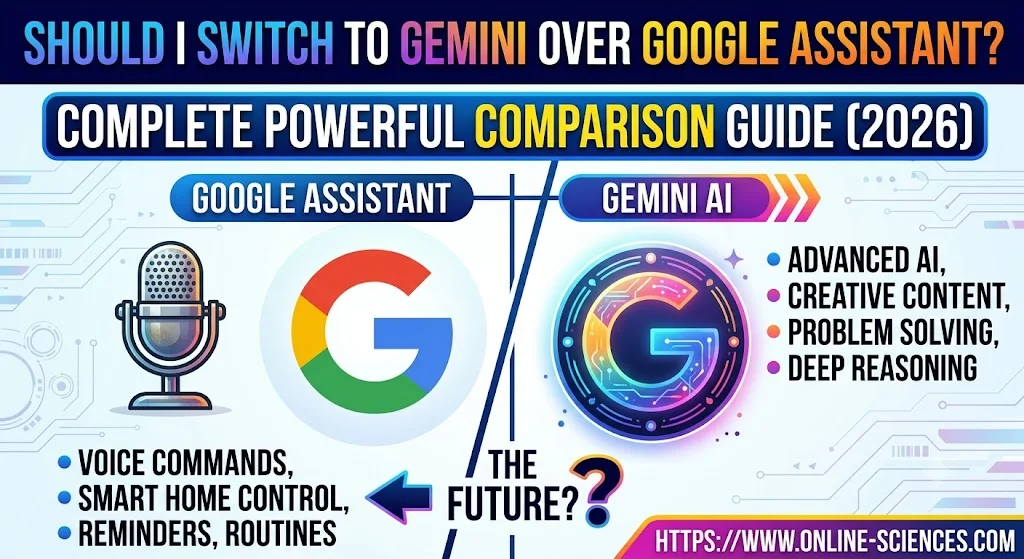
Gemini vs Google Assistant: the biggest difference is that Gemini is built as a conversational AI assistant, while Google Assistant was designed primarily as a voice-command assistant. Google Assistant excels at quick actions such as setting alarms, controlling smart home devices, sending messages, checking the weather, and playing music. Gemini adds a much broader set of capabilities, including long-form conversations, contextual understanding, reasoning, content generation, and productivity assistance.
Conversation and Understanding
Gemini can maintain context across multiple questions and follow-up requests, making interactions feel more natural. For example, you can ask a complex question, request a summary, then ask for a rewrite without restating the original topic. Google Assistant usually performs best with short, direct commands and has a more limited conversational memory.
Productivity and Work Features
Gemini is significantly stronger for productivity tasks. It can summarize emails and documents, draft messages, generate reports, create outlines, brainstorm ideas, and help with research. Google Assistant is better suited for simple task execution, such as creating reminders, managing calendar events, or making calls.
Content Creation and Creativity
Gemini supports creative and professional writing. It can help generate articles, social media posts, presentations, study notes, marketing copy, and even basic coding assistance. Google Assistant does not offer these advanced content-generation capabilities and focuses mainly on retrieving information and executing commands.
Smart Home Control
Google Assistant remains one of the strongest platforms for smart home control. It integrates deeply with many connected devices and often feels faster for turning lights on or off, adjusting thermostats, or controlling media playback. Gemini supports smart home functions as well, but its main strength is AI-driven assistance rather than device control.
Search and Information Retrieval
Both assistants can answer questions and access Google Search information. However, Gemini is generally better at synthesizing information from multiple sources, explaining concepts in depth, and providing detailed comparisons. Google Assistant tends to deliver shorter, direct answers optimized for voice interactions.
Learning and Research
For students and researchers, Gemini offers a clear advantage. It can explain complex topics, create study guides, generate practice questions, and summarize large amounts of text. Google Assistant can answer factual questions, but it is less effective for extended learning workflows.
Device and Ecosystem Integration
Google Assistant is deeply embedded in Android phones, smart speakers, smart displays, and many third-party devices. Gemini is increasingly integrated into Android and Google services such as Gmail, Docs, Drive, Maps, and Workspace, with Google positioning it as the future of its assistant ecosystem.
Which One Is Better?
Choose Gemini if you need:
- Advanced AI conversations.
- Writing and content creation.
- Research and learning assistance.
- Document and email summarization.
- Productivity and brainstorming tools.
Choose Google Assistant if you primarily need:
- Fast voice commands.
- Reliable smart home control.
- Simple everyday tasks.
- A familiar assistant experience.
Google Assistant is excellent for quick actions and device control, while Gemini is a more powerful AI assistant designed for conversation, productivity, creativity, and problem-solving. For many users, Gemini represents a substantial upgrade beyond traditional voice-assistant functionality.
You can follow science online on YouTube from this link: Science online
Gemini Takes Over: The End of Google Assistant in 2026! 🚀
Goodbye Google Assistant: Can Your Android Phone Actually Run Gemini? 🚀
Goodbye Google Assistant? 10 Powerful Reasons Gemini AI Is the Future in 2026
Will Gemini AI Replace Google Assistant? The Ultimate Guide to Google’s Powerful AI Upgrade 2026
Google Assistant Review 2026: Features, Pros, Cons and What It Can Do
Claude AI advantages, disadvantages, features and Is Claude better than GPT 4?
Claude Sonnet 4.5 features, advantages, disadvantages, Is Claude Sonnet 4 better than GPT 4?
Gemini AI review, advantages, disadvantages and Is Gemini AI better than ChatGPT?
ChatGPT review, features, advantages and disadvantages
Google Bard AI chatbot advantages, disadvantages, review, features and Bard vs ChatGPT
Artificial intelligence marketing (AI Marketing) importance, features & Chatbots
Applications of Artificial intelligence marketing, How ai is changing marketing & advertising
Benefits & application of Artificial intelligence in business, E-commerce and marketing
Applications of Artificial Intelligence (AI) in Banking and Finance