
Microsoft Word Advantages & Disadvantages: Word VS. Excel, Can Microsoft Word be used online? in 2026
Microsoft Word is a great tool for creating business documents. It is the most popular word processor both in the past and in the present. It remains the top choice among the different word processors available. It is an indispensable tool for most computer users. You can create documents and complete many other functions related to word processing.
Microsoft Word
Microsoft Word
Microsoft Word is a commercial word processor designed by Microsoft. It is often called simply Word or MS Word. It is a component of the Microsoft Office suite of productivity software, but can be purchased as a stand-alone product. It was initially launched in 1983 and has since been revised numerous times. It is available for both Windows and Apple operating systems.
Microsoft Word processing has improved, and it has made the work of typing faster and more convenient. It is one of the most used aspects of information technology, and people of most ages, from young grade school students to elderly grandmothers, could have encountered the need for word processing.
Early versions of Word had code names fit for a spy novel. Word 1.1 was called “Bill the Cat,” and Word 2.0 was known as “Spaceman Spiff”. The automatic spell checker and correction weren’t added until Word 6.0 in 1993, when typos started to fix themselves automatically! Before that, users had to be their own grammar police.
Microsoft Word
One of the things that made Word revolutionary was its WYSIWYG interface. This means “What You See Is What You Get” – what you typed on the screen looked almost exactly like how it would be printed, unlike earlier programs that required special codes. Microsoft Word was released for Apple Macintosh before it was available for Windows.
Word has a sneaky “hidden text” feature. You can type text that shows up during editing but vanishes in the final document, like secret messages for yourself. You can hide text so it doesn’t show up on screen, but it can still be found with the find and replace tool. Sort of like a secret message in a document!
Did you know you can write complex equations in Word? It supports fancy stuff like square roots and fractions. There’s a shortcut for selecting text in Word that might surprise you. Clicking twice selects a word, three times selects a paragraph, but holding Ctrl and clicking selects a whole sentence at once.
What is Microsoft Word?
Microsoft Word is a word processing application that allows users to create, edit, format, and share digital documents. It is part of the Microsoft 365 productivity suite and supports text formatting, tables, images, templates, spell checking, and collaboration features.
Microsoft Word advantages
MS Word is a great tool as typing is faster than ever. It is easy to correct mistakes by just hitting the backspace or delete button. There are templates for any type of document, and mail merge from a database so that you can easily send out letters to multiple people at a time.
You can align the text at the center, right, or left margins, or justified takes just one click, and spelling and grammatical mistakes are pointed out instantly. You can correct any mistakes that are made easily. The bullets and numbers are done automatically, and there is always an option to ask for help.
You can use the thesaurus feature when your words run out, The images and the figures can be attached and laid out easily, Copying the documents is fast and easy, Copies can easily be made which saves on printing and it is much easier to do, Microsoft Word can save multiple versions of documents and easily sort them so that you can go back to the previous versions of the same document.
Microsoft Word is available practically everywhere, It comes standard on many PCs, You can typically find it on your work computer, The computers at school, and your home PC, This makes it easy to save documents on a flash drive, take them with you and work on them somewhere else, If you need to do some work, you can usually find a computer with Microsoft Word on it.
Microsoft Word lets you create simple word-processing documents like letters and reports. You can add color, you can use clip art, you can write in a variety of fonts and sizes, you can use tables, borders, and bullet formatting, you can format the text and the general page layout so that you can make the page look more appealing or easier to read.
Microsoft Word offers templates to help you create numerous other documents, such as calendars and greeting cards. You can save the documents in a variety of formats, including a Web page.
Microsoft Word can easily integrate with other Microsoft Office programs. If you have a spreadsheet that you created in Microsoft Excel, you can easily paste it into a Word document. You can work with programs such as PowerPoint. This makes it possible to complete a wide array of computing tasks without having to spend time converting the documents or the files so that they are usable in other programs.
Microsoft Word offers an easy-to-use navigation pane at the top, So, You can see the visual representations of many of the functions that you might need, You can simply hold your mouse cursor over an icon to see exactly what it does, Then you can click on the buttons to initiate certain functions and tasks, Instead of having to scroll through multiple menus to find something, You can usually find what you need on the pane.
While you are creating a document, Microsoft Word helps you make sure that it is the best it can be, When you misspell a word, Microsoft Word will underline it, You can click on the word and get suggested spellings, If you type a sentence that has poor grammar, It will underline the sentence for you and you can change the document while you are still working on it.
Disadvantages of Microsoft Word
Microsoft Word requires a computer to edit or view the documents, which may sometimes not be available, especially when on the go. People use the same templates, so the documents just become clones of each other, and the help option sometimes provides vague answers.
Typing is impossible when there is a blackout or laptops run out of batteries, plagiarism is easy to do because it is very easy to just copy and paste, and the thesaurus has a very limited vocabulary.
Some symbols aren’t easily accessible, which makes typing in different languages that use a different alphabet difficult, and some complex mathematical equations would be easier to handwrite.
While sharing and collaborating on the documents within a small group, only one person can make corrections at any given time. The shared documents can not be edited in real-time, and restarting numbering and bullets is problematic.
People tend to become careless because they know they can easily correct their mistakes. Spelling and grammar checkers can not spot all the mistakes, and people can become dependent on them.
The bullets and numbering sometimes have a mind of their own, the auto-format tool can be annoyingly inflexible at times, and the images and the figures can be pretty stubborn and hard to position well.
What is the difference between Word and Excel?
Microsoft Word and Microsoft Excel are part of the Microsoft Office suite.
Microsoft Word
- Purpose: Word processing.
- Primary Use: Creating, editing, and formatting text-based documents.
- Typical Documents: Letters, reports, resumes, essays, brochures.
Features:
- Text formatting tools (fonts, styles, paragraphs).
- Spell check and grammar tools.
- Inserting images, tables, and charts.
- Page layout and design options.
- Track changes and comments for editing.
Microsoft Excel
- Purpose: Spreadsheet management and data analysis.
- Primary Use: Organizing and analyzing numeric data.
- Typical Documents: Budgets, financial reports, schedules, data charts.
Features:
- Rows and columns to enter data.
- Mathematical formulas and functions.
- Charts and graphs for visualization.
- PivotTables for data summarization.
- Conditional formatting and data validation.
Microsoft Word in 2026
Microsoft Word remains one of the most widely used word processing applications in the world in 2026. Developed by Microsoft, the software is commonly used for creating documents, reports, resumes, assignments, business letters, and professional content. Its user-friendly interface and advanced editing tools make it suitable for students, teachers, businesses, and professionals.
Over the years, Microsoft Word has evolved with cloud integration, AI-powered writing assistance, collaboration tools, and improved formatting options. Despite its many advantages, the software also has some disadvantages related to pricing, compatibility, and system requirements. Understanding the pros and cons of Microsoft Word can help users decide whether it is the right document editor for their needs.
In 2026, Microsoft Word continues to dominate the word processing industry with powerful AI-assisted writing features, smarter formatting tools, and seamless cloud synchronization. The software now helps users generate summaries, improve grammar, organize documents, and collaborate more efficiently in real time. Students, businesses, and content creators rely heavily on Microsoft Word because of its reliability, flexibility, and professional document design capabilities.
Microsoft Word in 2026 also integrates more deeply with cloud services and productivity applications, making remote work and online collaboration easier than ever. Despite competition from free alternatives, Word remains popular due to its advanced editing tools, security features, and compatibility across different devices and operating systems. Its continuous updates ensure that users can create high-quality documents quickly and efficiently.
The advantages and disadvantages of Microsoft Word continue to evolve in 2026 as AI tools, cloud collaboration, and advanced formatting improve productivity while subscription costs and compatibility concerns remain important limitations for some users.
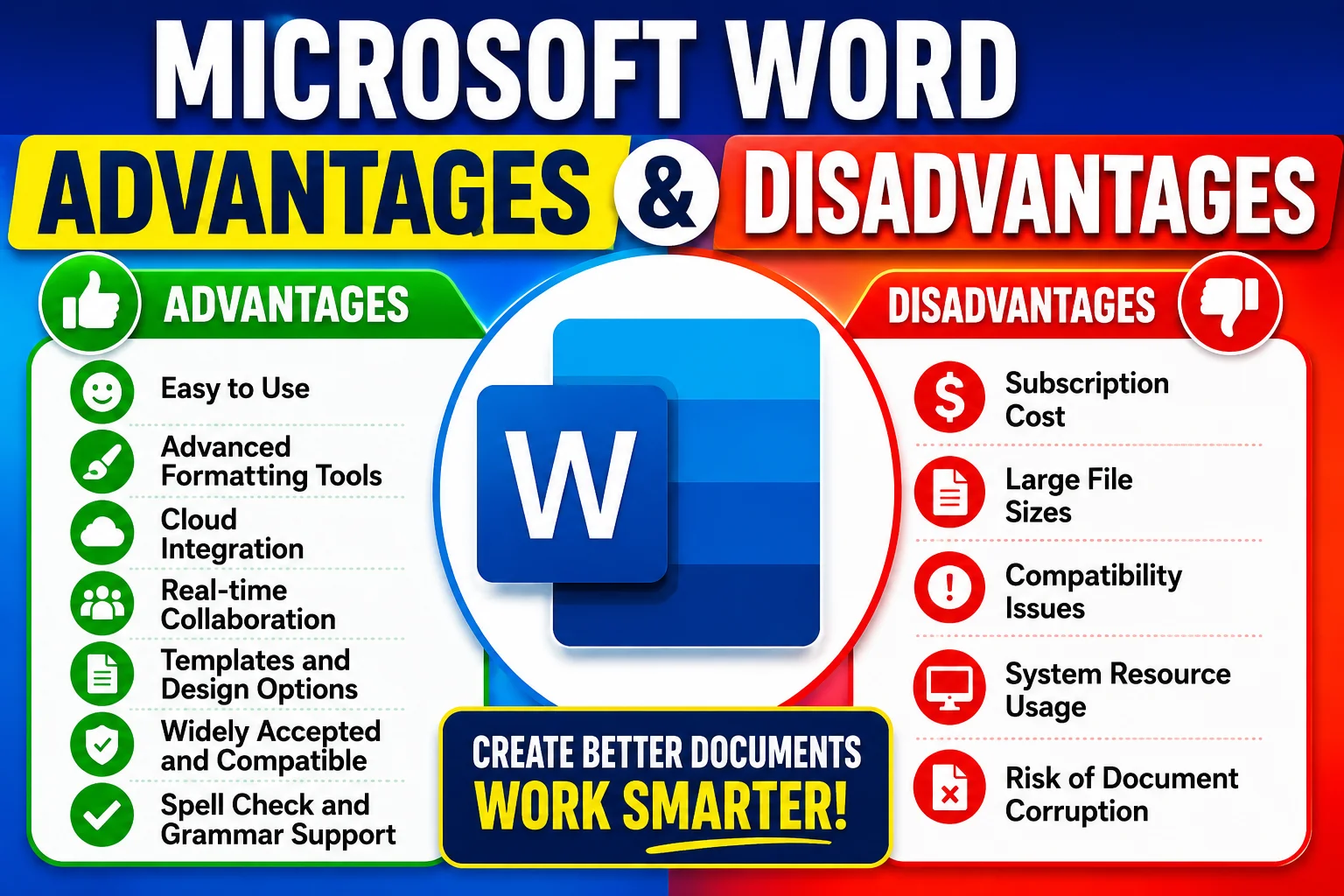
Pros of Microsoft Word
- Easy to Use: Microsoft Word has a simple and organized interface that makes document creation easy for beginners and professionals.
- Advanced Formatting Tools: Users can customize fonts, colors, margins, tables, headers, and layouts for professional-looking documents.
- Spell Check and Grammar Support: The software includes built-in spelling and grammar correction tools that improve writing quality.
- Cloud Integration: Word connects with OneDrive, allowing users to save, access, and edit files from multiple devices.
- Collaboration Features: Multiple users can work on the same document in real time using online collaboration tools.
- Templates and Design Options: Microsoft Word offers ready-made templates for resumes, reports, flyers, business letters, and presentations.
- Compatibility: Word documents are widely accepted in schools, offices, and organizations around the world.
Cons of Microsoft Word
- Subscription Cost: Many advanced features require a paid Microsoft 365 subscription.
- Large File Sizes: Documents with images and graphics may become large and difficult to share.
- Compatibility Issues: Some formatting may change when opening files in other word processors.
- System Resource Usage: Newer versions may consume more memory and processing power on older computers.
- Risk of Document Corruption: Improper shutdowns or software crashes can occasionally damage files.
FAQ about Microsoft Word
1. What are the main advantages of Microsoft Word?
Microsoft Word offers easy document creation, advanced formatting, spell checking, templates, cloud storage, and collaboration tools.
2. What are the disadvantages of Microsoft Word?
The main disadvantages include subscription costs, compatibility issues, large file sizes, and higher system requirements.
3. Is Microsoft Word free in 2026?
Some limited online versions are free, but advanced features usually require a Microsoft 365 subscription.
4. Why is Microsoft Word so popular?
Microsoft Word is popular because it is user-friendly, widely accepted, and packed with professional editing features.
5. Can Microsoft Word be used online?
Yes, Microsoft Word can be accessed online through Microsoft 365 and OneDrive integration.
6. Is Microsoft Word good for students?
Yes, students commonly use Word for assignments, research papers, presentations, and note-taking.
7. What is the difference between Microsoft Word and Google Docs?
Microsoft Word offers more advanced formatting and offline tools, while Google Docs focuses more on online collaboration and free cloud access.
8. Does Microsoft Word support PDF files?
Yes, Microsoft Word allows users to open, edit, and save documents in PDF format.
Conclusion
Microsoft Word remains one of the best word processing tools in 2026 because of its advanced features, professional formatting capabilities, and powerful collaboration tools. Although it has some disadvantages such as subscription costs and compatibility issues, its advantages continue to make it a leading choice for students, businesses, and professionals worldwide.
You can subscribe to Science Online on YouTube from this link: Science Online
Microsoft Excel advantages and disadvantages
Advantages and disadvantages of PowerPoint skills
Windows 10 advantages and disadvantages






very encourageable in learning Microsoft word
Thank you very much
ki sundor lekha
Thank you very much for your comment
Thanks
You are welcome
It is very usefull
Thank you very much for your comment
good article
i loved this
This website is very helpful
I love your posts
great post
Step by step advantages and disadvantages in ms word, thank you
You are weicome